1. What is Amazon ECR?
Amazon Elastic Container Registry (ECR) is a fully managed Docker container image registry that makes it easy to store, manage, and deploy Docker container images. Think of it as a private Docker Hub hosted on AWS.
Core Concept ECR stores your Docker images. ECS and EKS pull images FROM ECR to run containers. The workflow is: Build image → Push to ECR → Deploy on ECS/EKS. ECR is to containers what S3 is to files — a storage service specifically for container images.
2. ECR Key Features
Private and Public Repositories
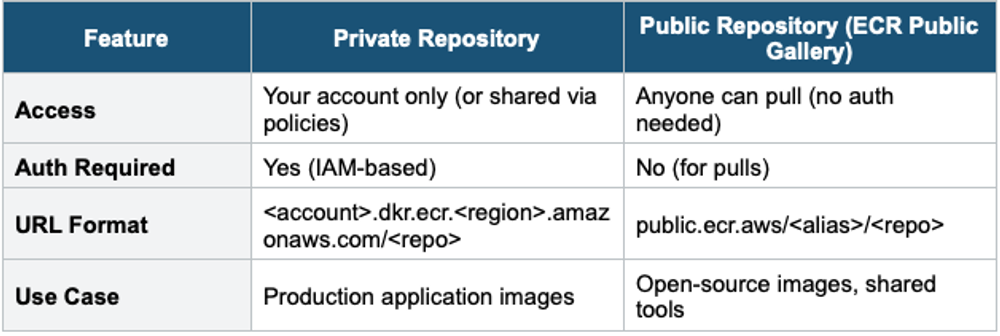
Image Storage & Management
- Images are stored in repositories (one repository per application/microservice)
- Each repository contains multiple image versions identified by tags (e.g., latest, v1.0, production)
- Images are stored as layers — shared layers are stored only once (cost-efficient)
- Encrypted at rest by default (using AWS KMS)
- Stored in S3 behind the scenes (managed by AWS, you don’t see the S3 bucket)
Image Scanning
Automatically scans images for known software vulnerabilities (CVEs)
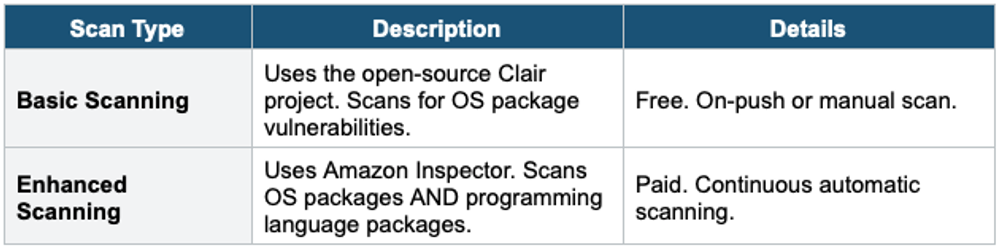
Lifecycle Policies
- Automatically clean up old or unused images to reduce storage costs
- Define rules based on: image age, image count, tag status (tagged/untagged)
- Example: "Keep only the last 10 images" or "Delete untagged images older than 7 days"
- Evaluated once every 24 hours
Cross-Region and Cross-Account Replication
- Replicate images automatically to other Regions (for DR, multi-Region deployment)
- Replicate to other AWS accounts (for multi-account architectures)
- Configured at the registry level with replication rules
Image Tag Immutability
- When enabled, it prevents image tags from being overwritten
- Ensures that a specific tag (e.g., v1.0) always refers to the same image
- Recommended for production to prevent accidental overwrites
3. ECR Authentication & Access
ECR uses IAM for authentication and authorization. To push or pull images, you need to authenticate with ECR.
Authentication Command
# Get login token (valid for 12 hours)
aws ecr get-login-password --region us-east-1 \
  | docker login --username AWS \
    --password-stdin 123456789.dkr.ecr.us-east-1.amazonaws.com

# Push an image
docker tag my-app:latest 123456789.dkr.ecr.us-east-1.amazonaws.com/my-app:latest
docker push 123456789.dkr.ecr.us-east-1.amazonaws.com/my-app:latest

# Pull an image
docker pull 123456789.dkr.ecr.us-east-1.amazonaws.com/my-app:latest
Access Control
- IAM policies control who can push, pull, and manage images
- Repository policies (resource-based) can grant cross-account access
- ECS Task Execution Role needs ecr:GetAuthorizationToken and ecr:BatchGetImage permissions to pull images
4. ECR with ECS and EKS
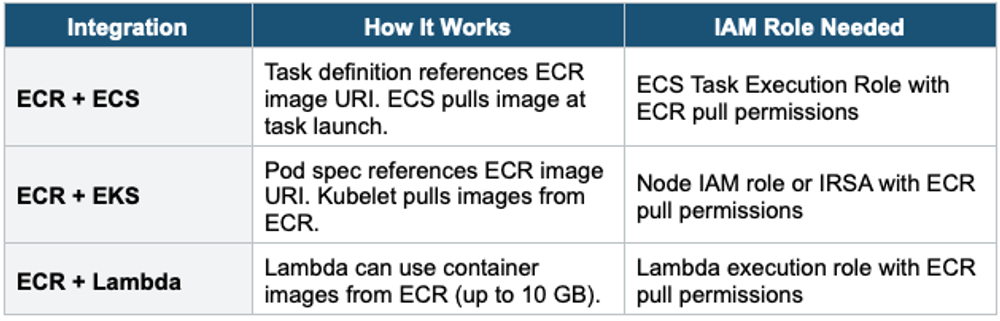
5. ECR Pricing
- Storage: pay per GB/month of stored images
- Data Transfer: free within the same Region. Standard rates for cross-Region.
- No charge for private image pulls within the same Region
- Enhanced scanning: charged per image scan via Amazon Inspector pricing
6. ECR vs Docker Hub vs Other Registries
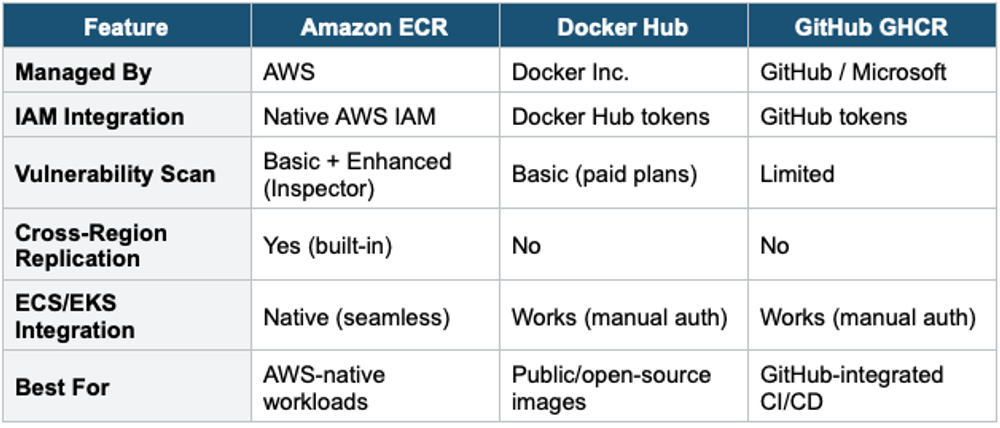
7. When to use
Use ECR when you need to store, manage, and deploy container images on AWS.
Common scenarios:
- Store Docker images — Push and pull container images for your applications.
- CI/CD pipelines — Integrate with CodeBuild, CodePipeline, or Jenkins to build and push images automatically.
- Run containers on AWS — Store images used by ECS, EKS, Fargate, or Lambda (container image support).
- Share images across accounts — Grant cross-account access to container images.
- Security scanning — Automatically scan images for known vulnerabilities on push.
Exam Tip ECR questions: "Where to store Docker images for ECS/EKS" = ECR. "Scan images for vulnerabilities" = ECR with Enhanced Scanning (Inspector) or Basic Scanning. "Replicate images across Regions" = ECR cross-Region replication. "Clean up old images automatically" = ECR Lifecycle Policies. "ECS Task Execution Role" is needed to pull images from ECR. Tag immutability = prevent accidental overwrites in production.