1. Containers Basics
Before diving into ECS, it’s important to understand what containers are and why they matter.
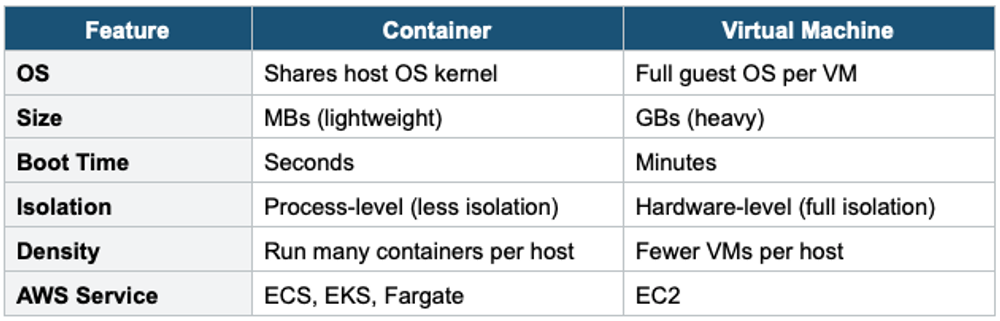
What is a Container?
- A lightweight, standalone, executable package that includes everything needed to run software: code, runtime, libraries, and system tools
- Containers share the host OS kernel — much lighter than virtual machines
- Consistent: runs the same in development, testing, and production
- Starts in seconds (vs minutes for VMs)
- Docker is the most popular container technology
Container vs Virtual Machine
2. What is Amazon ECS?
Amazon Elastic Container Service (ECS) is a fully managed container orchestration service that makes it easy to run, stop, and manage Docker containers on a cluster. It is AWS’s proprietary container orchestration platform.
Core Concept ECS manages the lifecycle of containers for you: where to place them, how to scale them, how to connect them to networking and storage, and how to monitor them. You define WHAT to run (task definition) and ECS handles WHERE and HOW.
3. ECS Architecture & Key Concepts
Cluster
- A logical grouping of tasks or services
- Can contain tasks running on EC2 instances or Fargate
- One account can have multiple clusters
- Clusters can span multiple AZs within a Region
Task Definition
- A blueprint (like a Docker Compose file) that describes your containers
- Specifies: container image, CPU/memory, port mappings, environment variables, IAM role, logging configuration, volumes
- Can define 1 to 10 containers in a single task definition
- Immutable — each change creates a new revision
Task Definition (simplified):
{
  "family": "my-web-app",
  "containerDefinitions": [
    {
      "name": "web",
      "image": "123456789.dkr.ecr.us-east-1.amazonaws.com/my-app:latest",
      "cpu": 256,
      "memory": 512,
      "portMappings": [{ "containerPort": 80 }],
      "logConfiguration": {
        "logDriver": "awslogs"
      }
    }
  ]
}
Task
- A running instance of a task definition (like a running Docker container)
- A task can contain one or more containers that are co-located on the same host
- Tasks are ephemeral — when they stop, they’re gone
- Use tasks for: batch jobs, one-time processes, short-lived workloads
Service
- Ensures a specified number of tasks are running at all times (like a deployment)
- If a task dies, the service automatically replaces it
- Integrates with ELB for load balancing
- Supports rolling updates and blue/green deployments (via CodeDeploy)
- Use services for: web applications, APIs, microservices, long-running processes
Task vs Service Task = run once and stop (batch job, data processing). Service = keep N copies running forever (web server, API). A service manages tasks. Think: Task = a single job. Service = a long-running application that self-heals.
4. ECS Launch Types
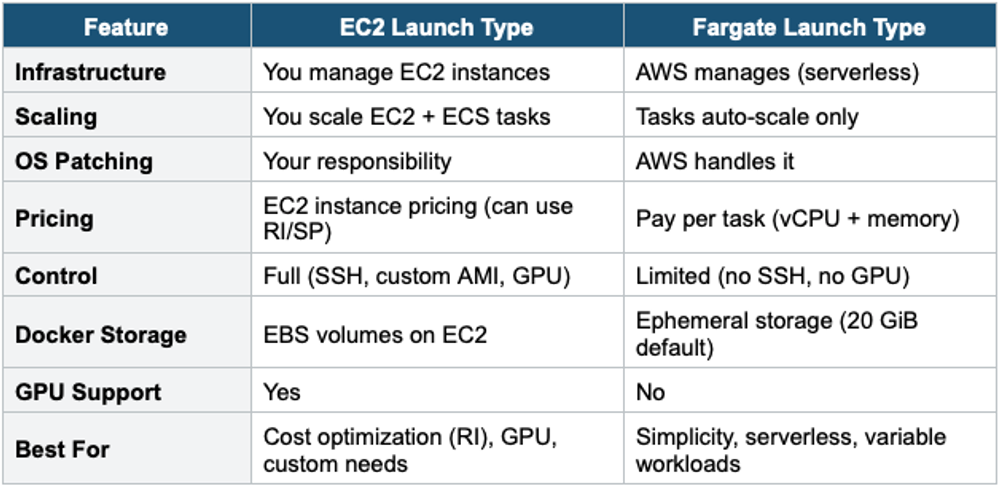
Launch Type 1: EC2 Launch Type
- You manage the underlying EC2 instances (the cluster infrastructure)
- You must provision and maintain the EC2 instance fleet
- ECS Agent runs on each EC2 instance to register it with the cluster
- You are responsible for: scaling the instances, patching the OS, and managing capacity
- More control, but more operational overhead
- You can use Reserved Instances / Savings Plans for the EC2 fleet to save costs
Launch Type 2: Fargate Launch Type (Serverless)
- AWS manages the underlying infrastructure — you don’t see or manage any EC2 instances
- You only define the task definition (CPU, memory, container image)
- AWS provisions, scales, and manages the compute for each task
- Pay per task based on vCPU and memory used
- No cluster capacity management needed
- No OS patching — AWS handles everything
EC2 vs Fargate Comparison
5. ECS IAM Roles
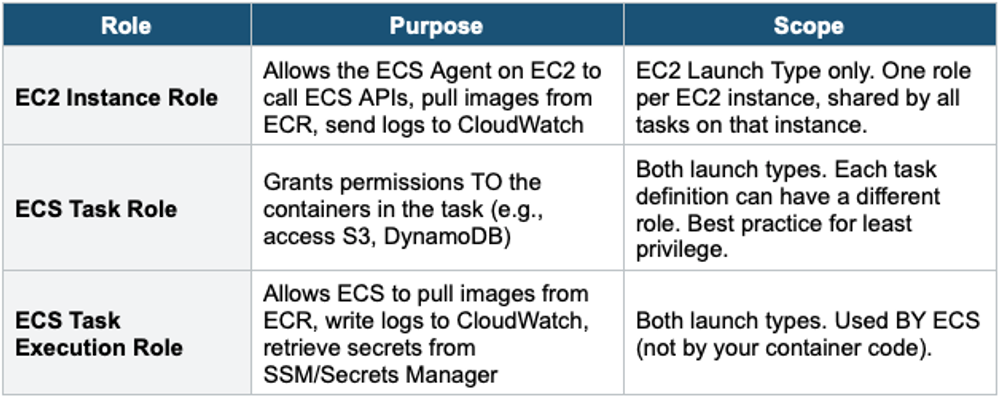
Task Role vs Task Execution Role Task Execution Role = ECS uses this to SET UP the task (pull image, write logs). Task Role = YOUR CODE inside the container uses this to ACCESS AWS services (read S3, write DynamoDB). They are separate roles with different purposes. The exam tests this distinction.
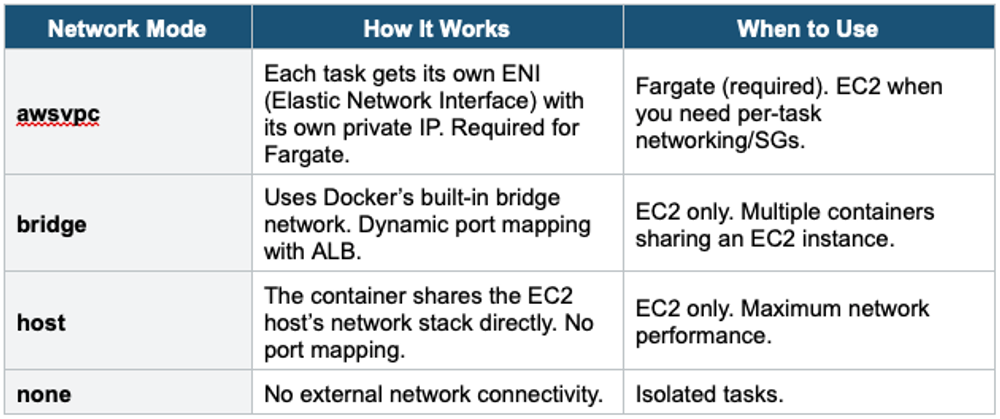
6. ECS Networking
7. ECS Auto Scaling
ECS supports auto scaling at two levels:
Task-Level Auto Scaling (ECS Service Auto Scaling)
- Automatically adjusts the number of tasks in a service
- Uses Application Auto Scaling (not EC2 Auto Scaling)
- Scaling policies: Target Tracking, Step Scaling, Scheduled Scaling
- Common metrics: ECSServiceAverageCPUUtilization, ECSServiceAverageMemoryUtilization, ALBRequestCountPerTarget
Cluster-Level Auto Scaling (EC2 Launch Type Only)
- Automatically adjusts the number of EC2 instances in the cluster
- Uses EC2 Auto Scaling Group with ECS Capacity Provider
- The Capacity Provider manages the relationship between ASG and the ECS cluster
- Not needed for Fargate (AWS manages capacity)
8. ECS Data Volumes
- EFS (Elastic File System): Shared persistent storage across tasks. Works with both EC2 and Fargate. Best for shared data between containers.
- EBS (Elastic Block Store): Block storage. EC2 launch type only (attached to the EC2 instance). Not shareable across tasks.
- Bind Mounts: Share storage between containers within the SAME task. Ephemeral. Lost when the task stops.
- Fargate Ephemeral Storage: 20 GiB by default (expandable to 200 GiB). Lost when the task stops.
Exam Tip ECS questions: "Serverless containers" = Fargate. "No server management" = Fargate. "GPU containers" = EC2 Launch Type. "Least privilege per container" = ECS Task Role (not Instance Role). "Pull image from ECR" = Task Execution Role. "Shared file storage between tasks" = EFS. awsvpc = required for Fargate, gives each task its own IP.