1. What is Amazon EFS?
Amazon Elastic File System is a fully managed, serverless, elastic NFS (Network File System) that can be shared across multiple EC2 instances, Lambda functions, and ECS/EKS containers simultaneously.
EFS vs EBS vs S3 EBS = block storage, attached to ONE EC2 instance (one AZ). S3 = object storage, accessed via HTTP API. EFS = file storage (NFS), shared across MANY instances simultaneously, across multiple AZs. Think: EFS is a shared network drive.
2. Key Characteristics
- NFS v4.1 protocol — Linux only (not Windows)
- Multi-AZ: accessible from any AZ in the Region simultaneously
- Automatically grows and shrinks (no capacity provisioning needed)
- Can scale to petabytes. Thousands of concurrent connections.
- Pay-per-use: charged per GB stored (no upfront provisioning)
- Encryption at rest (KMS) and in transit (TLS)
- Accessible from on-premises via AWS Direct Connect or VPN
- Compatible with: EC2, ECS, EKS, Fargate, Lambda
3. EFS Performance Modes

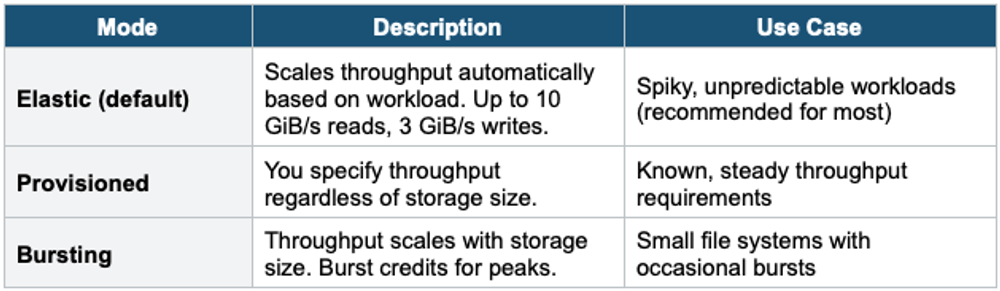
4. EFS Throughput Modes
5. EFS Storage Classes
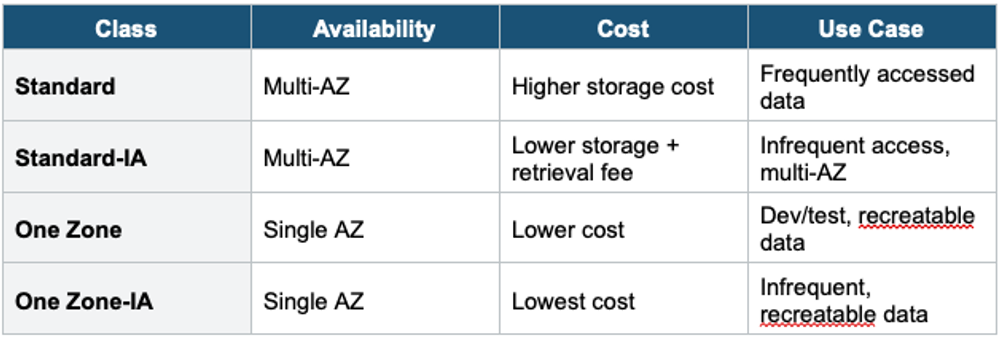
- EFS Lifecycle Policy automatically moves files between Standard and IA tiers based on last access time (7, 14, 30, 60, 90 days)
- EFS Intelligent-Tiering moves files automatically between all tiers
6. EFS vs EBS Comparison
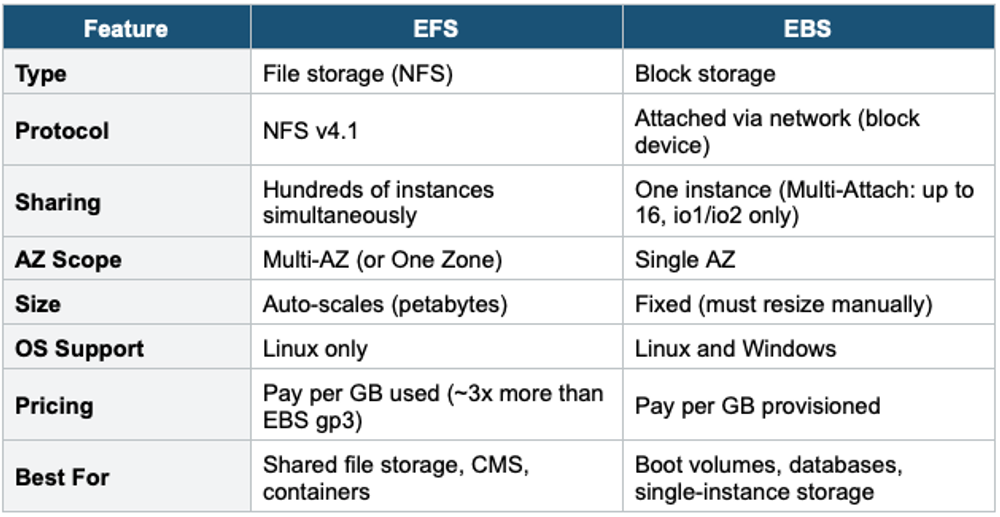
7. EFS vs EBS Comparison
Use EFS when you need a shared, scalable NFS file system accessible by multiple EC2 instances or containers simultaneously.
Key exam triggers:
- "shared file system"
- "NFS"
- "Multiple instances access the same files."
- "auto-scaling storage"
- "Linux file system"
- "container shared storage."
Common scenarios:
- Web servers share content across multiple EC2 instances.
- Container storage for ECS/EKS/Fargate.
- Home directories for users across instances.
- CMS/media processing where multiple instances read/write the same files.
- Big data and analytics need shared access.
- Lift-and-shift on-premises NFS workloads.
Exam Tip EFS questions: "Shared file storage across multiple EC2 instances" = EFS. "Linux only" = EFS (not Windows). "Auto-scaling file system" = EFS. "Lambda needs persistent shared storage" = EFS. "Windows shared storage" = FSx for Windows (not EFS). EFS is ~3x more expensive than EBS per GB, but eliminates capacity planning.