1. What is Kubernetes?
Kubernetes (K8s) is an open-source container orchestration platform originally developed by Google. It automates the deployment, scaling, and management of containerized applications. It is the industry standard for container orchestration.
ECS vs EKS ECS = AWS-proprietary container orchestration (simpler, tighter AWS integration). EKS = Managed Kubernetes (open-source, cloud-agnostic, industry standard). If a company uses Kubernetes on-premises and wants to migrate to AWS, the answer is EKS. If starting fresh on AWS with no K8s experience, ECS is often simpler.
2. What is Amazon EKS?
Amazon Elastic Kubernetes Service (EKS) is a managed Kubernetes service that makes it easy to run Kubernetes on AWS without needing to install, operate, and maintain your own Kubernetes control plane.
- AWS manages the Kubernetes control plane (API server, etcd, scheduler, controller manager)
- Control plane runs across multiple AZs for high availability
- You manage the worker nodes (EC2 instances) OR use Fargate for serverless
- Supports the standard Kubernetes API — existing K8s tools and plugins work
- EKS is certified Kubernetes-conformant
3. EKS Architecture
EKS Architecture:

┌───────────────────────────────────────┐
│  Control Plane (AWS Managed)       │
│  - API Server                      │
│  - etcd (cluster state)            │
│  - Scheduler                       │
│  - Controller Manager              │
│  (Multi-AZ, auto-scaled by AWS)    │
└───────────────────────────────────────┘
          |           |           |
    ┌───────┐   ┌───────┐   ┌───────┐
    │ Node  │   │ Node  │   │ Node  │
    │ (EC2) │   │ (EC2) │   │Fargate│
    │ Pods  │   │ Pods  │   │ Pods  │
    └───────┘   └───────┘   └───────┘
     AZ-a         AZ-b         AZ-c
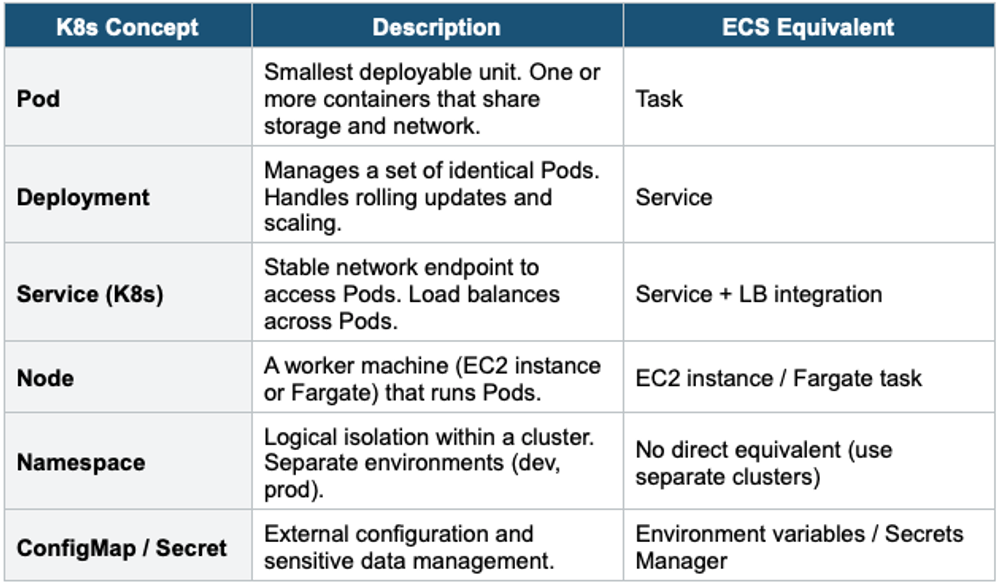
4. EKS Key Concepts (Kubernetes Terminology)
5. EKS Node Types
Managed Node Groups
- AWS creates and manages EC2 instances for you
- Nodes are part of an EC2 Auto Scaling Group managed by EKS
- Supports On-Demand and Spot instances
- Automatic OS patching and AMI updates via managed updates
- Best for: most production workloads
Self-Managed Nodes
- You create and manage EC2 instances yourself
- You register them with the EKS cluster
- You are responsible for AMI, patching, and scaling
- Full control but more operational burden
- Best for: custom AMIs, specific OS requirements, GPU instances
Fargate (Serverless Pods)
- No EC2 instances to manage — AWS runs each Pod on its own micro-VM
- Define a Fargate Profile to specify which Pods run on Fargate (by namespace, labels)
- Pay per Pod (vCPU + memory)
- No SSH, no DaemonSets, limited storage
- Best for: variable workloads, batch jobs, reduce operational overhead
6. EKS Networking
- EKS uses the Amazon VPC CNI plugin — each Pod gets a real VPC IP address
- Pods can communicate with other AWS services using VPC networking
- Supports Kubernetes Network Policies for Pod-to-Pod traffic control
- Integrates with ALB Ingress Controller for HTTP/HTTPS routing
- Integrates with NLB for TCP/UDP load balancing
7. EKS + IAM
- EKS integrates with IAM via IRSA (IAM Roles for Service Accounts)
- Maps Kubernetes Service Accounts to IAM Roles
- Each Pod can assume a different IAM role — least privilege per workload
- Similar to ECS Task Roles but using K8s Service Accounts
8. EKS Anywhere & EKS Distro
- EKS Anywhere: Run EKS clusters on your own on-premises infrastructure (VMware, bare metal). Same EKS APIs and tools. Useful for hybrid cloud and data sovereignty.
- EKS Distro (EKS-D): The same Kubernetes distribution used by EKS, available to install and manage yourself anywhere. Open-source, no AWS management.
Exam Tip EKS questions: "Already using Kubernetes on-premises" = EKS (not ECS). "Open-source, cloud-agnostic" = EKS. "Simplest container service on AWS" = ECS with Fargate. "Run K8s on-premises" = EKS Anywhere. "Per-Pod IAM" = IRSA (IAM Roles for Service Accounts). EKS control plane is managed by AWS and runs across multiple AZs.