1. What is ElastiCache?
Amazon ElastiCache is a fully managed in-memory data store and cache service. It supports two open-source engines: Redis and Memcached. ElastiCache delivers sub-millisecond latency for read-heavy workloads and reduces database load by caching frequently accessed data.
Core Concept ElastiCache = managed Redis or Memcached in the cloud. Use it to cache database query results, session data, API responses, and computed values. It sits between your application and your database, dramatically reducing read latency and database load.
2. Common Caching Patterns
Lazy Loading (Cache-Aside)
Read Request Flow:

1. App checks ElastiCache for data
2. Cache HIT → return cached data (fast!)
3. Cache MISS → query database
4. Store the result in the cache for next time
5. Return data to the app

Pros: Only the requested data is cached. Cache failures don’t break the app.
Cons: Cache miss penalty (3 calls). Stale data until TTL expires.
Write-Through
Write Request Flow:

1. App writes to the database
2. App also writes to ElastiCache
3. Cache is always up-to-date

Pros: Data never stale. Read operations always hit cache.
Cons: Write penalty (2 writes). Lots of data in cache that may never be read.
Session Store Pattern
- Store user session data in ElastiCache instead of on the web server
- Makes your application stateless — any server can handle any user
- Enables horizontal scaling: add/remove servers without losing sessions
- Redis is preferred for sessions (persistence, TTL support)
3. Redis vs Memcached
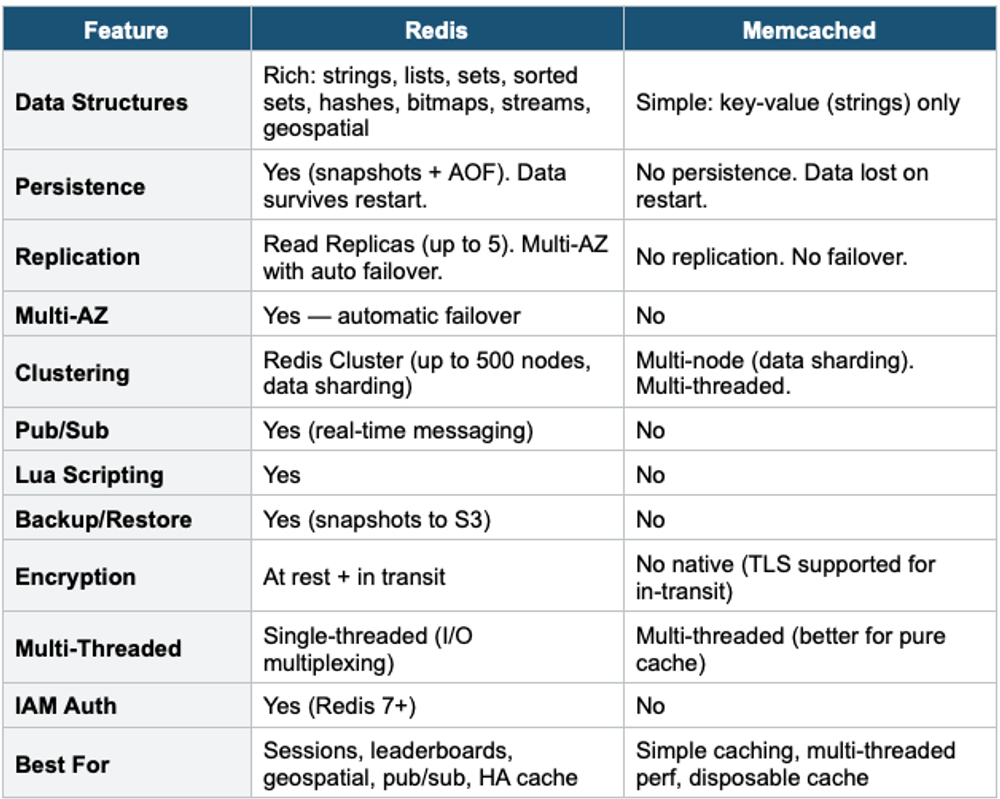
Redis vs Memcached Decision Choose Redis when you need: persistence, replication, Multi-AZ, complex data types, pub/sub, backups, or any feature beyond simple caching. Choose Memcached when you need: simple key-value cache, multi-threaded performance, and you DON’T need persistence or replication. The exam answer is almost always Redis unless the question specifically mentions multi-threaded or a simplest cache.
4. ElastiCache for Redis — Deep Dive
Cluster Mode Disabled
- Single shard: 1 primary node + 0–5 read replicas
- Multi-AZ with automatic failover (replica promoted to primary)
- All data fits in one node (limited by node memory)
- Use for: smaller datasets, simple HA caching
Cluster Mode Enabled
- Data is partitioned across multiple shards (1–500 shards)
- Each shard has 1 primary + 0–5 replicas
- Scales horizontally: more shards = more memory + more write throughput
- Supports online resharding (add/remove shards without downtime)
- Use for: large datasets, high write throughput, horizontal scaling
ElastiCache Global Datastore
- Cross-Region replication for Redis
- 1 primary Region (read/write) + up to 2 secondary Regions (read-only)
- Sub-second cross-Region replication
- Failover to secondary in <1 minute
- Use for: global applications, disaster recovery
5. ElastiCache Security
- Runs in your VPC — NOT publicly accessible
- Security Groups control network access
- Redis AUTH: password authentication (set a token)
- Redis IAM Auth: use IAM identity for authentication (Redis 7+)
- Encryption at rest: KMS (Redis only)
- Encryption in transit: TLS (Redis and Memcached)
- No IAM authentication for Memcached (use SASL)
6. ElastiCache Use Cases
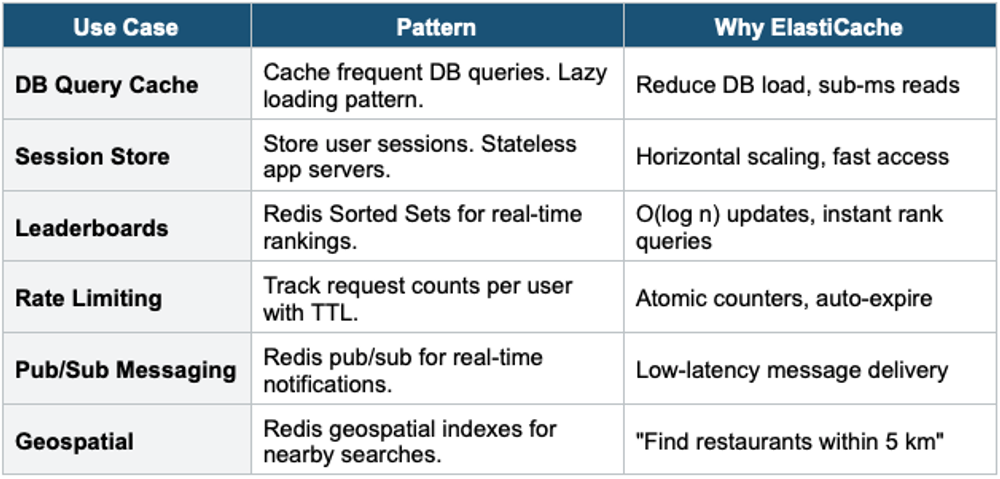
7. DynamoDB + DAX vs RDS + ElastiCache
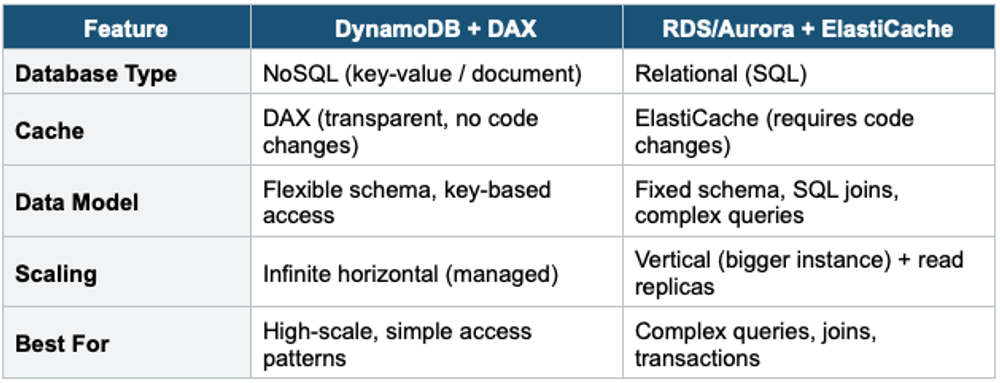
Exam Tip ElastiCache: "Reduce RDS read load" = ElastiCache (lazy loading). "Store user sessions for stateless app" = ElastiCache Redis. "Real-time leaderboard" = Redis Sorted Sets. Redis vs Memcached: Redis wins for almost everything (persistence, replication, HA, data types). Memcached = only for simple, multi-threaded, disposable cache. "DynamoDB read caching" = DAX (not ElastiCache). ElastiCache is VPC-only (not public). Redis Cluster Mode = horizontal scaling (sharding).