1. Overview
Amazon FSx provides fully managed third-party high-performance file systems on AWS. It offers four file system options, each optimized for specific workloads and protocols.
2. FSx for Windows File Server
- Fully managed Windows-native file system
- Built on Windows Server. Supports SMB protocol and Windows NTFS.
- Integrates with Microsoft Active Directory (self-managed or AWS Managed AD)
- Supports Windows features: ACLs, user quotas, DFS namespaces, DFS Replication
- Multi-AZ option for high availability
- Accessible from Linux via SMB client
- Can be accessed from on-premises via VPN or Direct Connect
Use for: Windows-based applications, SMB file shares, Active Directory environments, .NET applications, SQL Server, SharePoint, IIS.
3. FSx for Lustre
- High-performance parallel file system for compute-intensive workloads
- Lustre = Linux + Cluster (HPC file system)
- Sub-millisecond latency, hundreds of GiB/s throughput, millions of IOPS
- Native integration with S3: can read from and write back to S3 transparently
- Scratch file system: temporary, high-performance, no replication (cheaper, data not persisted)
- Persistent file system: data is replicated within AZ, for long-term storage
Use for: HPC, machine learning training, video rendering, financial modeling, genomics, EDA (Electronic Design Automation).
4. FSx for NetApp ONTAP
- Fully managed NetApp ONTAP file system on AWS
- Supports NFS, SMB, and iSCSI protocols (works with Linux, Windows, and macOS)
- Compatible with on-premises NetApp environments
- Features: snapshots, cloning, replication, compression, deduplication, tiering
- Auto-scales storage capacity
- Multi-AZ for HA
Use for: Migrating NetApp workloads to AWS, workloads needing NFS + SMB + iSCSI simultaneously, VMware Cloud on AWS.
5. FSx for OpenZFS
- Fully managed OpenZFS file system on AWS
- NFS protocol (v3 and v4). Linux, Windows (via NFS client), macOS.
- Up to 1,000,000 IOPS, sub-millisecond latency
- Features: snapshots, cloning, compression, point-in-time recovery
- No Multi-AZ option (single AZ only)
Use for: Migrating ZFS workloads to AWS, workloads needing fast NFS with snapshots, internal tools, dev/test.
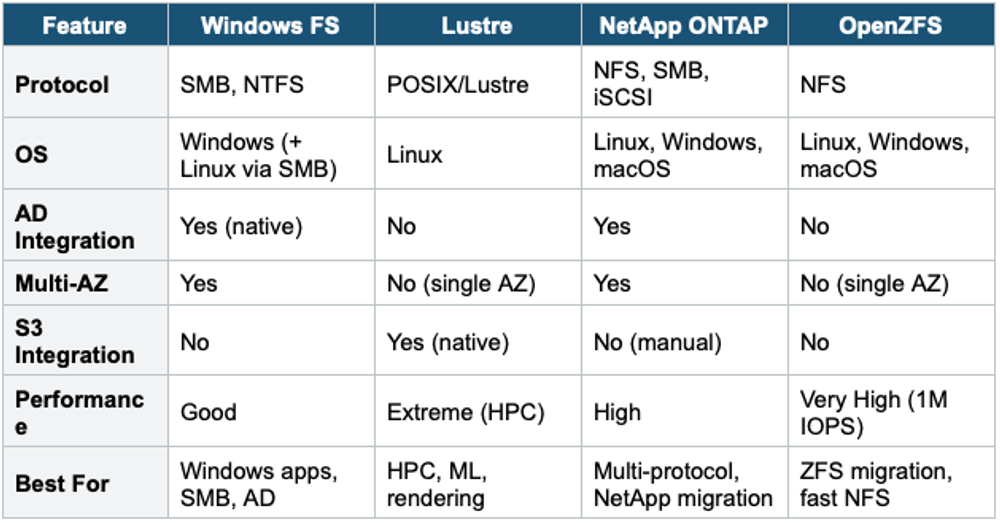
6. FSx Comparison
7. When to use
Use FSx when you need a fully managed, high-performance file system built on popular third-party file system technologies.
Key exam triggers:
- "Windows file shares"
- "Lustre"
- "high-performance computing (HPC)"
- "SMB protocol"
- "ONTAP"
- "NetApp migration"
- "ZFS"
Exam Tip FSx questions: "Windows file share with AD" = FSx for Windows. "HPC, ML training, S3 integration" = FSx for Lustre. "NFS + SMB + iSCSI" = FSx for NetApp ONTAP. "ZFS workload migration" = FSx for OpenZFS. "Shared Linux file system (NFS)" = check: if simple/managed → EFS; if HPC performance → Lustre; if multi-protocol → ONTAP.