1. Why Automate?
Manual incident response is too slow for cloud-scale threats. Attacks can compromise resources in seconds. Automated remediation detects and responds to security events in real-time without human intervention.
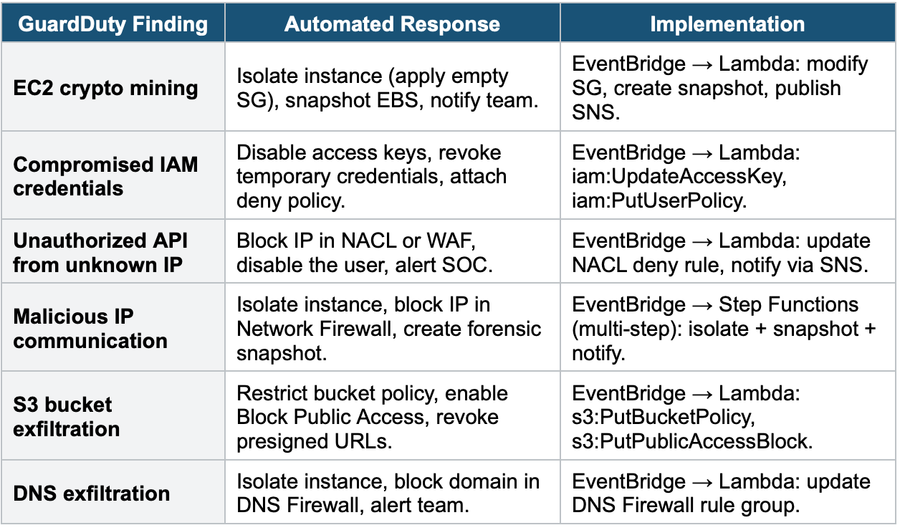
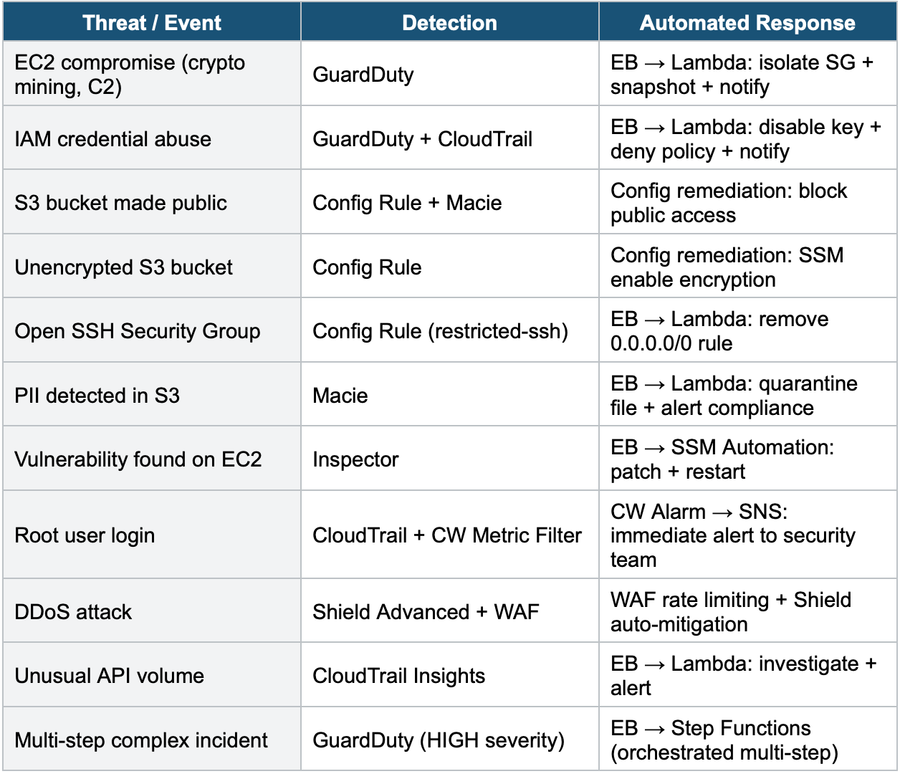
Automation Pattern The universal pattern: Security Service (detect) → EventBridge (route) → Lambda or SSM Automation (remediate) → SNS (notify). This pattern works for: GuardDuty findings, Config rule violations, Security Hub findings, IAM anomalies, S3 policy changes, and any security event.
2. Automated Remediation Architecture
Universal Security Automation Pattern:

  Detection Layer:
    GuardDuty / Security Hub / Config / Macie / Inspector
           |
  Routing Layer:
    EventBridge (match finding type, severity, resource)
           |
  Remediation Layer:
    Lambda (custom logic) or SSM Automation (pre-built runbooks)
           |
  Notification Layer:
    SNS → Email / Slack / PagerDuty / Chatbot

  Logging: all actions logged to CloudTrail + CloudWatch Logs
3. GuardDuty Automated Responses
4. Config Auto-Remediation
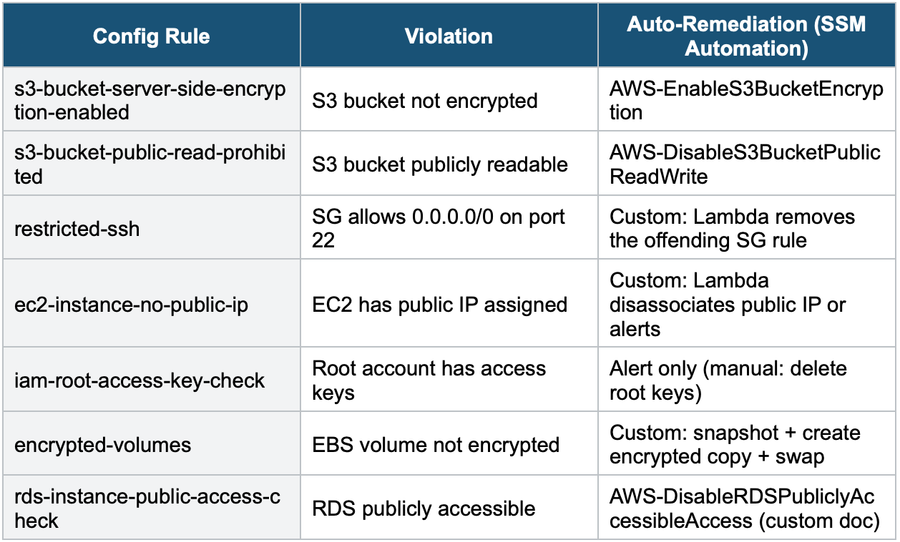
AWS Config Auto-Remediation:

  Config Rule: s3-bucket-server-side-encryption-enabled
  Evaluation: S3 bucket "my-data" has NO encryption
  Status: NON_COMPLIANT
        |
  Auto-Remediation:
    SSM Automation Document: AWS-EnableS3BucketEncryption
    Action: Enable AES-256 (SSE-S3) on the bucket
    Result: Bucket encrypted. Status → COMPLIANT
        |
  Notification:
    EventBridge → SNS: "Config remediated unencrypted S3 bucket."
Common Config Remediation Rules
5. Security Hub Automated Actions
Security Hub + EventBridge Automation:

  Security Hub Finding:
    Finding Type: "Software and Configuration Checks/..."
    Severity: CRITICAL
    Resource: S3 bucket / EC2 instance / IAM user
         |
  EventBridge Rule:
    Match: source = "aws.securityhub"
    Filter: severity = CRITICAL, compliance = FAILED
         |
  Target: Lambda or SSM Automation
    • Remediate the specific finding
    • Log the action
    • Notify via SNS
         |
  Security Hub Custom Action (manual trigger):
    The SOC analyst clicks "Remediate" in the Security Hub Console
→ EventBridge → Lambda (same remediation flow)- Security Hub Custom Actions: create buttons in the Security Hub Console that trigger EventBridge events
- Analysts can manually trigger automated remediation for specific findings
- Combines: automated (EventBridge rules) + manual (Custom Actions) response
6. Multi-Step Remediation with Step Functions
Step Functions IR Workflow:

  GuardDuty Finding: Compromised EC2 Instance
       |
  EventBridge Rule (match EC2 findings)
       |
  Step Functions State Machine:
    Step 1: Lambda — Capture metadata (instance, SG, role, VPC)
    Step 2: Lambda — Isolate (apply quarantine SG)
    Step 3: Lambda — Snapshot all EBS volumes
    Step 4: Lambda — Copy snapshots to forensic account
    Step 5: Lambda — Disable the instance’s IAM role
    Step 6: Choice: if severity=HIGH
      Step 7a: Lambda — Terminate instance + page SOC
      Step 7b: Lambda — Alert SOC for manual review
    Step 8: Lambda — Create OpsItem in SSM OpsCenter
    Step 9: SNS — Notify security team via Slack (Chatbot)

  Benefits: orchestrated multi-step, error handling, and audit trail
Step Functions for IR Use Step Functions when remediation requires MULTIPLE STEPS in sequence with error handling. Simple one-step responses (block IP, disable key) use Lambda directly. Complex responses (isolate + snapshot + copy + disable + notify) use Step Functions to orchestrate multiple Lambda functions with retry logic and conditional branching.
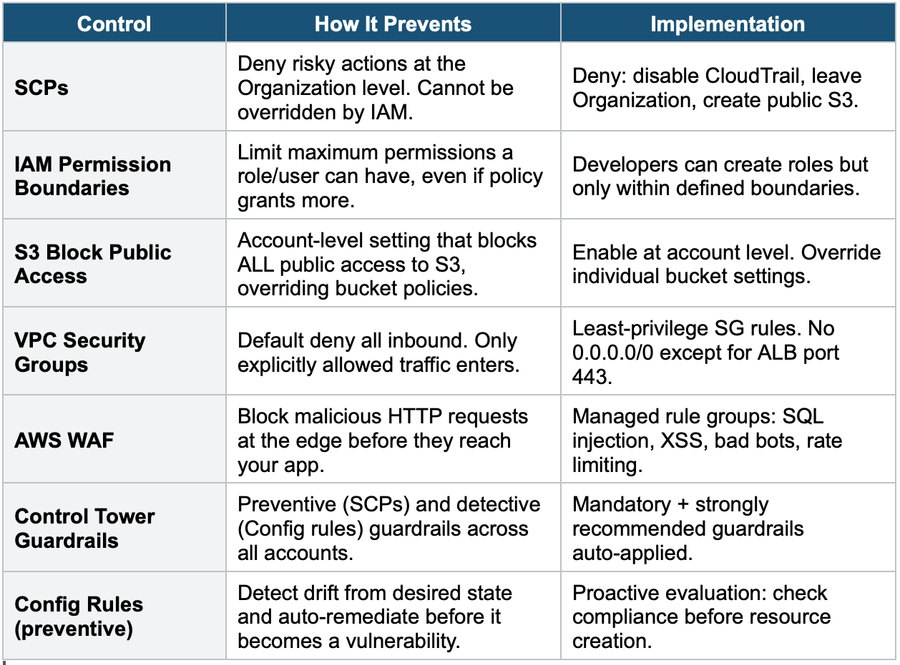
7. Preventive Controls (Stop Before It Happens)
8. Complete Security Automation Decision Table
Exam Tip Automated Remediation: Universal pattern = Detection → EventBridge → Lambda/SSM → SNS. "Config non-compliant" = Config auto-remediation (SSM Automation). "GuardDuty finding" = EventBridge → Lambda. "Multi-step IR" = Step Functions. "Manual trigger by analyst" = Security Hub Custom Actions. "Prevent before it happens" = SCPs + Permission Boundaries + S3 Block Public Access + WAF. "Rebuild, don’t patch" = terminate + redeploy from IaC.