1. AWS Billing & Cost Management Console
The Billing & Cost Management Console is your central hub for understanding and managing AWS spending. It provides tools for viewing bills, forecasting costs, setting budgets, and optimizing spend.
Core Tools AWS provides a suite of cost management tools: Billing Dashboard (current month overview), Cost Explorer (analyze past spend), AWS Budgets (set spending alerts), Cost Anomaly Detection (ML-based alerts), Cost and Usage Report (CUR, detailed CSV), Savings Plans/RI recommendations, and AWS Pricing Calculator (estimate costs before deploying).
2. Billing Dashboard
- Month-to-date spend overview by service
- Forecasted end-of-month costs
- Top services by cost
- Free Tier usage tracking (how much of each free tier you’ve consumed)
- Previous month comparison
- Available in the management account (or IAM users with billing access enabled)
3. AWS Cost Explorer
Cost Explorer is an interactive tool for visualizing, understanding, and managing your AWS costs and usage over time.
Key Features
- Historical view: analyze costs for up to 12 months of past data
- Forecast: predict future costs for up to 12 months ahead
- Filter and group by: service, linked account, Region, AZ, instance type, tag, usage type
- Hourly granularity available (for current and previous month)
- Custom reports: save and share filtered views
- Savings Plans recommendations: suggest optimal commitment based on your usage
- RI coverage and utilization reports: how well you’re using existing commitments
- Right-sizing recommendations: suggest smaller instance types based on actual usage
Cost Explorer Visualizations
Cost Explorer Example Views:

1. Monthly costs by service (bar chart)
   → "EC2 is 45% of our bill, RDS is 20%, NAT GW is 15%."

2. Daily costs by linked account (line chart)
   → "Account Prod-A spiked on March 15th."

3. EC2 usage by instance type (stacked bar)
   → "We’re running 200 m5.large instances, only 50 are Reserved"

4. Savings Plans utilization (gauge)
   → "We’re using 87% of our Savings Plans commitment."

5. Right- recommendations (table)
   → "Instance i-abc is using 5% CPU, downsize from m5.xlarge to m5.large."
4. AWS Budgets
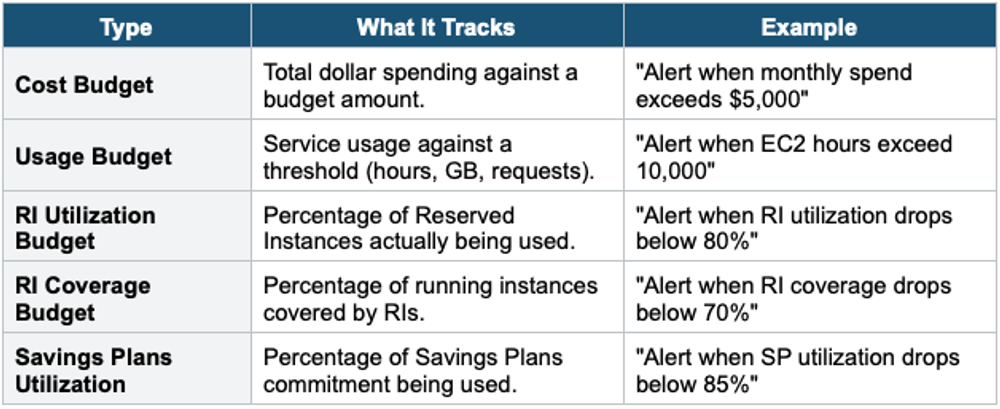
AWS Budgets lets you set custom cost, usage, reservation, and Savings Plans budgets with alerts when you exceed or are forecasted to exceed thresholds.
Budget Types
Budget Actions
- Automated responses when budget thresholds are exceeded
- Actions: apply IAM policy (restrict launches), apply SCP (restrict account), stop EC2 instances
- Requires approval or can be automatic
- Example: when the budget exceeds 90%, apply an SCP that denies EC2 RunInstances
Budget Alerts
- Alert at actual amount, forecasted amount, or percentage of budget
- Notify via: email, SNS topic, or Chatbot (Slack/Teams)
- Up to 5 alerts per budget
- First 2 budgets are free. Additional budgets: $0.02/day each.
5. AWS Cost Anomaly Detection
- ML-powered service that monitors spending patterns and alerts on unusual cost spikes
- Automatically learns your normal spending patterns (no manual thresholds)
- Monitors by: AWS service, linked account, cost allocation tag, cost category
- Alerts via: SNS or email with root cause analysis
- Example: "Your EC2 costs are 340% higher than expected. Root cause: 50 new m5.4xlarge instances launched in us-west-2."
- Free service (no additional charge)
6. AWS Cost and Usage Report (CUR)
- Most detailed cost dataset available from AWS
- CSV/Parquet files delivered to an S3 bucket (hourly, daily, or monthly)
- Contains: every line item, resource ID, tags, usage type, pricing, discounts
- Can be queried with: Athena, Redshift, QuickSight
- Use for: detailed cost analysis, chargeback, showback, custom dashboards
- CUR 2.0: improved schema, Parquet format, faster queries
7. AWS Pricing Calculator
- Web-based tool to estimate costs BEFORE deploying (not for existing resources)
- Build an estimate: add services, configure parameters, and see the projected monthly cost
- Save and share estimates via URL
- Use for: architecture cost planning, proposal budgets, comparing options
- URL: calculator.aws
8. Cost Allocation Tags
Tags are key-value pairs attached to AWS resources. Cost allocation tags allow you to track costs by project, department, environment, or any custom grouping.
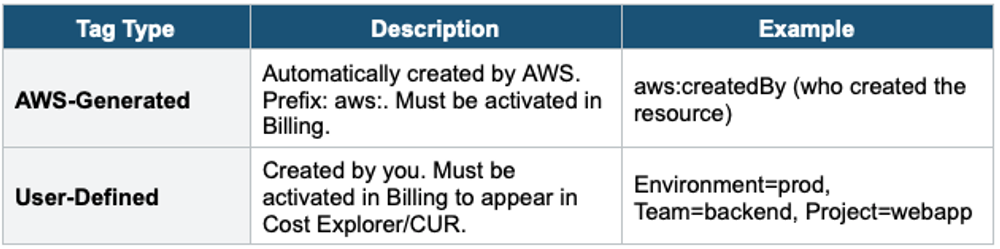
- Tags must be ACTIVATED in the Billing Console to appear in cost reports
- Tags are NOT retroactive — they only apply to costs AFTER activation
- Use for: departmental chargeback, project cost tracking, and environmental cost comparison
9. AWS Organizations Billing Features
Consolidated Billing
- All linked accounts’ bills are combined into one payment from the management account
- Volume discounts: combined usage across all accounts qualifies for tiered pricing
- Reserved Instances and Savings Plans can be shared across the organization
- The management account sees all costs. Linked accounts see only their own (unless enabled).
Service Control Policies (SCPs) for Cost
- Restrict which services or instance types accounts can use
- Example: deny launching anything larger than m5.xlarge in dev accounts
- Example: deny using Regions other than us-east-1 and eu-west-1
- SCPs don’t affect the management account (only member accounts)
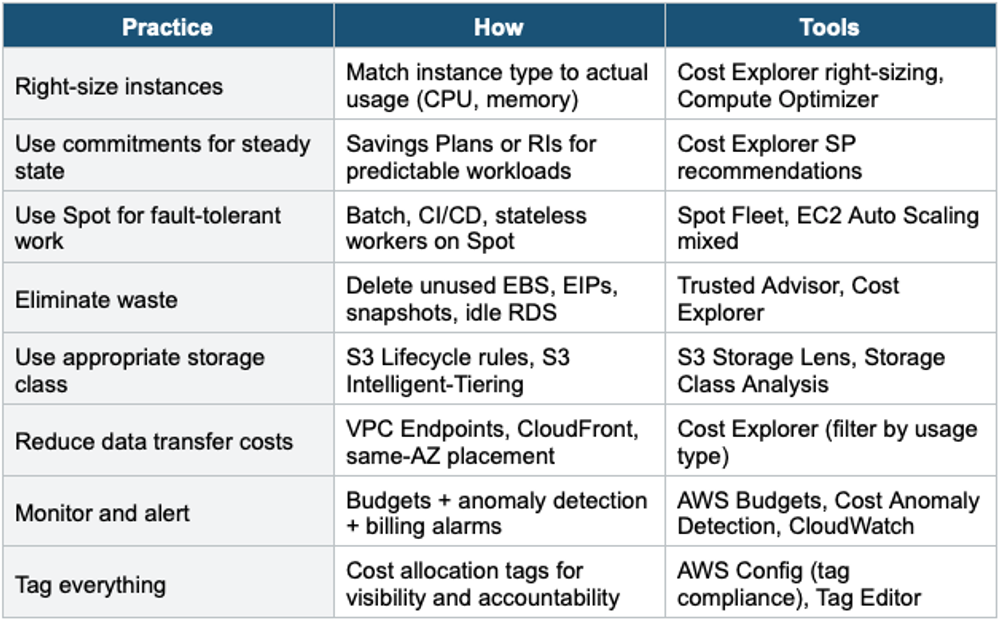
10. Cost Optimization Best Practices
11. Complete Cost Management Tools
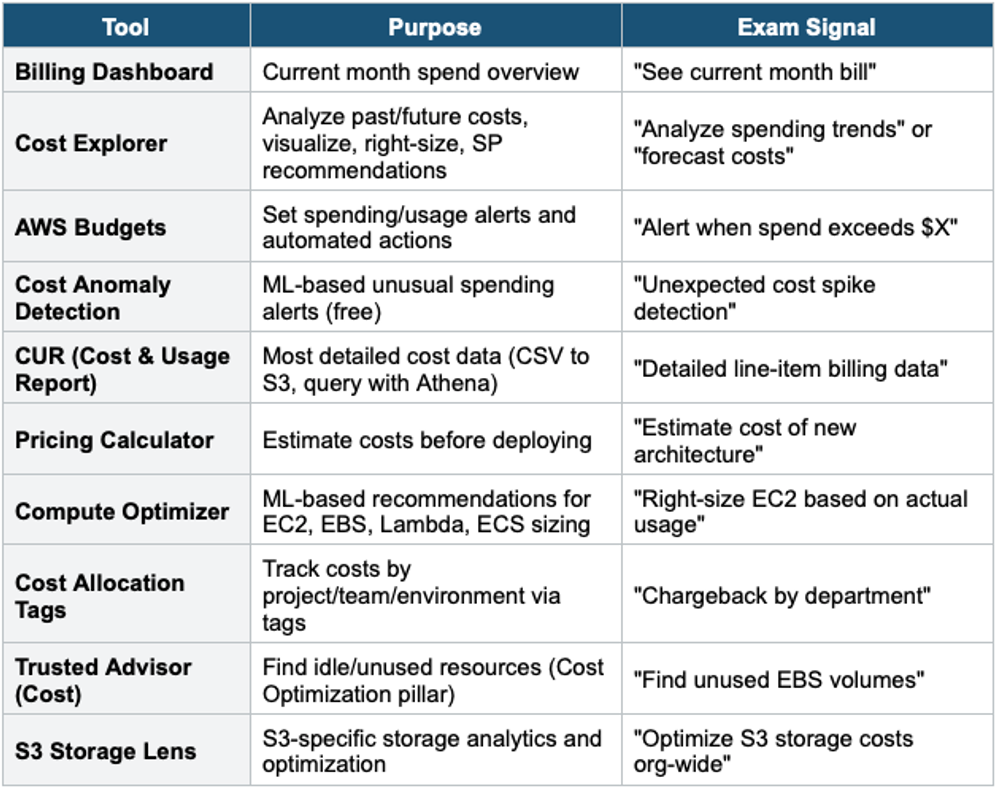
Exam Tip Cost Management: "Analyze past spending" = Cost Explorer. "Alert on budget" = AWS Budgets. "Detect unusual spend" = Cost Anomaly Detection (free, ML). "Detailed billing CSV" = CUR. "Estimate before deploying" = Pricing Calculator. "Right-size EC2" = Compute Optimizer or Cost Explorer. "Track by department" = Cost Allocation Tags. "Find idle resources" = Trusted Advisor. Consolidated Billing = combined volume discounts. RIs/SPs shared across organizations.