1. What is ACM?
ACM provisions, manages, and deploys SSL/TLS certificates for AWS services. Public certificates are FREE with automatic renewal.
Core Concept Request a certificate, validate domain ownership (DNS recommended), and deploy to ALB/CloudFront/API GW. ACM handles auto-renewal. You never handle private key files.
2. Certificate Types

3. Validation Methods
- DNS Validation (recommended): Add CNAME to DNS. Auto-renewal supported. Route 53 auto-adds.
- Email Validation: Click the approval link in the email. Manual renewal. Less recommended.
4. ACM Integrations
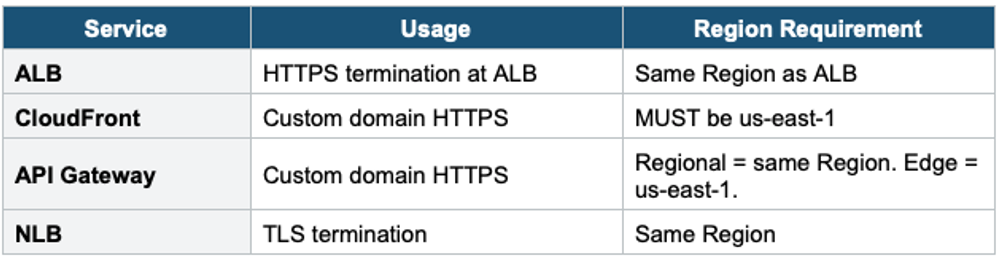
Important Warning ACM certificates CANNOT be used directly on EC2. ACM does not export the private key for public certs. For EC2: use a third-party certificate or ACM Private CA with export.
5. Key Facts
- Auto-renew if DNS-validated. Supports wildcard (*.example.com) and SAN.
- Regional service. Cannot export public cert private key.
- Private CA certs CAN be exported (for EC2, on-premises, IoT).
6. When to use
Use ACM when you need to provision, manage, and deploy SSL/TLS certificates for encrypting traffic to your AWS resources.
Key exam triggers:
- "SSL" / "TLS"
- "HTTPS"
- "certificate"
- "encrypt in transit."
- "custom domain with HTTPS"
Common scenarios:
- Enable HTTPS on ALB, CloudFront, and API Gateway.
- Secure custom domain names with SSL/TLS.
- Auto-renew certificates without manual effort.
- Terminate TLS at the load balancer.
Exam Tip ACM: "Free SSL" = ACM public. "CloudFront cert" = us-east-1. "Auto-renew" = DNS validation. "SSL on EC2" = NOT ACM. "Internal cert" = ACM Private CA ($400/mo). Wildcard supported.