1. What is CloudTrail?
AWS CloudTrail records ALL API calls made in your AWS account. Every action taken by a user, role, or AWS service is logged as an event. It provides governance, compliance, operational auditing, and risk auditing of your account.
Core Concept
CloudTrail = who did what, when, and from where. Every API call (Console, CLI, SDK, or service) is recorded with: who (IAM identity), what (API action), when (timestamp), where (source IP), and which resource. It is the audit log for your entire AWS account.
2. Event Types
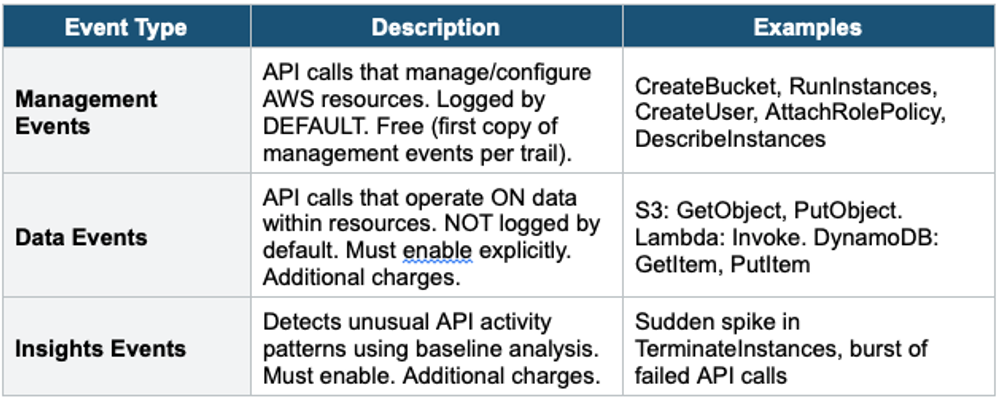
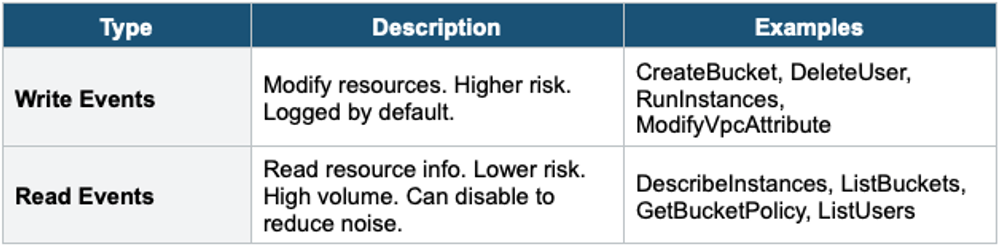
Management Events: Read vs Write
3. CloudTrail Trails
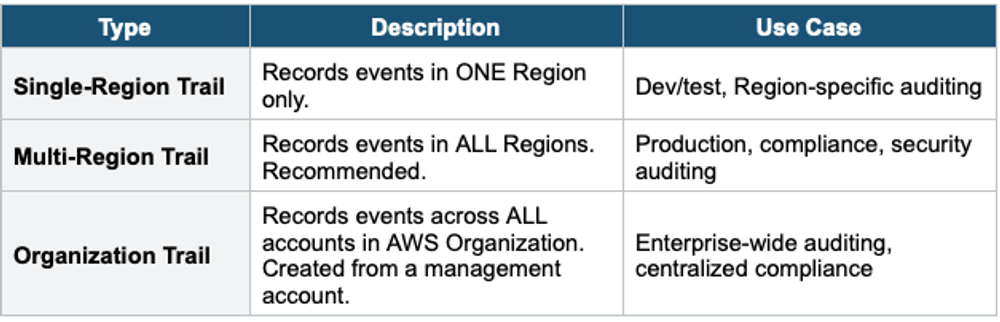
Trail Types
Trail Configuration
- Events delivered to: S3 bucket (required, stores log files as gzipped JSON)
- Optional: also deliver to CloudWatch Logs (for real-time monitoring, metric filters, alarms)
- Log file validation: SHA-256 hashing to detect tampering (enable for integrity)
- SSE-S3 encryption by default. Can use SSE-KMS for customer-managed key.
- S3 bucket can be in a different account (centralized logging pattern)
4. CloudTrail Event History
- CloudTrail Console shows the last 90 days of management events for FREE
- No trail needed — Event History is always available
- Searchable by: event name, username, resource type, time range
- For longer retention: create a Trail to deliver events to S3 (indefinite retention)
- For analysis: query S3 logs with Athena
5. CloudTrail Lake
- Managed data lake for CloudTrail events
- Query events using SQL directly in CloudTrail (no S3 + Athena setup needed)
- Retention: configurable, up to 7 years (2,555 days)
- Can ingest events from multiple accounts and Regions
- Can import external events (non-AWS activity)
- Faster and simpler than S3 + Athena for CloudTrail analysis
- More expensive than S3 storage (charges per data ingestion and query)
6. CloudTrail Insights
- Detects unusual patterns in API activity: unexpected spikes, unusual APIs, access anomalies
- Establishes a baseline of normal activity over 7 days
- Generates Insights events when activity deviates significantly from baseline
- Example: normally 5 RunInstances/day, suddenly 500 RunInstances → Insights alert
- Insights events sent to: S3, EventBridge, CloudTrail Console
- Must be explicitly enabled (not on by default). Additional charges.
7. CloudTrail Log File Example
CloudTrail Event Record (simplified):

{
  "eventTime": "2024-01-15T14:30:00Z",
  "eventSource": "s3.amazonaws.com",
  "eventName": "DeleteBucket",
  "awsRegion": "us-east-1",
  "sourceIPAddress": "203.0.113.50",
  "userIdentity": {
    "type": "IAMUser",
    "userName": "alice",
    "arn": "arn:aws:iam::123456789:user/alice"
  },
  "requestParameters": {
    "bucketName": "my-important-bucket"
  },
  "responseElements": null,
  "errorCode": "AccessDenied"
}
8 CloudTrail Security Best Practices
- Enable multi-Region trail in all accounts
- Deliver logs to a CENTRALIZED S3 bucket in a separate logging account
- Enable log file validation (detect tampering)
- Encrypt with SSE-KMS (customer-managed key for access control)
- Restrict S3 bucket access with bucket policy (deny delete, limit access)
- Enable CloudWatch Logs integration for real-time alerting
- Enable CloudTrail Insights for anomaly detection
- Use S3 Object Lock to prevent log deletion
9. CloudTrail vs Config
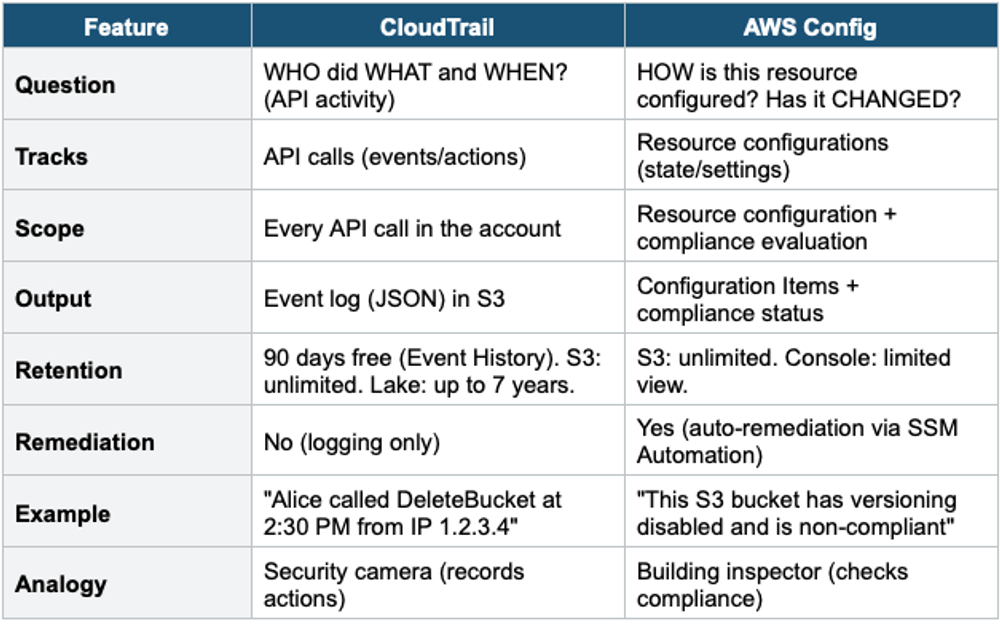
CloudTrail + Config Together
Use both together for complete governance. CloudTrail answers: WHO changed it? WHEN? Config answers: WHAT changed? Is it still compliant? Example: Config detects a Security Group has become non-compliant. CloudTrail shows who made the change and when.
Exam Tip
CloudTrail: "Who deleted the S3 bucket?" = CloudTrail. "API audit log" = CloudTrail. Management Events = free (first copy). Data Events = must enable, costs extra. "Detect unusual API activity" = CloudTrail Insights. "Query events with SQL" = CloudTrail Lake. "90 days free" = Event History. Enable multi-Region + log file validation + SSE-KMS + centralized S3.