1. The Cost Optimization Framework
Cost optimization is not about spending less — it is about eliminating waste while delivering maximum business value. AWS organizes cost optimization into five focus areas.
Five Focus Areas 1) Right-Size: match resources to actual workload. 2) Increase Elasticity: scale with demand, stop paying for idle. 3) Choose the Right Pricing Model: RI/SP/Spot for predictable or interruptible workloads. 4) Optimize Storage: Use the cheapest storage class that meets requirements. 5) Monitor and Govern: visibility, alerts, accountability via tagging and budgets.
2. Right-Sizing
Right-sizing means selecting the smallest instance type that still meets your performance requirements. Most organizations over-provision by 50–75%.
AWS Compute Optimizer
- ML-based service that analyzes CloudWatch metrics (CPU, memory, network, disk) over 14+ days
- Recommends: EC2 instance type, EBS volume type/size, Lambda memory, ECS task size
- Shows projected cost savings and performance risk for each recommendation
- Enhanced recommendations: opt-in for 3-month analysis window (more accurate, paid feature)
- Integrates with Cost Explorer right-sizing recommendations
Right-Sizing Strategies by Service
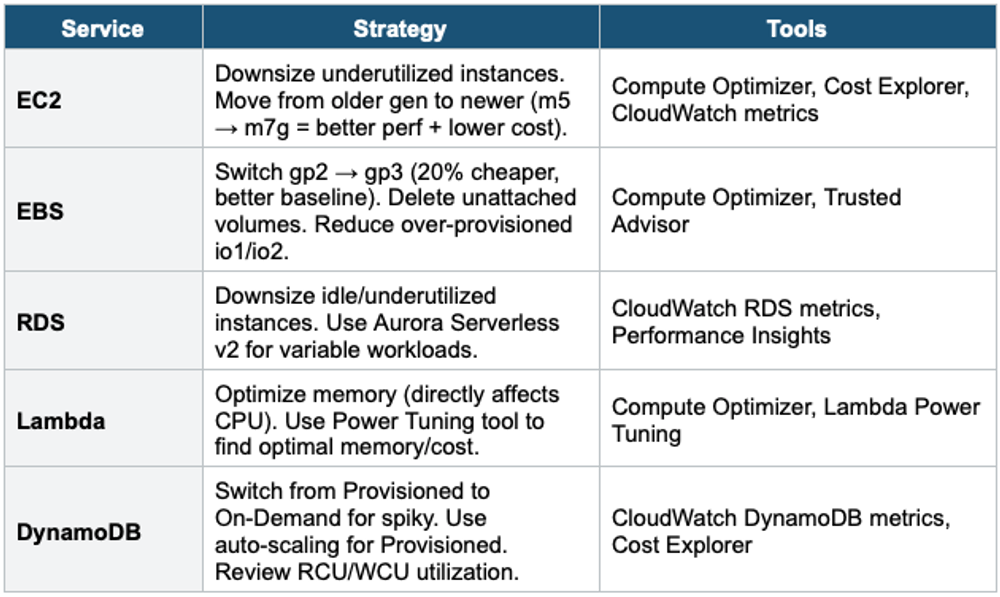
Graviton Instances = Free Performance + Cost Savings AWS Graviton (Arm-based) instances (m7g, c7g, r7g, t4g) deliver up to 40% better price-performance than equivalent x86 instances. Simply changing from m5.large to m7g.large can save 20–40% with equal or better performance. This applies to EC2, RDS, ElastiCache, and Lambda (arm64 runtime).
3. Increase Elasticity
Stop paying for resources when they are not in use. Scale down during low demand and scale up during peak.
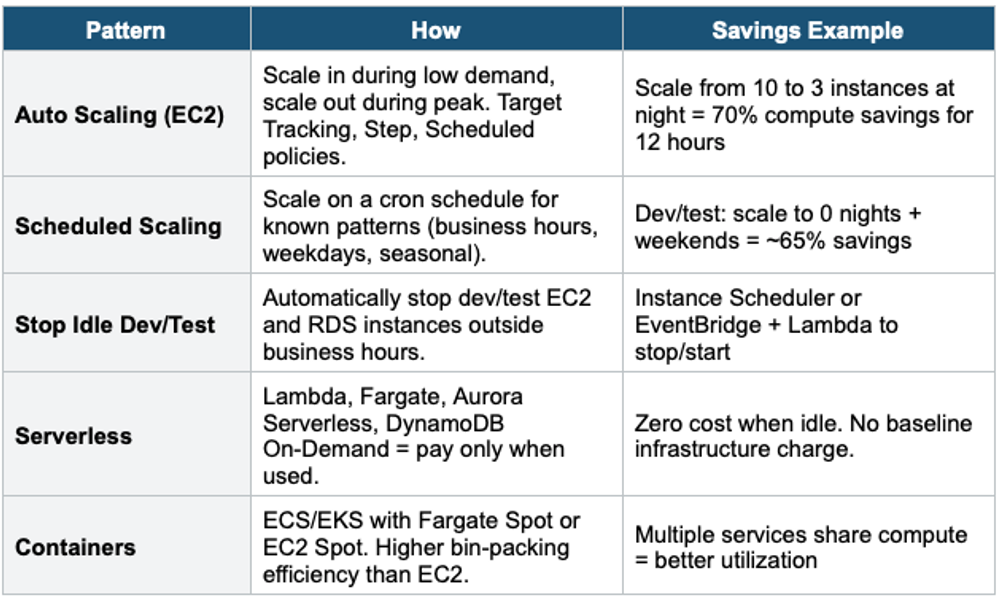
Instance Scheduler Pattern:

EventBridge Rule: cron(0 19 ? * MON-FRI *)  // 7 PM weekdays
  → Lambda: stop all EC2/RDS tagged with Schedule=office-hours

EventBridge Rule: cron(0 7 ? * MON-FRI *)   // 7 AM weekdays
  → Lambda: start all EC2/RDS tagged with Schedule=office-hours

Savings: ~65% for dev/test environments (running 10/24 hrs, 5/7 days)
4. Choose the Right Pricing Model
Pricing Decision Tree:

Is the workload steady-state (runs 24/7, predictable)?
  └─ YES: Use Savings Plans or Reserved Instances (up to 72% off)
     └─ Flexible across services? → Compute Savings Plan
     └─ Specific EC2 family?    → EC2 Instance Savings Plan
     └─ Specific instance type?  → Reserved Instance

Is the workload fault-tolerant (can handle interruptions)?
  └─ YES: Use Spot Instances (up to 90% off)
     └─ Batch processing, CI/CD, data analysis, stateless web

Is the workload variable/unpredictable?
  └─ YES: Use On-Demand or serverless (Lambda, Fargate)
     └─ Pay per use, no waste, scale to zero

Combination strategy (most cost-effective):
  └─ Base load:   Savings Plans / RIs (steady 24/7 portion)
  └─ Peak load:   On-Demand (auto-scaled portion)
  └─ Batch/jobs:  Spot Instances (interruptible portion)
Spot Instance Best Practices
- Use Spot Fleet or EC2 Auto Scaling with mixed instance types (diversify for availability)
- Use a capacity-optimized allocation strategy (reduces interruption risk)
- Design for interruption: checkpointing, stateless architecture, SQS-driven workers
- Spot Block (deprecated) → use Spot with diversification instead
- Combine On-Demand + Spot in ASG: On-Demand for base, Spot for burst
5. Optimize Storage
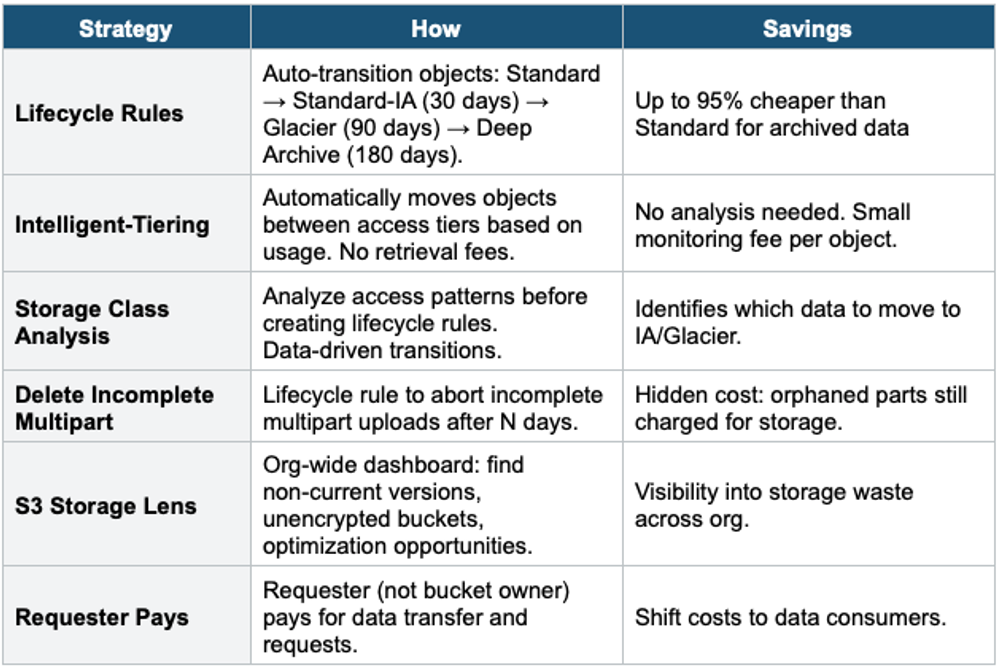
S3 Cost Optimization
EBS Cost Optimization
- gp2 → gp3: 20% cheaper + better baseline IOPS/throughput. No performance change needed.
- Delete unattached EBS volumes (Trusted Advisor identifies these)
- Delete old snapshots no longer needed (AWS Backup lifecycle rules)
- Right-size provisioned IOPS volumes (io1/io2): reduce IOPS if not fully used
- Use Instance Store for temporary data instead of EBS (free, faster)
Database Cost Optimization
- Aurora Serverless v2: pay per ACU for variable workloads (no idle instance cost)
- RDS Reserved Instances: up to 69% off for steady databases
- DynamoDB On-Demand for spiky, Provisioned + Auto Scaling for steady
- ElastiCache Reserved Nodes: up to 55% off for steady caches
- Use read replicas to offload reads (cheaper than scaling up the primary)
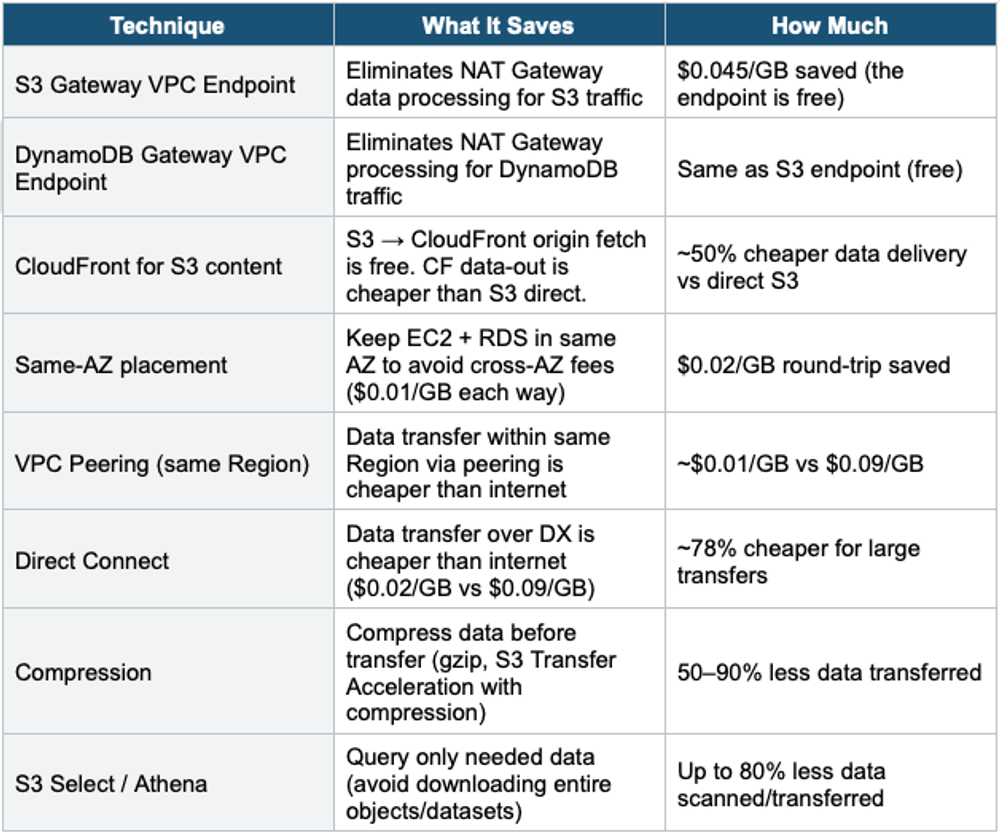
6. Reduce Data Transfer Costs
7. Monitor, Alert, and Govern
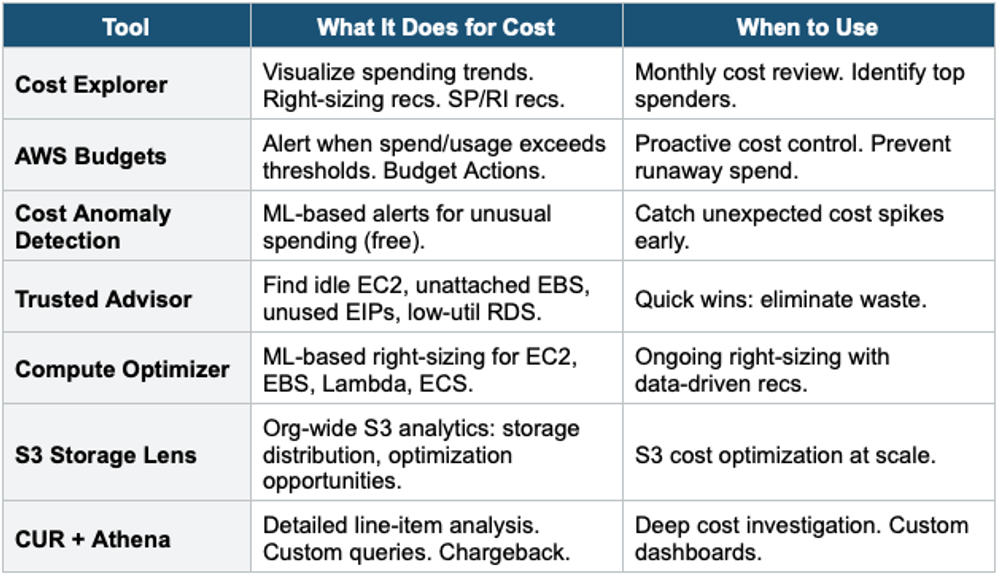
Visibility Tools
Governance Guardrails
- Cost Allocation Tags: tag everything (Team, Project, Environment). Activate in Billing.
- AWS Organizations SCPs: restrict expensive services/instance types in dev accounts
- AWS Budgets Actions: auto-apply SCP or stop instances when the budget is exceeded
- Service Quotas: request increases proactively; avoid emergency scaling failures
- AWS Config Rules: detect non-compliant resources (e.g., unencrypted, over-provisioned)
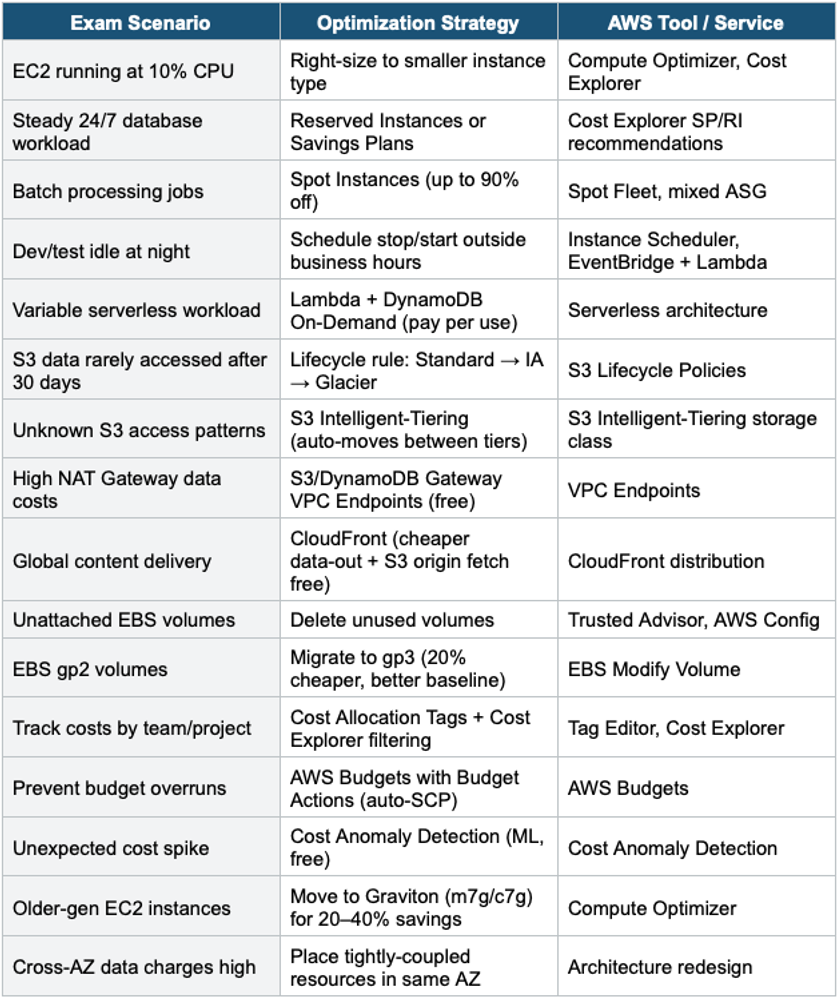
8. Cost Optimization Decision Table
9 Cost Optimization Exam Patterns
Common Exam Question Patterns:

Q: "How to reduce costs for a steady 24/7 workload?"
A: Savings Plans or Reserved Instances (up to 72% off)

Q: "How to reduce costs for fault-tolerant batch processing?"
A: Spot Instances (up to 90% off)

Q: "How to reduce NAT Gateway data transfer costs?"
A: S3/DynamoDB Gateway VPC Endpoints (free)

Q: "How to reduce S3 storage costs for infrequently accessed data?"
A: S3 Lifecycle Rules or Intelligent-Tiering

Q: "How to find underutilized EC2 instances?"
A: AWS Compute Optimizer or Trusted Advisor

Q: "How to prevent unexpected charges?"
A: AWS Budgets (alerts) + Cost Anomaly Detection (ML)

Q: "How to track costs by department?"
A: Cost Allocation Tags (activated in Billing)

Q: "Cheapest EC2 for same performance?"
A: Graviton instances (m7g, c7g, r7g, t4g)
Exam Tip Cost Optimization: This is the #1 most tested cost topic. Key patterns: Steady = RIs/SPs. Fault-tolerant = Spot. Variable = Serverless/On-Demand. NAT costs = VPC Endpoints. S3 costs = Lifecycle/Intelligent-Tiering. Find waste = Trusted Advisor + Compute Optimizer. Alert = Budgets + Anomaly Detection. Tag = Cost Allocation Tags. Graviton = free savings. gp2→gp3 = free savings.