1. Data Transfer Landscape
AWS provides multiple services for moving data into, out of, and within the cloud. Choosing the right service depends on data volume, transfer speed, protocol requirements, and whether the transfer is one-time or ongoing.
Data Transfer Decision Rule Small data + network available = DataSync or S3 CLI. Large data + good network = DataSync (optimized for speed). Large data + slow/no network = Snow Family (physical device). File uploads from external partners via SFTP = Transfer Family. Database migration = DMS. Server migration = MGN.
2. AWS DataSync
What is DataSync?
AWS DataSync is an online data transfer service that simplifies, automates, and accelerates moving data between on-premises storage, other clouds, and AWS storage services. It is purpose-built for fast, large-scale data transfers.
Core Concept DataSync = fast, automated, scheduled file/storage sync. It transfers data up to 10x faster than open-source tools by using a purpose-built network protocol with automatic parallelization, compression, and integrity validation. One-time migration or recurring sync.
Key Characteristics
- Fully managed agent-based transfer (agent runs on-premises or in another cloud)
- Up to 10 Gbps throughput (10x faster than open-source tools like rsync)
- Automatic data integrity validation (checksums at source and destination)
- Automatic encryption in transit (TLS) and optional encryption at rest
- Bandwidth throttling: configurable to avoid saturating your network
- Scheduling: one-time or recurring (hourly, daily, weekly)
- Incremental transfers: only transfers changed files after initial sync
- Preserves file metadata: permissions, timestamps, ownership, links
- Pay per GB transferred (~$0.0125/GB)
DataSync Sources & Destinations
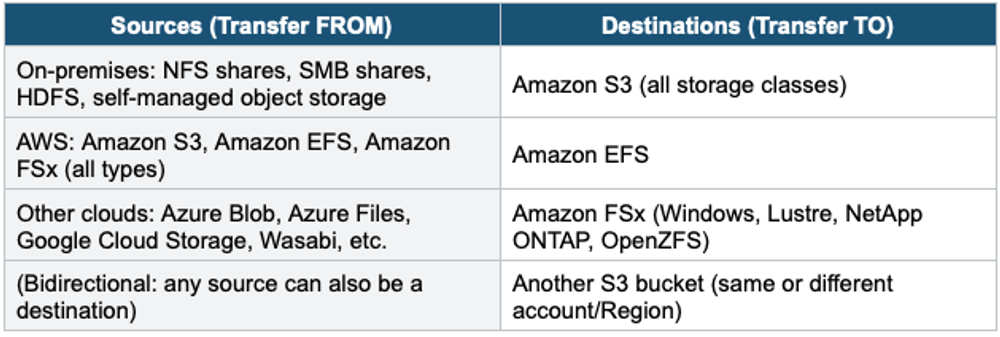
DataSync Architecture
DataSync Architecture (On-Premises to AWS):

On-Premises                          AWS

NFS / SMB Share                  S3 / EFS / FSx
      |                              ^
  DataSync Agent       Internet      |
  (VM on-prem)   ──────────────→  DataSync Service
  - reads data          or           - writes to destination
  - compresses      Direct Connect   - validates integrity
  - encrypts (TLS)                   - preserves metadata

DataSync Architecture (AWS to AWS):

  S3 Bucket (us-east-1) ───→ DataSync ───→ EFS (eu-west-1)
(No agent needed for AWS-to-AWS transfers)- On-premises → AWS: requires DataSync Agent (VMware, KVM, Hyper-V, or EC2 for cloud-to-cloud)
- AWS → AWS: no agent needed (e.g., S3 to EFS, cross-Region S3 copy)
- Transfer via: public internet, VPN, Direct Connect, or VPC Endpoint (PrivateLink)
DataSync Scheduling & Filtering
- Task scheduling: run at specific intervals (every hour, daily, weekly, custom cron)
- Include/Exclude filters: transfer only specific directories, file types, or patterns
- Transfer mode: transfer all data, transfer only changed data, or transfer deleted files
- Task Reports: detailed report of what was transferred, skipped, or failed
- CloudWatch metrics and logs for monitoring task progress
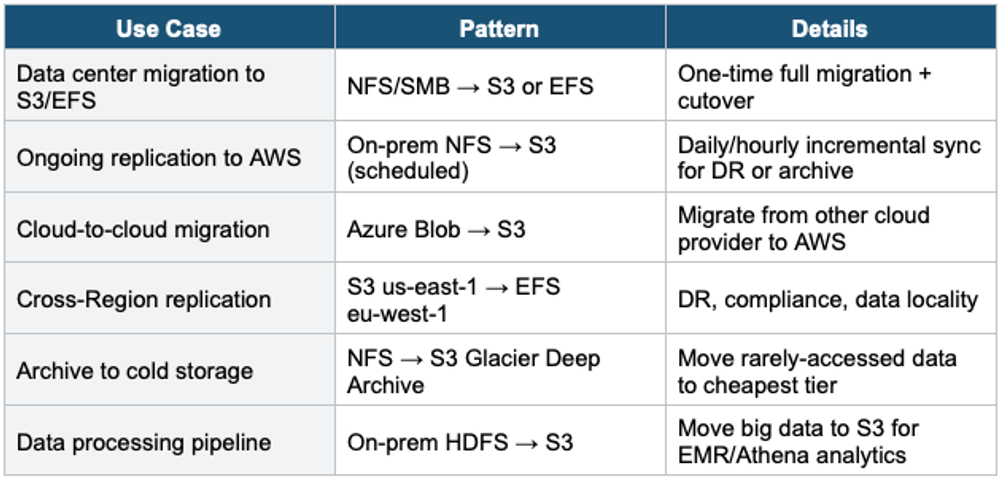
DataSync Use Cases
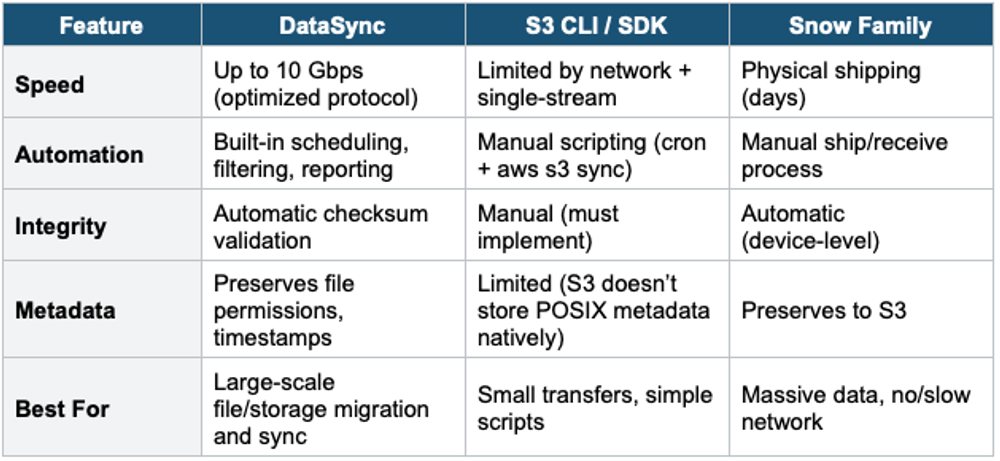
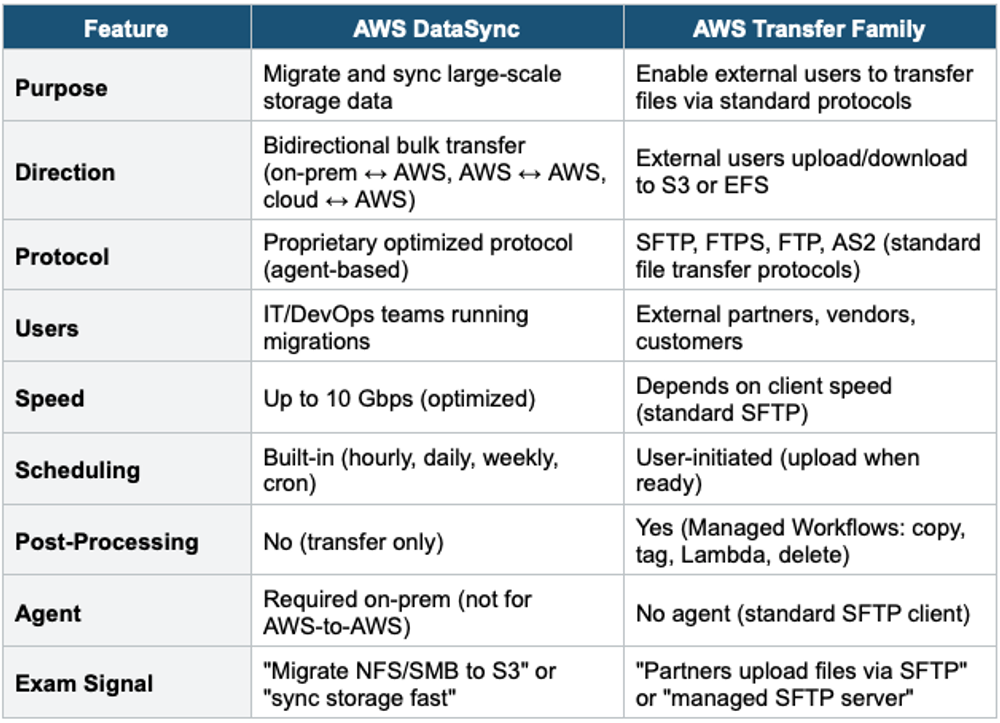
DataSync vs Other Transfer Services
3. AWS Transfer Family
What is a Transfer Family?
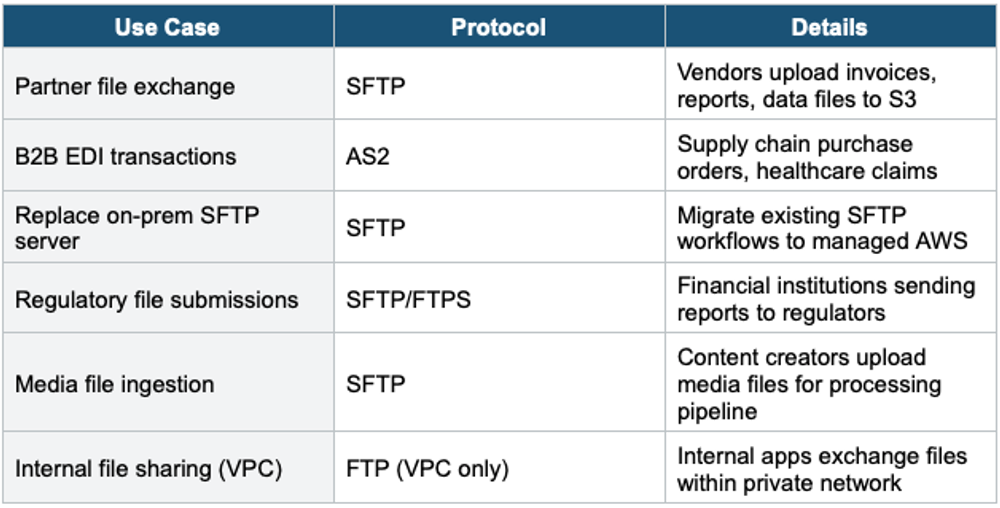
AWS Transfer Family provides fully managed file transfer services that enable your users and partners to transfer files directly into and out of Amazon S3 or Amazon EFS using standard file transfer protocols: SFTP, FTPS, FTP, and AS2.
Core Concept Transfer Family = managed SFTP/FTP server backed by S3 or EFS. Your partners/vendors upload files using their existing SFTP clients (WinSCP, FileZilla, scripts). The files land directly in your S3 bucket or EFS file system. No servers to manage. You keep your existing workflows and DNS.
Supported Protocols
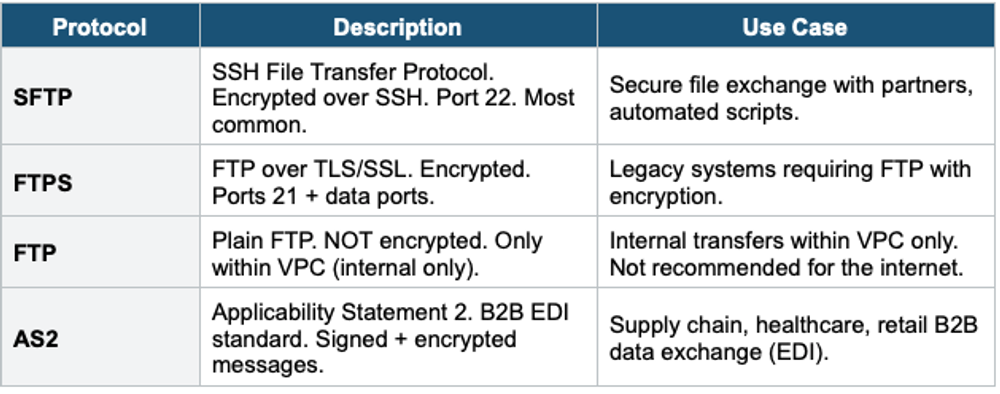
Important Warning FTP (plain, unencrypted) is only available within a VPC endpoint and should NEVER be exposed to the internet. For internet-facing file transfer, always use SFTP or FTPS. The exam may test this: "secure file transfer" = SFTP or FTPS, never plain FTP over the internet.
Key Features
- Fully managed: no servers to provision, patch, or scale
- Storage backend: Amazon S3 or Amazon EFS (you choose per server)
- Custom DNS: use your own domain (sftp.example.com) via Route 53
- Authentication: service-managed (SSH keys), AWS Directory Service (AD), custom identity provider (Lambda + API Gateway for LDAP, Okta, etc.)
- Elastic IP support: static IPs for firewall whitelisting
- VPC endpoint: deploy inside VPC for private access
- CloudWatch logging: track file transfers, user activity
- Managed workflows: post-upload processing (copy, tag, decrypt, invoke Lambda)
- Scales automatically to thousands of concurrent users
Transfer Family Architecture
Transfer Family Architecture:

External Partner / Vendor
      |
  SFTP Client (WinSCP, FileZilla, scripts)
      |
      v
  AWS Transfer Family Server
  (sftp.example.com → Route 53 Alias)
      |
  Authentication:
    - Service-managed (SSH keys)
    - AD (Active Directory)
    - Custom (Lambda authorizer)
      |
      v
  Amazon S3 Bucket           or  Amazon EFS
  /uploads/partner-a/           /incoming/partner-a/
      |
  Managed Workflow (post-upload):
    - Copy to processing bucket
    - Tag with metadata
    - Invoke Lambda for processing
    - Notify via SNS
Managed Workflows
- Automate post-upload processing steps (no custom infrastructure needed)
- Steps: Copy file, Tag file, Custom processing (invoke Lambda), Delete original
- Exception handling: on error, move to quarantine location
- Triggered automatically on file upload
- Use for: file validation, virus scanning, format conversion, notification
Transfer Family Use Cases
4. DataSync vs Transfer Family
5. Complete Data Transfer Decision Table
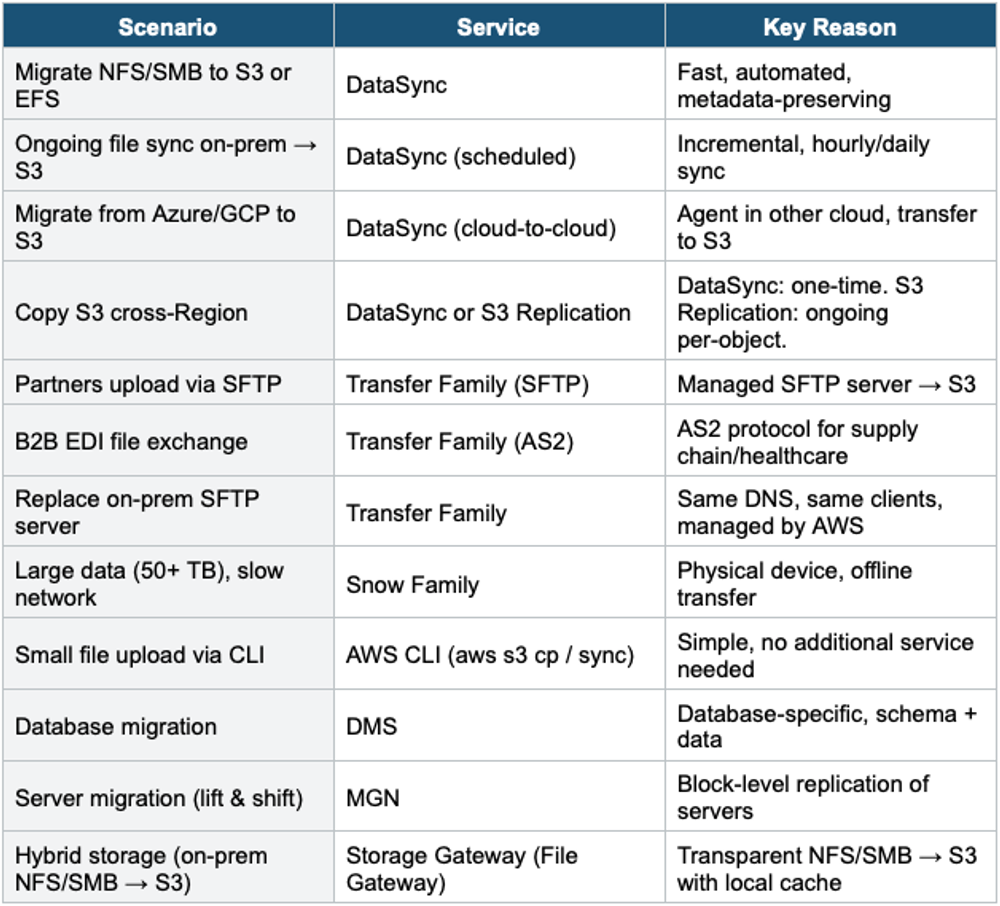
DataSync vs Storage Gateway DataSync = TRANSFER data (one-time or scheduled bulk sync). Storage Gateway = ACCESS data (ongoing transparent bridge: on-prem NFS/SMB → S3 with local cache). If the question says "migrate data" or "sync files" = DataSync. If it says "on-prem applications access S3 via NFS" = Storage Gateway. Both move data to S3, but for different purposes.
Exam Tip Data Transfer: "Fast NFS/SMB migration to S3" = DataSync (10 Gbps, automated). "Partners upload via SFTP" = Transfer Family. "B2B EDI" = Transfer Family AS2. "Offline large data" = Snow Family. "On-prem NFS access to S3" = Storage Gateway (not DataSync). DataSync = bulk transfer tool. Transfer Family = managed protocol server. DataSync preserves metadata. Transfer Family supports Managed Workflows.