1. What is Direct Connect?
AWS Direct Connect (DX) is a dedicated, private physical connection between your on-premises network and AWS. Unlike VPN, traffic does NOT go over the public internet. It provides consistent, low-latency, high-bandwidth connectivity.
Core Concept Direct Connect = a physical cable from your data center to an AWS Direct Connect location. Traffic travels over a private fiber connection, NOT the public internet. This gives you consistent network performance, lower latency, and higher throughput than a VPN. But it takes weeks–months to set up and costs more.
2. Key Characteristics
- Dedicated private connection (does NOT use the public internet)
- Consistent network performance: low latency, predictable bandwidth
- Speeds: 1 Gbps, 10 Gbps, 100 Gbps (dedicated). 50 Mbps–500 Mbps via partners (hosted).
- Setup time: weeks to months (physical fiber installation)
- NOT encrypted by default (private but unencrypted). Add VPN on top for encryption.
- Supports both private (VPC) and public (AWS public services) access
- Requires a Direct Connect location (AWS colocation facility) or partner facility
Important Warning Direct Connect is NOT encrypted. The connection is private (not over the internet), but the data on the wire is NOT encrypted. If you need encryption, establish an IPSec VPN tunnel OVER the Direct Connect connection. The exam tests this: "secure private connection" = DX + VPN on top.
3. Direct Connect Architecture
Direct Connect Architecture:

Your Data Center       DX Location         AWS Region
┌────────────┐   ┌────────────┐   ┌────────────┐
│            │   │            │   │            │
│  Your      │   │  AWS       │   │  VPC       │
│  Router ─────── DX Router ──────   VGW / TGW │
│            │   │            │   │     |      │
│  Servers   │   │ Colocation │   │  Subnets   │
└────────────┘   └────────────┘   └────────────┘
     Dedicated fiber     |   AWS backbone
     (not internet)      |
                    Your equipment
                    or partner cage
4. Virtual Interfaces (VIFs)
After establishing a DX connection, you create virtual interfaces to access AWS resources:
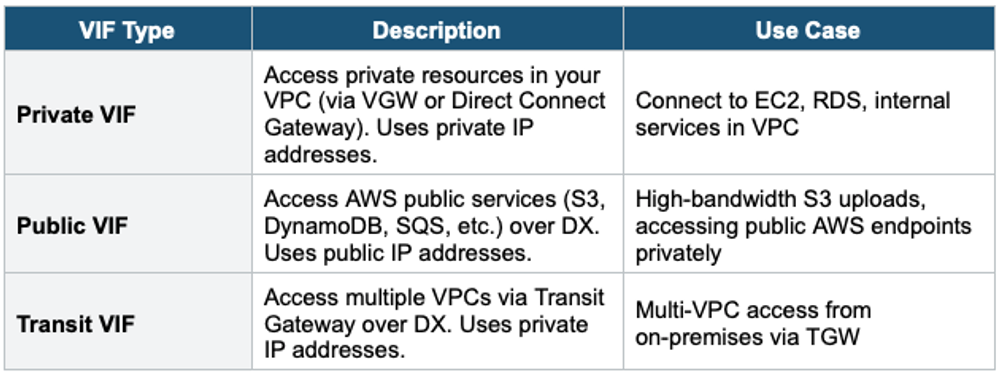
VIF Selection Private VIF = reach resources in ONE VPC (via VGW) or multiple VPCs (via DX Gateway + VGWs). Public VIF = reach AWS public services (S3 API, SQS API) over DX instead of the internet. Transit VIF = reach multiple VPCs via Transit Gateway. For modern multi-VPC architectures, Transit VIF + TGW is preferred.
5. Direct Connect Gateway
- Allows a single DX connection to access VPCs in multiple Regions
- Without DX Gateway, a DX connection only reaches VPCs in the Region where the DX location is
- DX Gateway connects to VGWs in multiple Regions via Private VIFs
- Also works with Transit Gateway via Transit VIFs
- Global service (not Region-specific)
- Does NOT enable VPC-to-VPC communication (only on-prem to VPC)
Without DX Gateway:         With DX Gateway:

  DX → VGW → VPC (1 Region)   DX → DX Gateway → VGW-A → VPC us-east-1
                                            → VGW-B → VPC eu-west-1
                                            → VGW-C → VPC ap-southeast-1

  One DX connection reaches VPCs in multiple Regions!
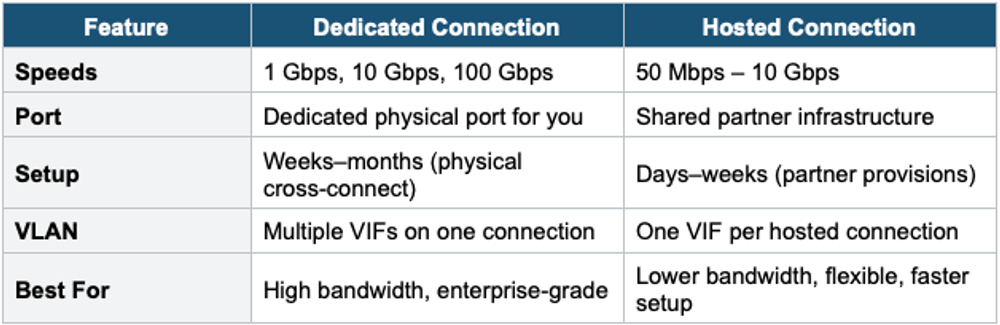
6. Connection Types
Dedicated Connection
- Physical fiber port reserved for you at the DX location
- Speeds: 1 Gbps, 10 Gbps, or 100 Gbps
- You request via AWS Console, then work with the DX location to get the physical cross-connect
- Setup: weeks to months
- Best for: high bandwidth, consistent workloads
Hosted Connection
- Provisioned by an AWS Direct Connect Partner (e.g., AT&T, Verizon, Equinix)
- Speeds: 50 Mbps, 100 Mbps, 200 Mbps, 300 Mbps, 400 Mbps, 500 Mbps, 1 Gbps, 2 Gbps, 5 Gbps, 10 Gbps
- The partner provides the connection from their infrastructure to AWS
- Easier to set up than dedicated (partner handles physical installation)
- Can add or remove capacity on demand (for certain speeds)
- Best for: lower bandwidth needs, faster setup, first-time DX users
7. Direct Connect Resiliency
AWS recommends different levels of resiliency based on your requirements:
Maximum Resiliency (Critical Workloads)
- Two DX connections at TWO separate DX locations
- Each location has its own physical connection
- Survives: single device failure, single DX location failure
High Resiliency (Important Workloads)
- Two DX connections at ONE DX location
- Each connection terminates on a different AWS device
- Survives: single device failure. Does NOT survive DX location failure.
DX + VPN Backup
- Primary: Direct Connect (high bandwidth, low latency)
- Backup: Site-to-Site VPN (lower bandwidth, over the internet, encrypted)
- If DX fails, traffic automatically fails over to VPN via BGP routing
- Cost-effective alternative to dual-DX for non-critical workloads
Resiliency Options:

Maximum:     DX Location A ── DX Connection 1 ──┐
             DX Location B ── DX Connection 2 ──┤── VGW/TGW
             (survives full location failure)    │

High:        DX Location A ── DX Connection 1 ──┤
             DX Location A ── DX Connection 2 ──┤── VGW/TGW
             (survives device failure only)      │

DX + VPN:    DX Location A ── DX Connection ────┤
             Internet ───── VPN (backup) ─────┤── VGW/TGW
             (cost-effective, encrypted backup)  │
8. Encryption on Direct Connect
- DX is NOT encrypted by default — traffic is private but unencrypted
- Solution 1: Create an IPSec VPN tunnel OVER the DX connection (most common)
- Solution 2: Use MACsec (IEEE 802.1AE) for Layer 2 encryption — available on 10 Gbps and 100 Gbps dedicated connections
- MACsec encrypts at the link layer (line-rate encryption, no bandwidth overhead)
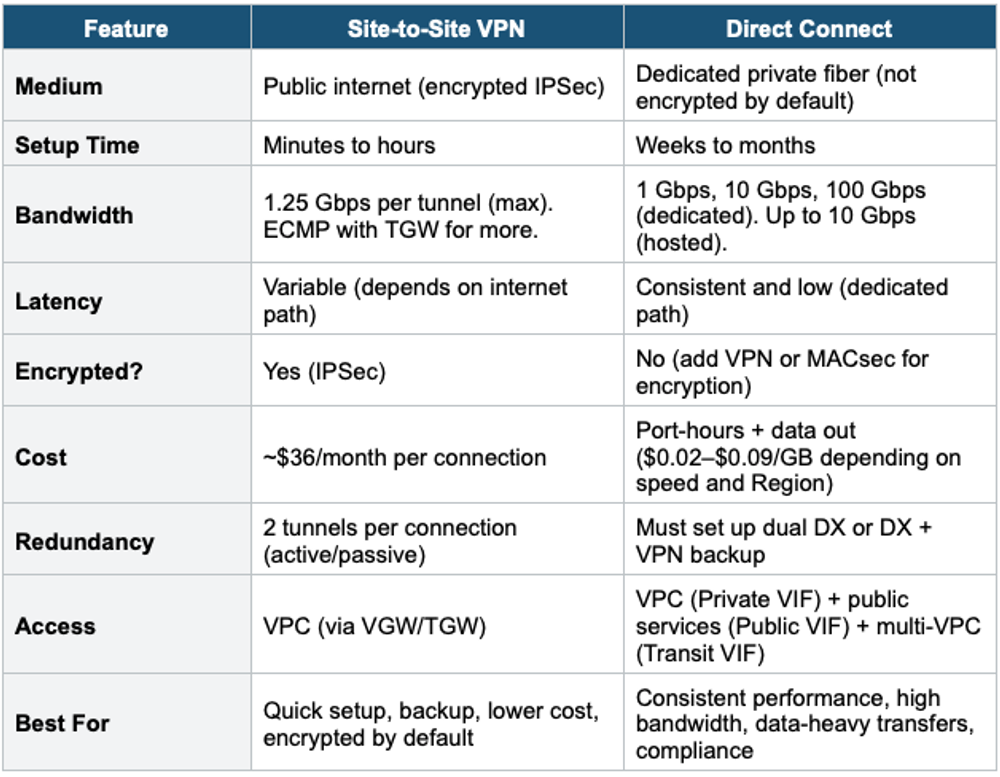
9. Direct Connect + Site-to-Site VPN Comparison
10. Hybrid Connectivity Decision Table
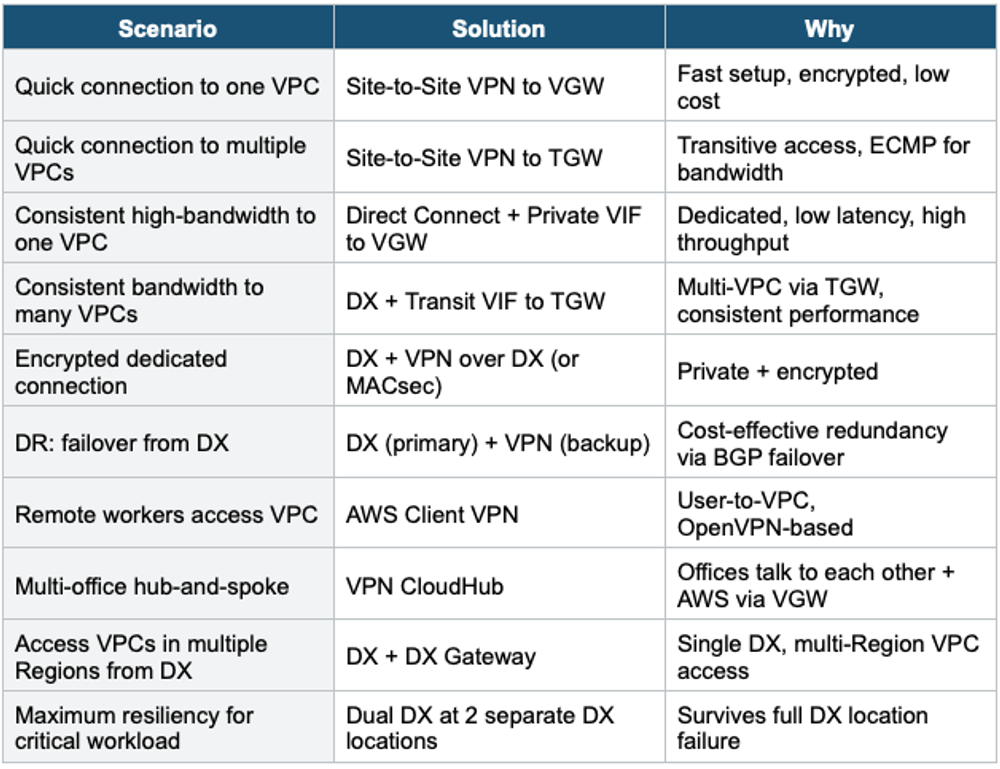
Exam Tip Direct Connect: "Dedicated private connection, consistent latency" = Direct Connect. "Quick setup, encrypted" = VPN. "High bandwidth to AWS" = DX (1/10/100 Gbps). "DX is NOT encrypted" = add VPN on top of or MACsec. "Access multiple Regions from one DX" = DX Gateway. "Multiple VPCs from DX" = Transit VIF + TGW. "DX + VPN" = common exam pattern for encrypted backup. Setup time: VPN = minutes, DX = weeks–months.