1. AWS Directory Service Overview
AWS Directory Service provides multiple ways to use Microsoft Active Directory (AD) with AWS services. It is essential for enterprises that use AD for identity management.
2. Directory Service Options
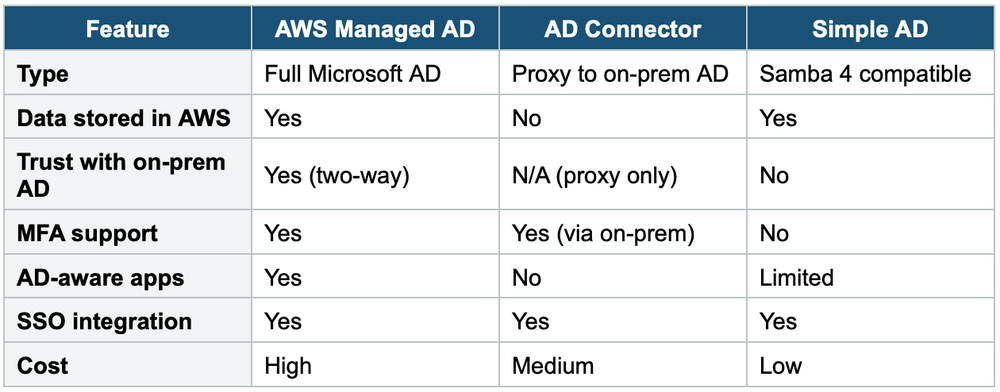
Option 1: AWS Managed Microsoft AD
- Full Microsoft Active Directory running on AWS (managed by AWS)
- Supports AD-aware applications: SQL Server, SharePoint, .NET apps
- Supports trust relationships with on-premises AD (two-way trust)
- Users exist in BOTH on-premises AD and AWS AD
- Supports MFA
- Automatic replication across AZs
Use when: You need a full AD in AWS, or you need trust with on-premises AD, or you need AD-aware workloads in AWS.
Option 2: AD Connector
- A proxy (directory gateway) that redirects authentication requests to your on-premises AD
- Does NOT store any directory data in AWS — it’s just a connector
- Users are managed ONLY in on-premises AD
- Requires VPN or Direct Connect to on-premises
- Cannot be used with SQL Server, SharePoint, or other AD-aware apps
Use when: You want to use existing on-premises AD for AWS Console login or AWS SSO without replicating directory data to AWS.
Option 3: Simple AD
- Basic, low-cost AD-compatible directory powered by Samba 4
- Standalone — cannot join or trust with on-premises Microsoft AD
- Supports basic AD features: user accounts, groups, group policies
- Does NOT support MFA, trust relationships, or AD-aware workloads
Use when: You need a simple, cheap directory for basic user management in AWS and have no on-premises AD.
3. Directory Service Comparison
4. Identity Federation
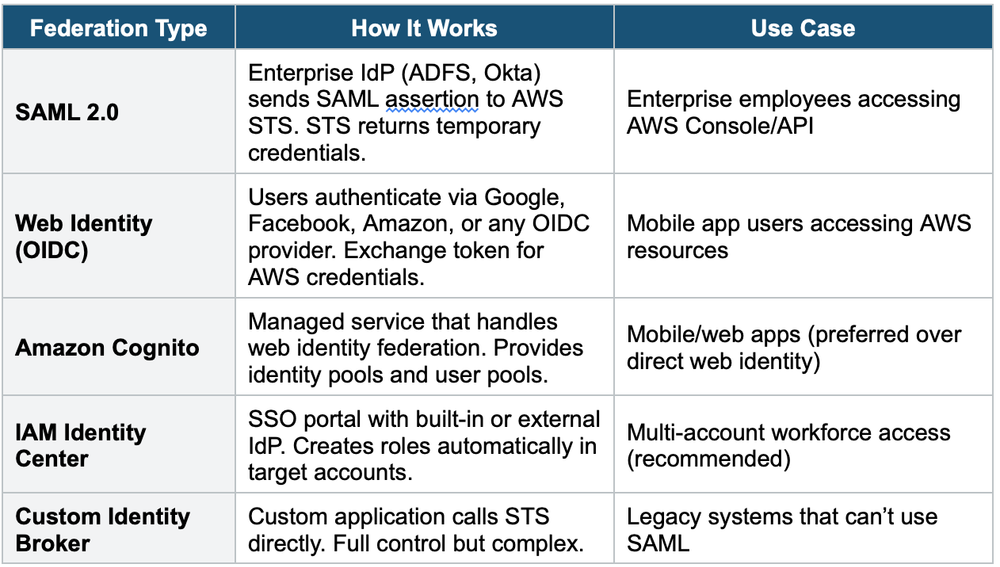
Federation allows external users to access AWS resources without creating IAM users. Users authenticate against an external identity provider (IdP) and receive temporary AWS credentials.
Federation Types
5. SAML 2.0 Federation Flow
- Step 1: User authenticates against the corporate IdP (e.g., Active Directory via ADFS)
- Step 2: IdP validates credentials and returns a SAML assertion
- Step 3: User’s browser posts the SAML assertion to AWS STS (sts: AssumeRoleWithSAML)
- Step 4: STS validates the assertion and returns temporary credentials
- Step 5: User accesses AWS Console or API with temporary credentials
6. Amazon Cognito
Cognito provides two main components:
User Pools: User directory for sign-up/sign-in. Provides JWT tokens. Supports MFA, email/phone verification, and social sign-in (Google, Facebook, Apple). Think: authentication.
Identity Pools (Federated Identities): Provides temporary AWS credentials to access AWS services directly (S3, DynamoDB). Can use Cognito User Pool tokens OR external IdP tokens. Think: authorization for AWS access.
- User Pool = "Who are you?" (authentication → JWT token)
- Identity Pool = "What can you do in AWS?" (authorization → temporary AWS credentials)
- They can work together: User Pool authenticates → Identity Pool grants AWS access
Exam Tip
Federation questions: Enterprise/corporate users → SAML 2.0 or IAM Identity Center. Mobile/web app users → Cognito (preferred) or Web Identity. If you see Active Directory + AWS access, think: AD Connector or Managed AD + IAM Identity Center. Cognito User Pool = auth, Identity Pool = AWS credentials.