1. What is DMS?
AWS Database Migration Service migrates databases to AWS quickly and securely. The source database remains fully operational during the migration, minimizing downtime for applications.
Core Concept DMS = migrate databases with minimal downtime. It supports both one-time (full load) and continuous replication (CDC — Change Data Capture). The source database stays online during migration. DMS handles heterogeneous migrations (e.g., Oracle to Aurora) and homogeneous (e.g., MySQL to MySQL on RDS).
2. How DMS Works
DMS Architecture:

Source DB          DMS Replication Instance         Target DB
(on-prem or       (EC2 running DMS engine)         (AWS)
 other cloud)

Oracle      ───→  DMS Instance  ───→  Aurora PostgreSQL
MySQL       ───→  (runs tasks)  ───→  RDS MySQL
SQL Server  ───→               ───→  RDS SQL Server
MongoDB     ───→               ───→  DocumentDB

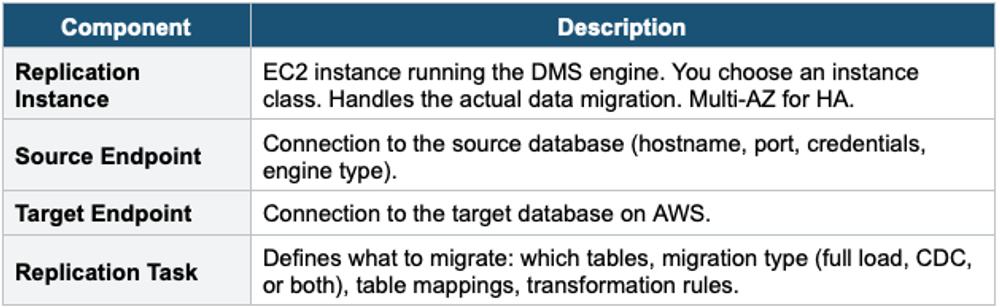
DMS Replication Instance:
  - EC2 instance (you choose size)
  - Runs migration tasks
  - Connects to source and target
  - Multi-AZ for HA
Key Components
3. Migration Types
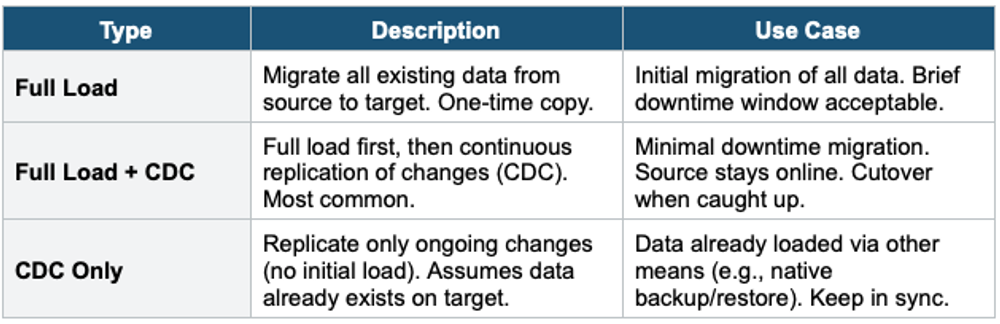
CDC (Change Data Capture) CDC captures ongoing changes (inserts, updates, deletes) from the source database and applies them to the target in near real-time. This keeps the target in sync while the source is still serving live traffic. When the target is caught up, you do a brief cutover (switch application to the target). Minimal downtime.
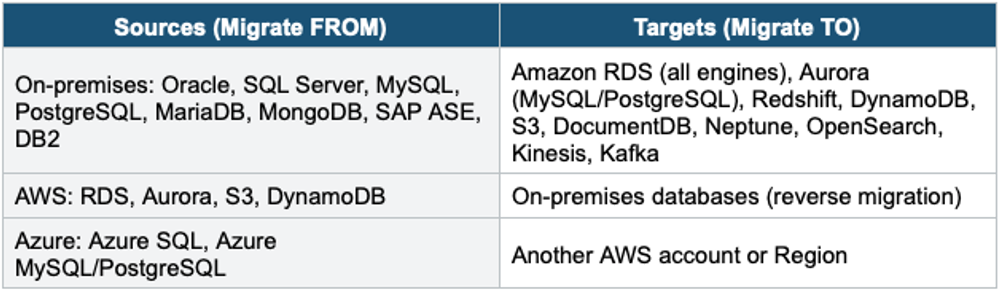
4. Supported Sources & Targets
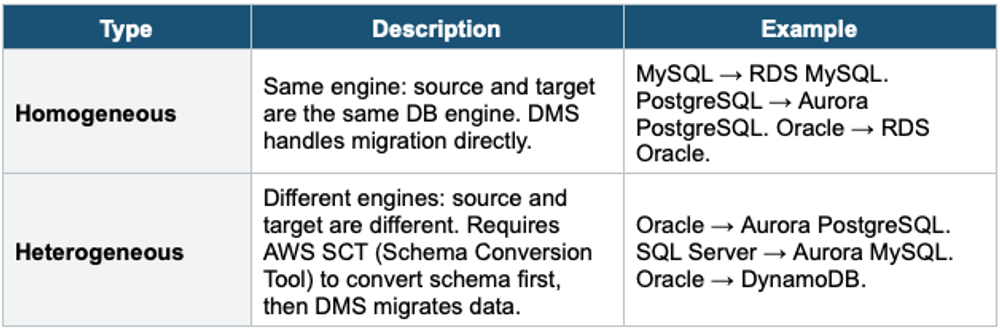
5. Homogeneous vs Heterogeneous Migration
6. AWS Schema Conversion Tool (SCT)
SCT converts database schema and code from one engine to another for heterogeneous migrations.
- Converts: table definitions, views, stored procedures, functions, triggers, and indexes
- Highlights code that cannot be automatically converted (requires manual intervention)
- Assessment Report: shows conversion complexity and manual effort required
- Supports: Oracle → PostgreSQL/MySQL, SQL Server → PostgreSQL/MySQL/Aurora, DB2, SAP ASE, etc.
- Also converts data warehouse schemas: Teradata/Oracle DW/Netezza → Redshift
- Free tool (desktop application)
Heterogeneous Migration Workflow:

1. SCT: Convert schema (Oracle → Aurora PostgreSQL)
   - Auto-converts tables, views, and indexes
   - Flags stored procedures needing manual rewrite
   - Generates Assessment Report

2. Apply the converted schema to the target Aurora PostgreSQL

3. DMS: Migrate data (Full Load + CDC)
   - Full load: bulk copy all data
   - CDC: replicate ongoing changes

4. Validate: verify data integrity

5. Cutover: switch application to Aurora PostgreSQL
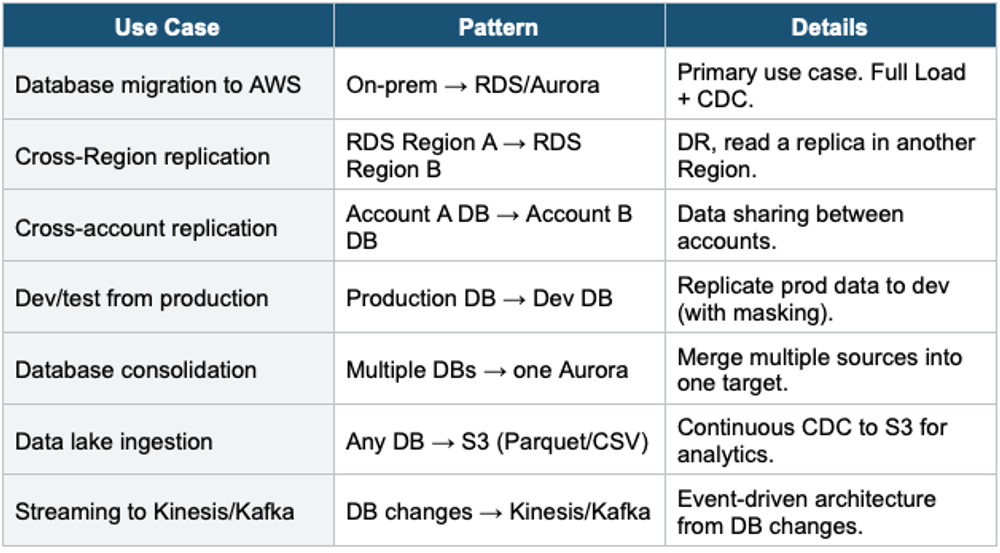
7. DMS Use Cases Beyond Migration
8. DMS + Snow Family (Large Migrations)
- For very large databases (10+ TB) where network bandwidth is insufficient:
- Step 1: Use SCT to extract data locally to a Snowball Edge device
- Step 2: Ship Snowball to AWS. Data loaded into S3.
- Step 3: Use DMS to load data from S3 into the target database
- Step 4: Use DMS CDC to replicate changes that occurred during shipping
Important Warning DMS does NOT convert schemas. SCT converts schema. DMS migrates data. For heterogeneous migrations, you need BOTH: SCT first (convert schema), then DMS (migrate data). For homogeneous migrations, DMS alone is sufficient (schema is compatible).
Exam Tip DMS: "Migrate database to AWS" = DMS. "Minimal downtime DB migration" = DMS (Full Load + CDC). "Convert Oracle schema to PostgreSQL" = SCT (then DMS for data). "Homogeneous" = same engine, DMS only. "Heterogeneous" = different engine, SCT + DMS. "DB to S3 for analytics" = DMS (target = S3). "Large DB + slow network" = SCT + Snowball + DMS CDC. Source stays online during migration.