1. What is Elastic Beanstalk?
AWS Elastic Beanstalk is a Platform as a Service (PaaS) that makes it easy to deploy and manage web applications and services. You upload your code, and Beanstalk automatically handles deployment, capacity provisioning, load balancing, auto scaling, and application health monitoring.
Core Concept Elastic Beanstalk is a developer-centric, managed service that uses familiar AWS resources (EC2, ALB, ASG, RDS) under the hood. You retain full control over the underlying resources, but Beanstalk handles the provisioning and configuration for you. It is free — you only pay for the underlying resources.
2. Key Characteristics
- Platform as a Service (PaaS) — upload code, Beanstalk does the rest
- Free service — you pay only for the underlying AWS resources (EC2, ALB, RDS, etc.)
- Full control — you can SSH into EC2 instances, modify configurations, and access all resources
- Supports multiple programming languages and platforms
- Automatically creates and manages: EC2 instances, ALB, Auto Scaling Group, Security Groups, CloudWatch alarms
- Built-in monitoring dashboard and health reporting
3. Supported Platforms
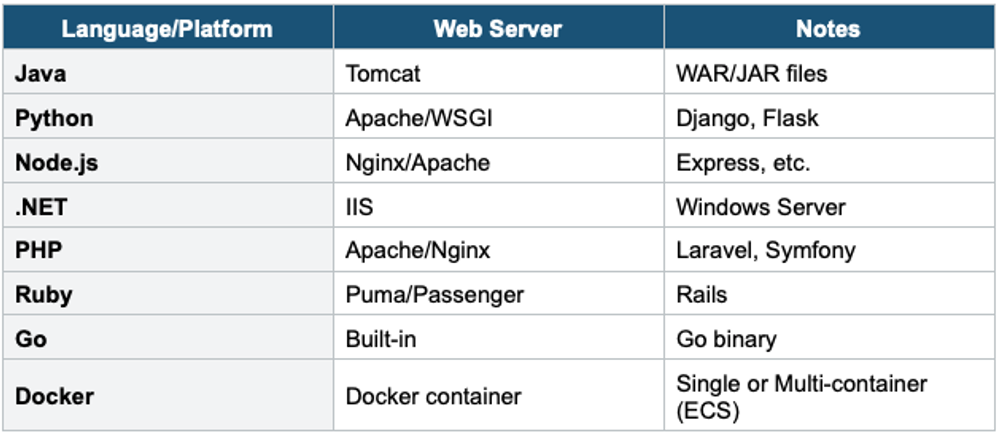
4. Beanstalk Architecture
Core Components
- Application: The top-level logical container. Contains environments, versions, and configurations.
- Application Version: A specific labeled iteration of your deployable code (stored in S3 as a ZIP).
- Environment: A running instance of your application. Contains the AWS resources (EC2, ALB, etc.).
- Environment Tier: Web Server tier (handles HTTP requests) or Worker tier (processes background tasks from SQS).
Environment Tiers
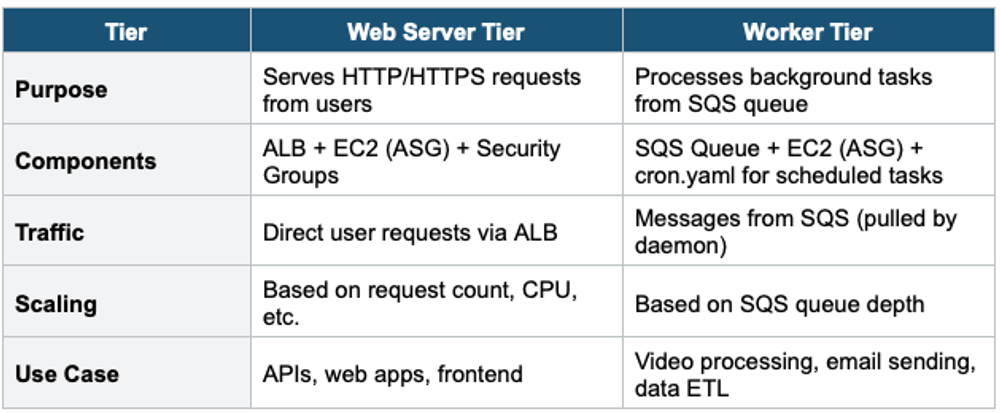
Common Architecture Pattern:

Users → ALB → Web Server Tier (processes request)
                    |
                    → Sends message to SQS
                          |
                    Worker Tier (picks up from SQS, processes in the background)
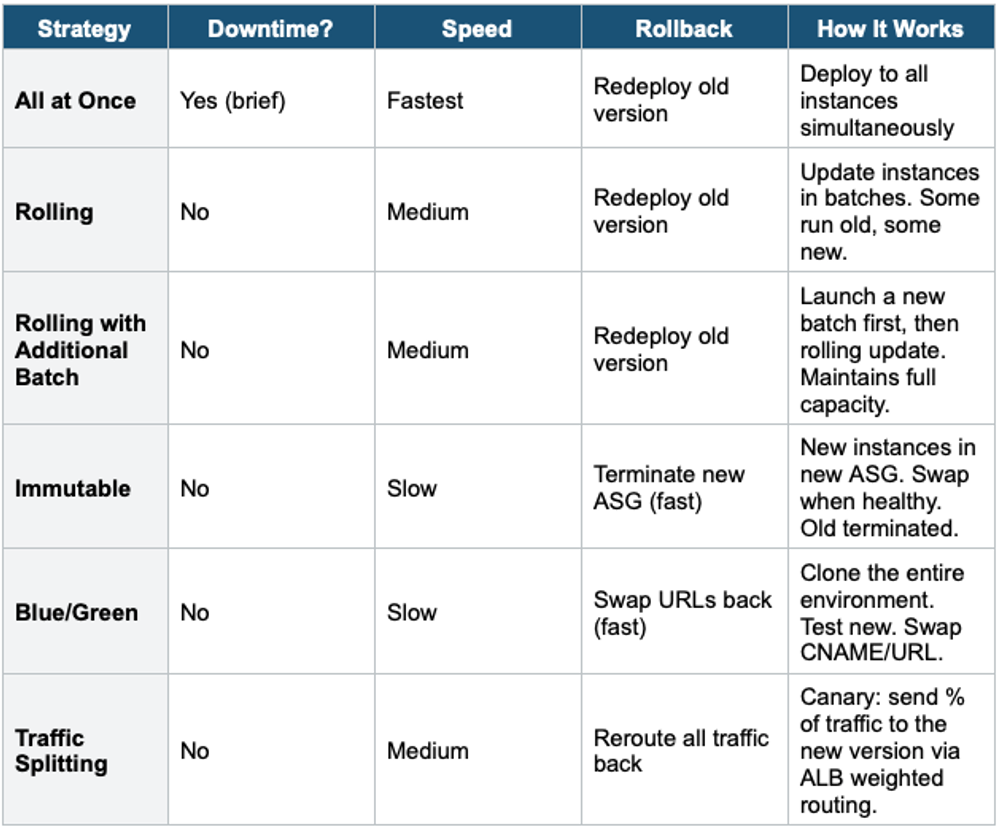
5. Deployment Strategies
6. Configuration & Customization
.ebextensions
- A folder in your application source called .ebextensions/
- Contains YAML or JSON config files (e.g., 01-custom.config)
- Used to: install packages, create files, run commands, configure environment variables, customize resources
- Executed during deployment
Environment Configuration
- Environment variables: set key-value pairs accessible by your application
- Instance type, key pair, IAM role, VPC, subnets, Security Groups
- Auto Scaling: min/max instances, scaling triggers
- Load Balancer type: ALB, NLB, or CLB
- Database: can optionally create an RDS instance (but better to create separately)
Important Warning If you create an RDS database inside a Beanstalk environment, it is tied to the environment lifecycle. When you terminate the environment, the database is deleted too. For production, ALWAYS create your RDS database outside Beanstalk and connect via environment variables.
7. Beanstalk Lifecycle Policy
- Beanstalk stores all application versions in S3
- Lifecycle policy removes old versions to stay within the 1,000 version limit
- Options: delete versions based on count (keep last N) or age (older than N days)
- Can choose to retain the source bundle in S3 even after removing the version
8. When to use
Key exam triggers:
- "PaaS"
- "Deploy web app quickly."
- "managed platform"
- "Don't want to manage infrastructure."
- "Upload code, and it just works."
- "developer-focused deployment"
Common scenarios:
- Deploy web apps (Java, .NET, Node.js, Python, Ruby, Go, PHP, Docker).
- Developers want to focus on code, not infrastructure.
- Need auto-scaling, load balancing, and monitoring out of the box.
- Quick prototyping or small-to-medium production apps.
Exam Tip Beanstalk questions: "Deploy web app quickly with minimal infrastructure knowledge" = Elastic Beanstalk. "PaaS on AWS" = Beanstalk. "Developer uploads code, AWS handles the rest" = Beanstalk. Beanstalk is FREE (you pay for underlying resources). "Background processing from SQS" = Worker Tier. "Zero downtime + fast rollback" = Immutable or Blue/Green. "Customize EC2 at deploy time" = .ebextensions. Never create RDS inside Beanstalk for production.