1. Overview
AWS has the largest and most comprehensive global cloud infrastructure. Understanding how AWS organizes its infrastructure is critical for the exam and for designing highly available, fault-tolerant architectures.
Core Concept
AWS Global Infrastructure is built around Regions, Availability Zones (AZs), and Edge Locations. Each serves a specific purpose in delivering reliable, low-latency cloud services worldwide.
2. Regions
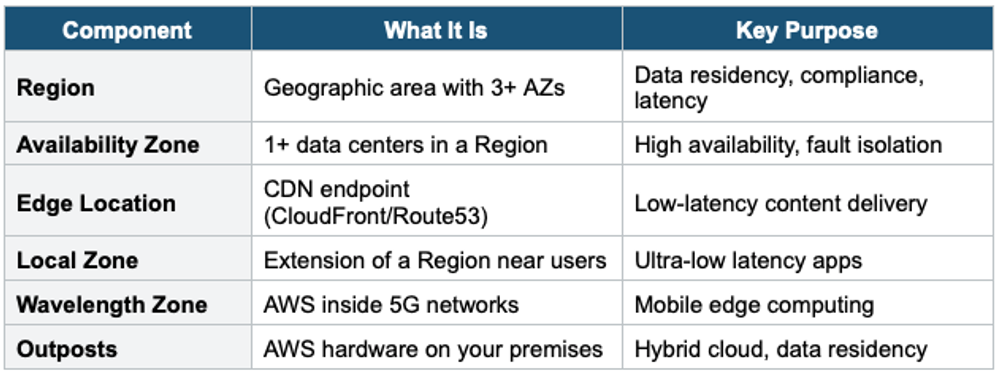
An AWS Region is a physical location in the world that contains multiple, isolated Availability Zones. Each Region is completely independent and isolated from other Regions.
Key Facts About Regions
- Each Region is a separate geographic area (e.g., us-east-1 = N. Virginia, eu-west-1 = Ireland)
- AWS has 30+ Regions globally (and growing)
- Data does NOT automatically replicate across Regions — you must explicitly configure cross-Region replication
- Each Region has at least 3 Availability Zones (most have 3, some have 6)
- Not all AWS services are available in every Region
How to Choose a Region
When selecting a Region, consider these four factors:
- 1. Compliance: Does your data need to stay in a specific country? Some regulations (GDPR, data sovereignty) require data to remain in certain locations.
- 2. Latency: Choose the Region closest to your end users for the lowest latency.
- 3. Service Availability: Not all services are available in every Region. Check if the services you need are offered.
4. Pricing: Pricing varies by Region. For example, us-east-1 is often the cheapest.
Exam Tip
The exam frequently asks: "What factors should you consider when choosing a Region?" Remember the 4 factors: Compliance, Latency, Service Availability, and Pricing.
3. Availability Zones (AZs)
An Availability Zone is one or more discrete data centers with redundant power, networking, and connectivity in an AWS Region.
Key Facts About AZs
- Each AZ is a physically separate facility within a Region
- AZs are connected via high-bandwidth, low-latency private fiber links
- AZs are designed to be isolated from failures in other AZs
- They are identified by a Region code followed by a letter (e.g., us-east-1a, us-east-1b, us-east-1c)
- AZ letter mapping is randomized per account — your us-east-1a may be a different physical data center than another account’s us-east-1a
Why AZs Matter
- Deploy across multiple AZs for high availability
- If one AZ goes down, your application continues running in other AZs
- Services like ELB and Auto Scaling can distribute traffic across AZs automatically
High Availability Pattern
Deploy your application across at least 2 AZs in a Region. Use Elastic Load Balancing to distribute traffic. If one AZ fails, the other AZ handles the load automatically.
4. Edge Locations & Regional Edge Caches
Edge Locations are AWS data centers designed to deliver content to end users with the lowest possible latency. They are separate from Regions and AZs.
Key Facts
- There are 400+ Edge Locations globally — far more than Regions
- Used primarily by Amazon CloudFront (CDN) and Route 53 (DNS)
- Also used by AWS WAF (Web Application Firewall) and AWS Shield
- Regional Edge Caches sit between CloudFront Edge Locations and origin servers for less popular content
5. AWS Local Zones & Wavelength Zones
Local Zones: Extensions of an AWS Region placed closer to large populations, industry, and IT centers. They let you run latency-sensitive applications closer to end users (e.g., real-time gaming, video streaming).
Wavelength Zones: AWS infrastructure embedded within telecom providers’ 5G networks. Enables ultra-low latency applications for mobile devices.
AWS Outposts: Fully managed AWS infrastructure delivered to your on-premises location. Runs AWS services locally for hybrid cloud use cases.
6. Global Infrastructure Summary Table