1. Overview
AWS IAM Identity Center (formerly AWS Single Sign-On / AWS SSO) is the recommended service for managing workforce access to multiple AWS accounts and business applications from one place.
Key Concept IAM Identity Center provides one login portal for accessing ALL your AWS accounts in an Organization, plus third-party applications (Salesforce, Slack, Microsoft 365, etc.). One login, one set of credentials, one place to manage.
2. Key Features
- Single sign-on access to multiple AWS accounts
- Single sign-on access to SAML 2.0-compatible business applications
- Centralized permission management across accounts
- Integration with AWS Organizations (required)
- Built-in identity store OR integration with external identity providers
- Free to use
3. Identity Sources
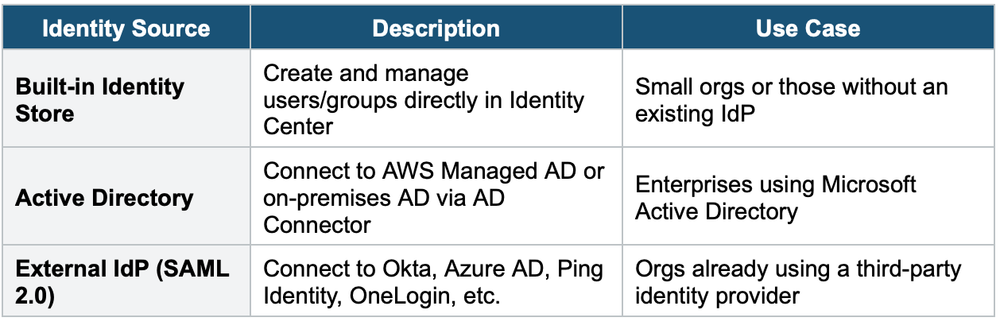
IAM Identity Center can use different identity sources for user authentication:
4. Permission Sets
Permission Sets define what users/groups can do in each AWS account. They are essentially collections of IAM policies that get assigned to users/groups for specific accounts.
- A Permission Set is created once and assigned to users/groups for specific accounts
- When assigned, Identity Center creates an IAM role in the target account
- Users assume this role automatically when accessing the account via the SSO portal
- Permission Sets can include AWS managed policies, customer-managed policies, and inline policies
- Maximum session duration is configurable (1–12 hours)
How It Works
- Step 1: Create a Permission Set (e.g., "ReadOnlyAccess" with the ReadOnlyAccess AWS managed policy)
- Step 2: Assign the Permission Set to a user/group for specific account(s)
- Step 3: User logs into the SSO portal, selects an account, and clicks the Permission Set
- Step 4: Identity Center assumes the corresponding IAM role in that account with temporary credentials
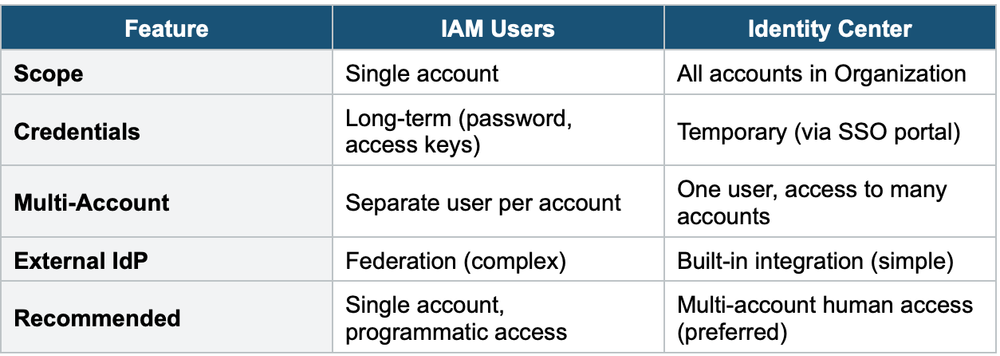
5. IAM Identity Center vs. IAM Users
6. When to use
Use IAM Identity Center when you need to centrally manage workforce access to multiple AWS accounts and business applications with single sign-on.
Key exam triggers:
- "SSO"
- "single sign-on"
- "centralized access across accounts"
- "workforce identity"
- "one login for multiple accounts"
- "SAML"
- "Active Directory integration"
Common scenarios:
- Employees log in once and access multiple AWS accounts.
- Centralize user management across an AWS Organization.
- Federate with corporate identity provider (Active Directory, Okta, Azure AD).
- Grant access to third-party SaaS apps (Salesforce, Slack, etc.) from one portal.
- Replace per-account IAM users with centralized SSO.
Exam Tip If the exam asks: "How should a company manage access across multiple AWS accounts for employees?" The answer is IAM Identity Center (not IAM users in each account). If the company uses Active Directory, the answer is IAM Identity Center with AD integration. Identity Center is ALWAYS the preferred answer for multi-account workforce access.