1. Lambda Execution Environment
When Lambda receives a request, it creates an execution environment (a lightweight container) to run your function. Understanding this lifecycle is critical for performance optimization.
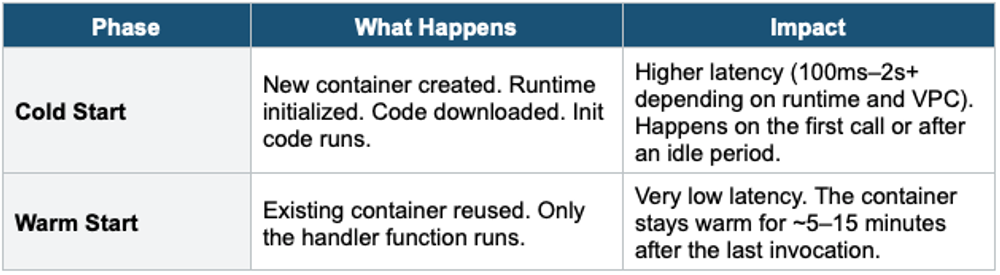
Cold Start vs Warm Start
Init Phase Optimization
- Code OUTSIDE the handler runs during Init (cold start) and is reused across warm invocations
- Put database connections, SDK clients, and config loading OUTSIDE the handler
- This is called "execution context reuse" — avoids reinitializing on every call
import boto3

# OUTSIDE handler = runs once during Init (reused on warm starts)
dynamodb_client = boto3.resource('dynamodb')
table = dynamodb_client.Table('MyTable')

def lambda_handler(event, context):
    # INSIDE handler = runs every invocation
    response = table.get_item(Key={'id': event['id']})
    return response['Item']
2. Provisioned Concurrency
- Pre-initializes a specified number of execution environments
- Eliminates cold starts entirely for those pre-warmed instances
- You pay for the provisioned concurrency whether used or not
- Can be combined with Application Auto Scaling to adjust based on schedule or utilization
- Use for: latency-sensitive APIs, predictable traffic patterns
3. Reserved Concurrency
- Limits the maximum concurrent executions for a specific function
- Guarantees that concurrency is always available for that function
- Other functions CANNOT use the reserved concurrency (it’s exclusive)
- Free — no additional cost
- Set to 0 = function is throttled (cannot run)
- Use for: protecting downstream resources, limiting function execution rate
Reserved vs Provisioned Concurrency
Reserved = limits max concurrency AND guarantees availability. Does NOT eliminate cold starts. Free. Provisioned = pre-warms execution environments. Eliminates cold starts. Costs money. You can use both together: reserve 100 concurrent, provision 20 of those to be always warm.
4. Lambda in VPC
By default, Lambda runs in an AWS-managed VPC with internet access. If you need Lambda to access private resources (RDS, ElastiCache, private EC2), you can configure it to run inside your VPC.
Lambda in VPC Configuration
- Specify VPC, subnets (at least 2 for HA), and Security Groups
- Lambda creates an ENI (Elastic Network Interface) in each subnet
- The Lambda function gets a private IP from your VPC
Internet Access from VPC Lambda
- Lambda in a VPC does NOT have internet access by default
- To access the internet: place Lambda in a private subnet + NAT Gateway in a public subnet
- To access AWS services without internet: use VPC Endpoints (Gateway or Interface)
Important Warning
Lambda in a VPC loses internet access by default. If your function needs to call external APIs or public AWS endpoints, you MUST configure a NAT Gateway (costs money) or VPC Endpoints. This is a very common exam question.
5. Lambda Layers
- A Layer is a ZIP archive containing libraries, custom runtimes, or dependencies
- Layers are extracted to /opt during execution
- A function can use up to 5 layers
- Total unzipped size (function + all layers) must be under 250 MB
- Layers are versioned and can be shared across functions and accounts
- Use for: shared code, common libraries (numpy, pandas), custom runtimes
6. Lambda Versions & Aliases
Versions
- Each published version is immutable (code + configuration frozen)
- $LATEST is the mutable, unpublished working version
- Versions are numbered: 1, 2, 3, etc.
- Each version has its own ARN: arn:aws:lambda:us-east-1:123456789:function:myFunc:3
Aliases
- A named pointer to a specific Lambda version (like a DNS CNAME)
- Common aliases: dev, staging, prod
- Aliases support weighted routing for canary deployments (e.g., 90% to v1, 10% to v2)
- API Gateway can reference an alias instead of a specific version
Alias Routing Example (Canary Deployment):

Alias: "prod"
  ├── 90% traffic → Version 3 (stable)
  └── 10% traffic → Version 4 (new release)

After validation, shift to 100% Version 4
7. Lambda Destinations
- For asynchronous invocations, send the result (success or failure) to a destination
- Destinations: SQS, SNS, Lambda, EventBridge
- Replaces the older Dead Letter Queue (DLQ) pattern (but DLQ still works)
- Destinations can capture both success AND failure; DLQ only captures failures
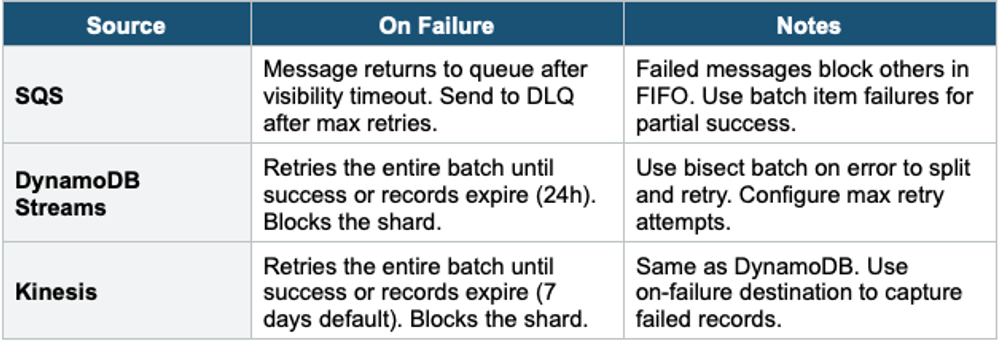
8. Lambda Event Source Mapping (Poll-Based)
For services like SQS, DynamoDB Streams, and Kinesis, Lambda uses an Event Source Mapping (ESM) to poll the source and invoke your function.
Key Behaviors
- Lambda polls the source and receives records in batches
- Batch size is configurable (e.g., 1–10,000 for SQS, 1–10,000 for Kinesis)
- Batch window: wait up to N seconds to collect a full batch before invoking
Error Handling by Source
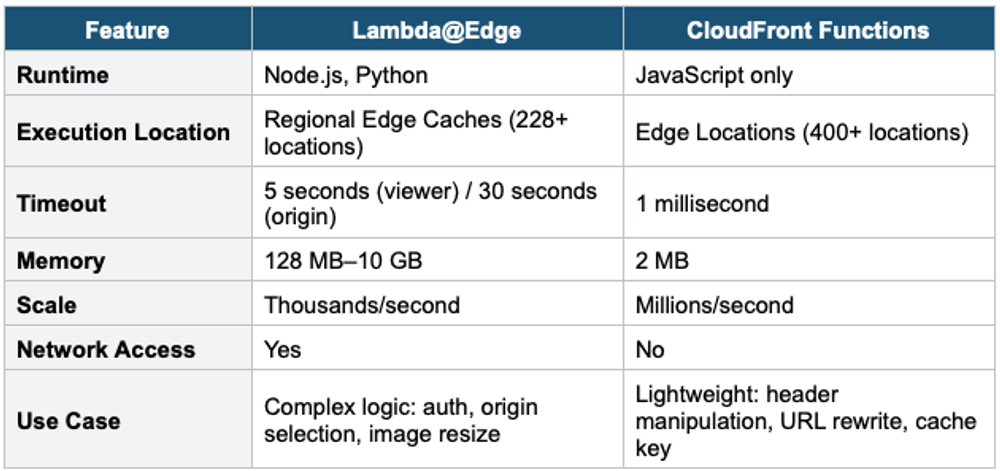
9. Lambda@Edge & CloudFront Functions
10. Lambda with EFS
- Lambda can mount an EFS file system for persistent, shared storage
- Lambda must be in a VPC to use EFS
- Useful for: large ML models, shared data between functions, processing large files
- EFS provides virtually unlimited storage (vs 10 GB /tmp)
Exam Tip Lambda Advanced: Cold start fix = Provisioned Concurrency ($). Reserved Concurrency = free, limits max. VPC Lambda = no internet by default (needs NAT Gateway). Layers = shared libraries (5 max). Versions = immutable. Aliases = pointer + weighted routing (canary). Lambda@Edge = CloudFront + complex logic. CloudFront Functions = lightweight, millions rps. "Lambda needs to access RDS" = Lambda in VPC + NAT Gateway or VPC Endpoint.