1. Overview
AWS provides three main ways to interact with AWS services. All three are built on the same underlying AWS API. Understanding when to use each is important.
2. AWS Management Console
The Console is a web-based graphical user interface (GUI) for managing AWS resources.
Key Features
- Browser-based — no installation required
- Visual, point-and-click interface
- Good for learning, exploring services, and quick tasks
- Supports multi-factor authentication (MFA)
- Includes a search bar to find services quickly
- Mobile app available for monitoring resources on the go
When to Use
- Learning and experimenting with new AWS services
- Quick one-time configurations
- Monitoring dashboards and alarms
- NOT recommended for repetitive tasks or automation
3. AWS Command Line Interface (CLI)
The AWS CLI is a unified tool to manage AWS services from the command line (terminal/shell).
Key Features
- Open-source tool that runs on Windows, Mac, and Linux
- Direct access to the AWS API from the terminal
- Can be scripted and automated (bash scripts, cron jobs)
- Supports all AWS services
- Uses access keys (Access Key ID + Secret Access Key) for authentication
Common CLI Commands
- aws configure — Set up credentials and default Region
- aws s3 ls — List S3 buckets
- aws ec2 describe-instances — List EC2 instances
- aws iam list-users — List IAM users
When to Use
- Automating repetitive tasks
- Scripting infrastructure management
- Quick resource management from your terminal
- CI/CD pipelines
4. AWS Software Development Kits (SDKs)
AWS SDKs let you access and manage AWS services programmatically from your application code.
Supported Languages
- Python (Boto3), JavaScript/Node.js, Java, .NET/C#, Go, Ruby, PHP, C++, and more
Key Features
- Embed AWS functionality directly into your applications
- Handles authentication, retries, and error handling automatically
- Used for building applications that interact with AWS services
- Same API calls as Console and CLI, but from code
When to Use
- Building applications that need AWS services (e.g., uploading to S3 from a web app)
- Custom automation and orchestration
- Serverless functions (Lambda uses SDK internally)
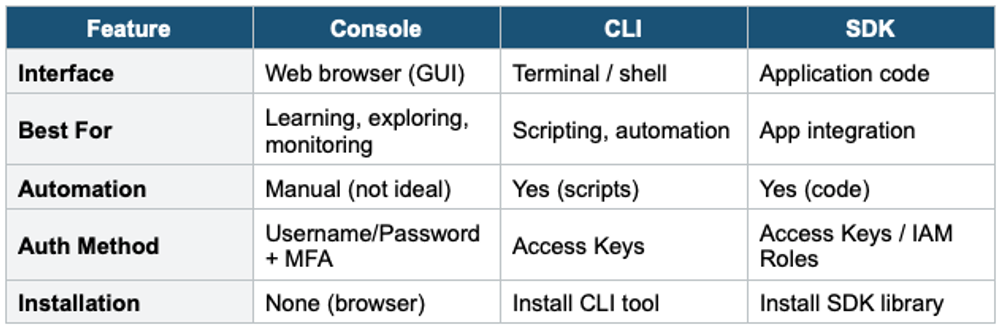
5. Comparison Table
6. Other Management Tools
AWS CloudShell: A browser-based shell in the AWS Console. Pre-configured with AWS CLI, Python, Node.js. No setup needed — opens directly from the Console.
AWS CloudFormation: Infrastructure as Code (IaC) service. Define your infrastructure in JSON or YAML templates and deploy them as stacks. Enables repeatable, version-controlled deployments.
AWS CDK (Cloud Development Kit): Define cloud infrastructure using familiar programming languages (TypeScript, Python, Java). Compiles to CloudFormation templates under the hood.
Exam Tip
All three tools (Console, CLI, SDK) use the same underlying AWS API. The exam may ask: "Which is the BEST way to automate resource management?" Answer: CLI for scripting, SDK for application integration. The Console is never the right answer for automation. CloudShell is a popular exam question — know that it’s a pre-configured CLI in the browser.