1. What is AWS Organizations?
AWS Organizations is a service that lets you consolidate multiple AWS accounts into a single organization. It provides centralized billing, account management, and policy-based governance.
2. Key Concepts
- Management Account (formerly Master): The account that creates the organization. Pays all bills. Has full control. Cannot be restricted by SCPs. There is exactly one per organization.
- Member Accounts: All other accounts in the organization. Can be created from the management account or invited from existing accounts. CAN be restricted by SCPs.
- Organizational Unit (OU): A logical container for accounts. OUs can be nested (OU inside OU). You apply SCPs to OUs to govern all accounts within them.
- Root: The top-level container in the organization hierarchy. Contains all OUs and accounts. Not the same as the root user.
3. Organization Hierarchy Example
Root
├── Management Account (pays all bills)
├── OU: Production
│   ├── Account: Prod-App-1
│   └── Account: Prod-App-2
├── OU: Development
│   ├── Account: Dev-Team-A
│   └── Account: Dev-Team-B
├── OU: Security
│   └── Account: Security-Audit
└── OU: Sandbox
    └── Account: Sandbox-Testing
4. Key Features of Organizations
Consolidated Billing
- Single payment method for all accounts in the organization
- Aggregated usage across accounts for volume pricing discounts
- Reserved Instance sharing across accounts within the organization
- One bill, one payment, easier financial management
Account Management
- Create new AWS accounts programmatically via API
- Invite existing accounts to join the organization
- Move accounts between OUs
- Remove accounts from the organization
5. Service Control Policies (SCPs)
SCPs are IAM-like policies that you attach to the Root, OUs, or individual accounts in your organization. They define the MAXIMUM permissions for the affected accounts.
Important Warning SCPs do NOT grant any permissions. They only restrict. An SCP sets the guardrails (ceiling) for what identity-based policies in the account can allow. To actually grant access, you still need IAM policies.
SCP Key Rules
- SCPs affect all users and roles in member accounts, including the account root user
- SCPs do NOT affect the management account — the management account always has full access
- SCPs do NOT affect service-linked roles
- SCPs must have an explicit Allow for actions to be permitted (implicit deny otherwise)
- SCP Deny overrides any IAM Allow in the member account
- SCPs are inherited — an SCP on a parent OU applies to all child OUs and accounts
SCP Strategies
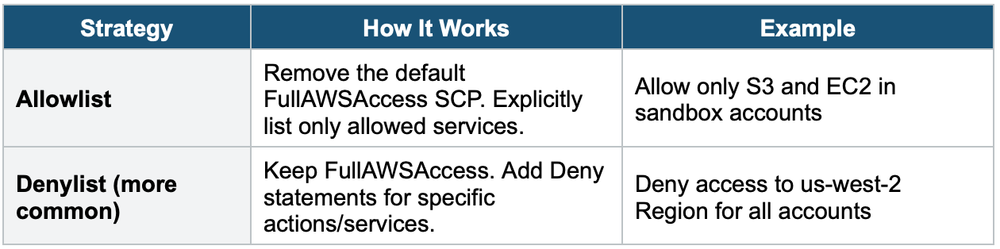
SCP Example: Deny Region Access
{
  "Version": "2012-10-17",
  "Statement": [
    {
      "Sid": "DenyNonApprovedRegions",
      "Effect": "Deny",
      "Action": "*",
      "Resource": "*",
      "Condition": {
        "StringNotEquals": {
          "aws:RequestedRegion": [
            "us-east-1",
            "eu-west-1"
          ]
        }
      }
    }
  ]
}
This SCP denies all actions in any Region except us-east-1 and eu-west-1. Applied to an OU, it prevents all member accounts from using other Regions.
SCP Example: Prevent Leaving the Organization
{
  "Version": "2012-10-17",
  "Statement": [
    {
      "Effect": "Deny",
      "Action": "organizations:LeaveOrganization",
      "Resource": "*"
    }
  ]
}
6. Organizations + IAM Policy Evaluation
When an account is in an organization with SCPs:
- The SCP must allow the action (or not deny it)
- AND the IAM identity policy must also allow the action
- Effective permissions = SCP ∩ IAM Policy (intersection)
- SCP Deny overrides everything in the member account
Exam Tip Key exam patterns: 1) SCP does NOT affect the management account. 2) SCP does NOT grant permissions, only restricts. 3) SCP affects the root user of member accounts. 4) Consolidated billing = volume discounts + RI sharing. 5) Denylist strategy is more common than Allowlist. 6) SCPs are inherited from parent OUs.