1. Overview
The AWS Snow Family is a collection of physical devices for transferring large amounts of data into and out of AWS, or running compute in edge locations where there is limited or no network connectivity.
When to Use Snow Use the Snow Family when network transfer is too slow, too expensive, or impossible. Rule of thumb: if transferring data over the network would take more than 1 week, consider a Snow device. Example: transferring 100 TB over a 1 Gbps line takes ~12 days. A Snowball takes 1 week (including shipping).
2. Snow Devices Comparison
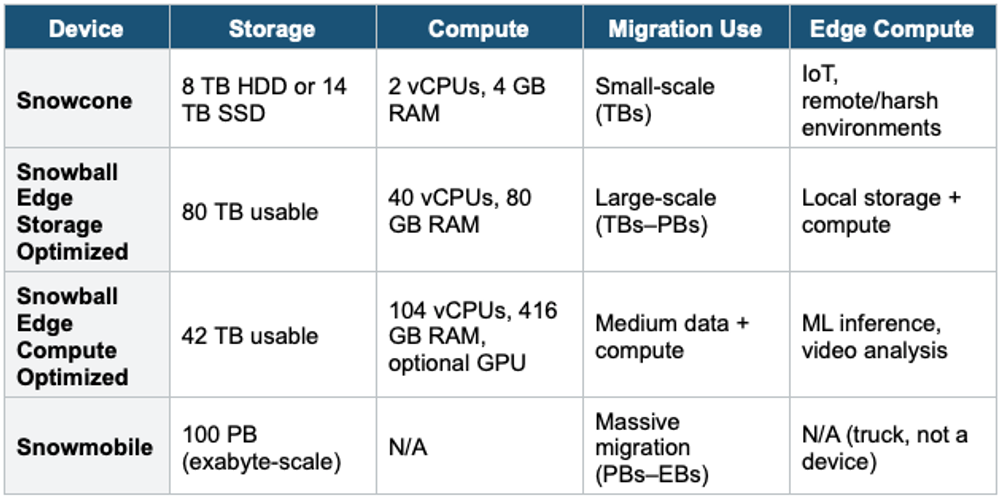
3. Snow Family Process
Data Migration Process:

1. Request device from AWS Console
2. AWS ships the device to you
3. Install Snowball Client or AWS OpsHub (GUI)
4. Copy data to the device
5. Ship the device back to AWS
6. AWS imports data into S3
7. Device is securely wiped (NIST 800-88)
4. Edge Computing Use Cases
- Process data locally before sending to AWS (pre-processing, filtering)
- Run EC2 instances and Lambda functions on Snow devices
- Operate in disconnected environments: ships, mines, factories, military
- IoT data collection in remote locations
- ML inference at the edge (Snowball Edge Compute with GPU)
5. AWS OpsHub
- Graphical management tool (GUI) for Snow Family devices
- Install on your computer to manage Snow devices locally
- Transfer files, launch EC2 instances, and monitor device status
- Replaces the old CLI-only Snowball Client
6. Snowball into Glacier
- You CANNOT import data directly from Snowball into Glacier
- Snowball imports into S3 first, then uses an S3 Lifecycle rule to transition to Glacier
7. When to use
Use Snow Family when you need to move large amounts of data to/from AWS physically or run compute at edge locations with no/limited connectivity.
Common scenarios:
- Large data migration — Moving terabytes or petabytes to AWS when network transfer would take too long (weeks/months).
- Edge computing — Run EC2 instances or Lambda functions in remote locations (factories, ships, military bases).
- Disaster recovery — Physically ship backups to AWS when bandwidth is limited.
- Data collection in harsh environments — Collect and process data where there's no internet (e.g., mining sites, ocean vessels).
- Datacenter decommission — Migrate entire datacenters to AWS using multiple Snow devices.
Exam Tip Snow Family: "Transfer 50 TB, limited bandwidth" = Snowball Edge. "Transfer 10 PB" = multiple Snowballs or Snowmobiles. "Edge compute with GPU" = Snowball Edge Compute Optimized. "Tiny device, harsh environment" = Snowcone. "Cannot go directly to Glacier" = import to S3 first, then lifecycle. "Manage Snow devices" = AWS OpsHub.