1. Overview
AWS Storage Gateway is a hybrid cloud storage service that connects your on-premises environment to AWS cloud storage. It provides a local cache for low-latency access while seamlessly integrating with S3, EBS, and Glacier.
Core Concept Storage Gateway bridges on-premises storage and AWS. Your applications access the gateway using standard storage protocols (NFS, SMB, iSCSI), and the gateway transfers data to AWS in the background. It solves: backup to cloud, tiered storage, DR, and migration.
2. Gateway Types
S3 File Gateway
- Presents S3 buckets as NFS or SMB file shares to on-premises applications
- Files are stored as objects in S3 (1:1 mapping)
- Local cache on the gateway for recently accessed files (low-latency reads)
- Supports S3 Standard, Standard-IA, One Zone-IA, Intelligent-Tiering
- Lifecycle rules on S3 can transition data to Glacier
- Integrated with Active Directory for SMB authentication
Use for: On-premises applications that need to store/access files in S3 using standard file protocols.
FSx File Gateway
- Provides on-premises access to Amazon FSx for Windows File Server
- Local cache for frequently accessed data
- SMB protocol, Active Directory integration
- Useful when you need a Windows file share backed by FSx but accessed from on-premises
Volume Gateway
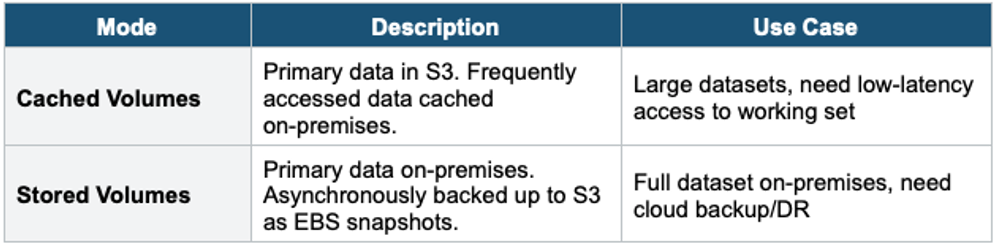
- Presents iSCSI block storage volumes to on-premises applications
- Volumes are backed by S3 as EBS snapshots
Tape Gateway
- Presents a virtual tape library (VTL) interface to backup applications
- Backup software writes to virtual tapes via iSCSI
- Virtual tapes are stored in S3. Archived tapes go to S3 Glacier or Deep Archive.
- Compatible with: Veeam, Veritas NetBackup, Commvault, etc.
Use for: Replacing physical tape libraries with cloud-backed virtual tapes. Tape backup to AWS.
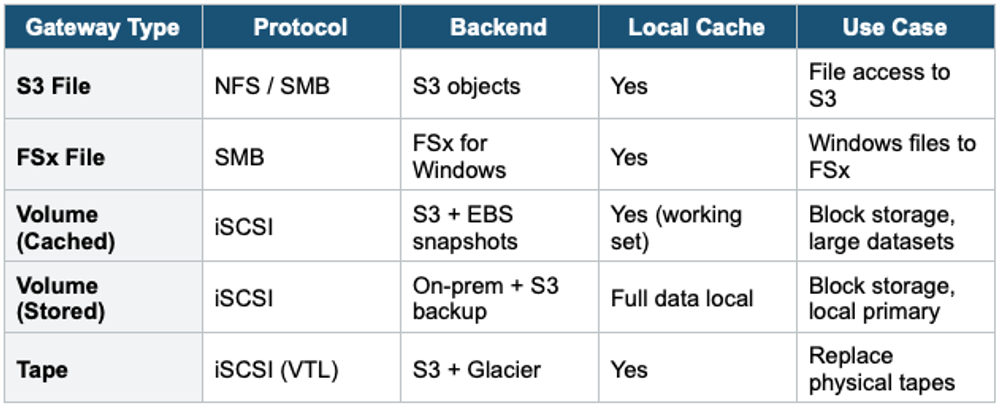
3. Storage Gateway Summary
4. When to use
Use Storage Gateway when you need to connect on-premises environments to AWS cloud storage seamlessly using standard storage protocols.
Common scenarios:
- Hybrid cloud storage — Extend on-premises storage to AWS without changing existing workflows.
- Cloud backup — Back up on-premises data to S3, S3 Glacier, or EBS.
- Disaster recovery — Keep cloud-based copies of on-premises data.
- Migrate data gradually — Move data to AWS over time without a full cutover.
- Low-latency local access — Cache frequently used data on-premises while storing the full dataset in AWS.
- Tape replacement — Replace physical tape infrastructure with virtual tapes in AWS.
Exam Tip Storage Gateway: "On-premises NFS/SMB access to S3" = S3 File Gateway. "On-premises Windows SMB + FSx" = FSx File Gateway. "On-premises iSCSI block storage backed by S3" = Volume Gateway. "Replace tape backups" = Tape Gateway. "Cached vs Stored": Cached = primary in cloud; Stored = primary on-premises.