1. Overview
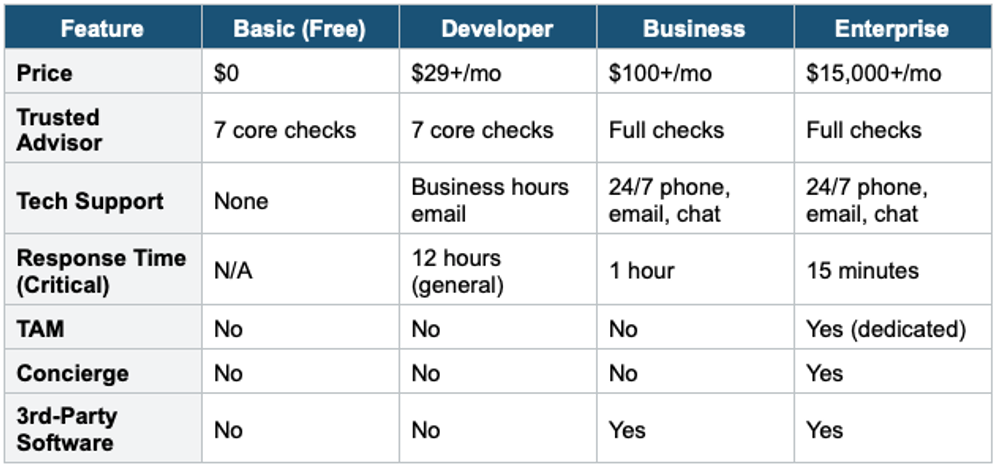
AWS offers multiple support plans to meet different needs and budgets. Understanding the differences between each plan is essential for the exam.
2. Support Plans Comparison
3. Enterprise On-Ramp Plan
AWS also offers an Enterprise On-Ramp plan, which sits between Business and Enterprise:
- Starting at $5,500/month
- Critical system response time: 30 minutes
- Pool of Technical Account Managers (not a dedicated TAM)
- Concierge support team for billing
- Full Trusted Advisor checks
4. Key Terms to Know
TAM (Technical Account Manager): A designated technical point of contact who provides proactive guidance and advocacy. Only available in Enterprise and Enterprise On-Ramp plans.
Concierge Support Team: Billing and account experts who help with account and billing best practices. Only in Enterprise and Enterprise On-Ramp plans.
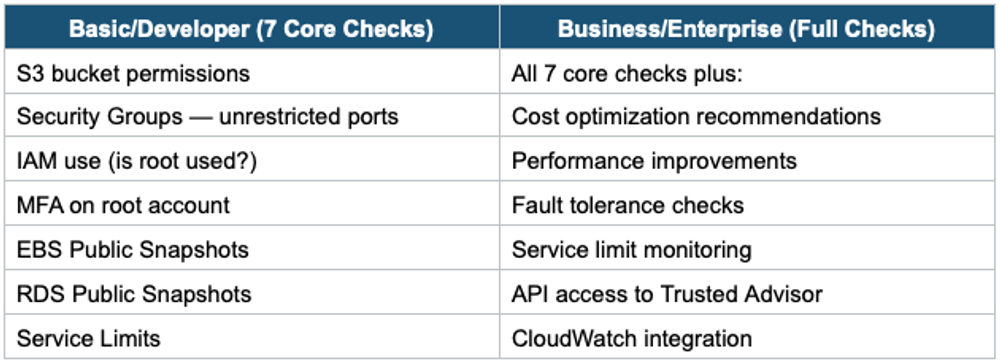
AWS Trusted Advisor: An automated tool that provides real-time guidance to help you provision resources following AWS best practices across 5 categories: Cost Optimization, Performance, Security, Fault Tolerance, and Service Limits.
AWS Health Dashboard: Provides alerts and remediation guidance when AWS is experiencing events that may impact you. Available to all customers (Personal Health Dashboard) and all plans (Service Health Dashboard).
5. Trusted Advisor — Basic vs. Full
6. When to use
Use this to choose the right level of AWS technical support and response times based on your organization's needs.
Key exam triggers:
- "24/7 support"
- "response time"
- "Technical Account Manager (TAM)"
- "Concierge"
- "Trusted Advisor full checks"
- "support plan comparison"
Exam Tip The exam has questions about support plans. Remember: TAM = Enterprise only. 24/7 support = Business and above. Full Trusted Advisor = Business and above. 15-minute response for critical issues = Enterprise only. If a question asks about a "designated" or "dedicated" TAM, the answer is Enterprise