1. AWS Network Security Layers
AWS provides multiple layers of network security. Each operates at a different level and addresses different threats. Understanding which service handles which type of attack is critical for the exam.
AWS Network Security Stack:

Layer 7 (Application): AWS WAF ─ SQL injection, XSS, rate limiting, bots
Layer 3/4 (Network):   AWS Shield ─ DDoS protection (SYN floods, UDP reflection)
VPC Level:             AWS Network Firewall ─ deep packet inspection, IDS/IPS
Subnet Level:          Network ACLs ─ stateless Allow/Deny rules
Instance Level:        Security Groups ─ stateful Allow rules
Org-Wide Management:   AWS Firewall Manager ─ centralize all of the above
2. AWS WAF (Web Application Firewall)
What is AWS WAF?
AWS WAF is a web application firewall that lets you monitor and control HTTP/HTTPS requests forwarded to your applications. It protects against common web exploits at the application layer (Layer 7).
Core Concept WAF operates at Layer 7 (HTTP/HTTPS). It inspects web request content: headers, body, URI, query strings, IP address, country, request rate. It can ALLOW, BLOCK, or COUNT requests matching your rules. Deployed ON TOP of: CloudFront, ALB, API Gateway, AppSync, or Cognito User Pools.
WAF Deployable Resources
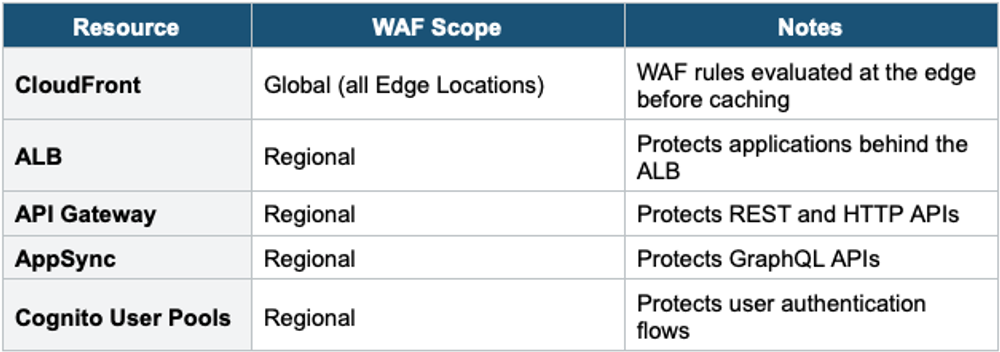
Important Warning WAF does NOT work with NLB (Layer 4), EC2 directly, or Global Accelerator. If you need WAF with NLB, place an ALB behind the NLB and attach WAF to the ALB. WAF is Layer 7 only — it needs HTTP/HTTPS traffic to inspect.
WAF Components
- Web ACL (Access Control List): The main container for WAF rules. Associate a Web ACL with a resource (ALB, CloudFront, etc.). One Web ACL per resource. Contains rules and rule groups.
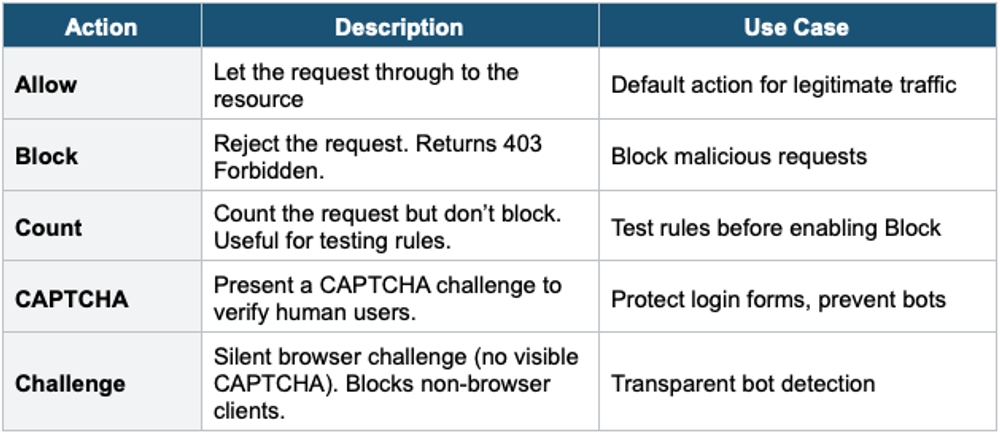
- Rules: Define what to inspect and what action to take. Each rule has a statement (condition) and an action (Allow, Block, Count, CAPTCHA, Challenge).
- Rule Groups: Reusable collections of rules. AWS Managed Rule Groups (pre-built by AWS) or your own custom rule groups. Can also use third-party Marketplace rule groups.
- Rule Priority: Rules in a Web ACL are evaluated in order of priority (lowest number first). First matching rule’s action is applied.
WAF Rule Types
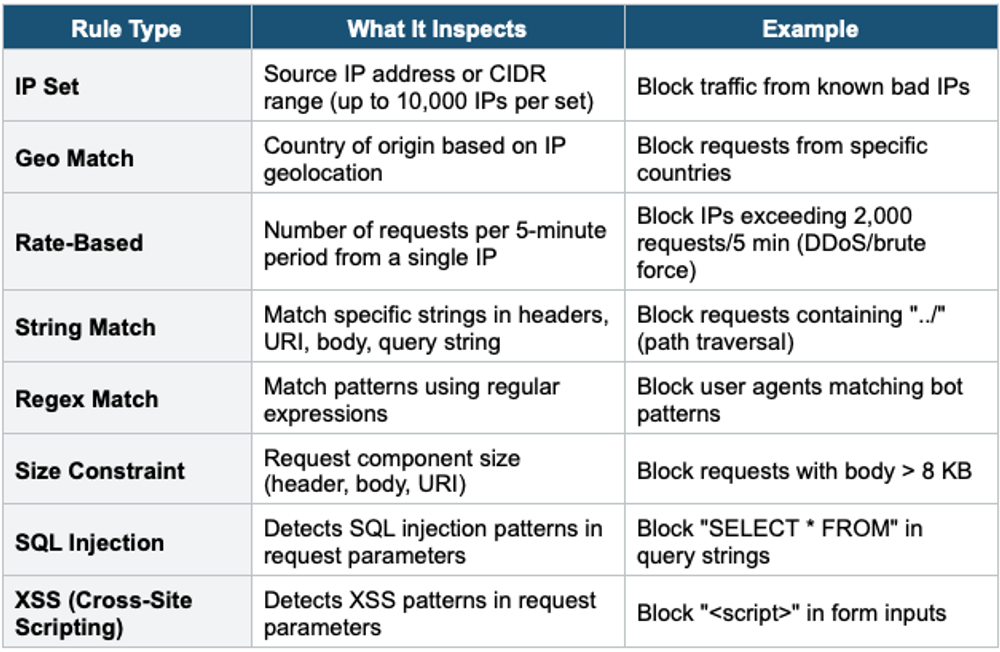
AWS Managed Rule Groups
- Pre-built rule collections maintained by AWS. Updated automatically.
- Core Rule Set (CRS): broad protection against OWASP Top 10 vulnerabilities
- Known Bad Inputs: blocks request patterns known to be malicious
- SQL Injection: detects SQLi patterns
- Bot Control: identifies and manages bot traffic (good bots vs bad bots)
- Account Takeover Prevention (ATP): protects login pages from credential stuffing
- Account Creation Fraud Prevention (ACFP): stops fake account creation
- Amazon IP Reputation List: blocks IPs with poor reputation
- Anonymous IP List: blocks VPNs, proxies, Tor exit nodes
WAF Actions
3. AWS Shield
What is AWS Shield?
AWS Shield is a managed DDoS (Distributed Denial of Service) protection service. It protects applications running on AWS against network-level and transport-level (Layer 3/4) DDoS attacks.
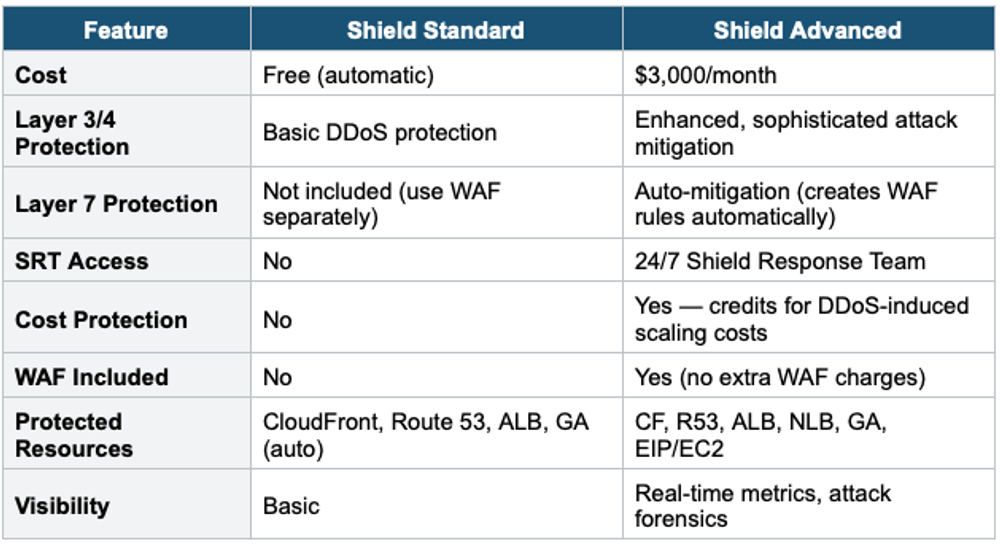
Shield Standard
- Free, automatically enabled for ALL AWS accounts
- Protects against common Layer 3/4 DDoS attacks: SYN/UDP floods, reflection attacks
- Applied to: CloudFront, Route 53, ALB, Global Accelerator (automatically)
- No configuration needed. Always on.
Shield Advanced
- $3,000/month per organization (1-year commitment). Expensive but comprehensive.
- Enhanced protection against larger, more sophisticated DDoS attacks
- Available on: CloudFront, Route 53, ALB, NLB, Global Accelerator, Elastic IP/EC2
- 24/7 access to AWS Shield Response Team (SRT) for incident response
- DDoS cost protection: AWS credits you for scaling costs incurred during a DDoS attack
- Real-time attack visibility and detailed diagnostics via CloudWatch metrics
- Automatic application-layer (Layer 7) DDoS mitigation — auto-creates WAF rules during attacks
- WAF is included at no extra charge when using Shield Advanced
4. AWS Firewall Manager
What is a Firewall Manager?
AWS Firewall Manager is a security management service that allows you to centrally configure and manage firewall rules across multiple AWS accounts and resources in your AWS Organization.
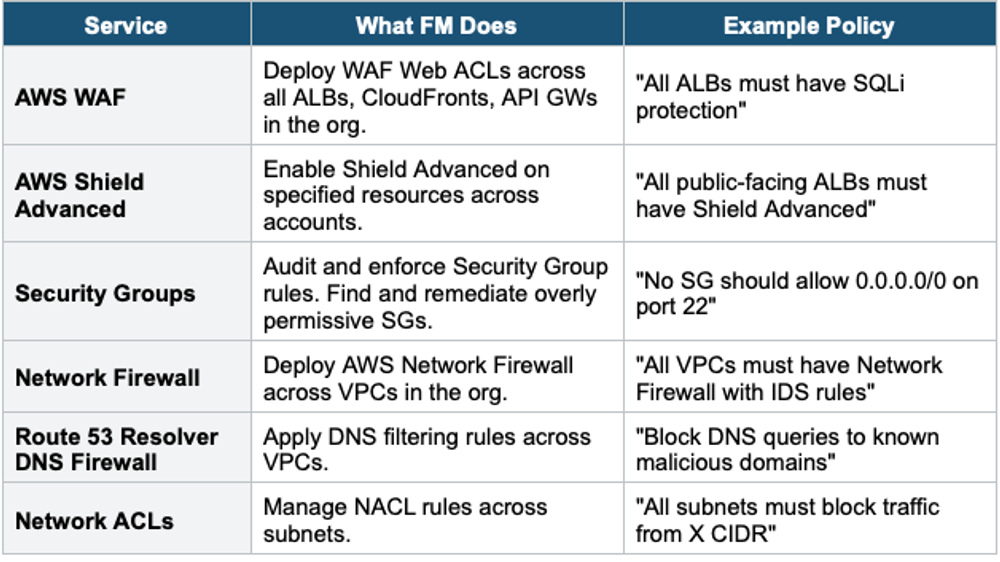
Core Concept Firewall Manager = centralized security policy management for an entire AWS Organization. Instead of configuring WAF, Shield, Security Groups, NACLs, and Network Firewall individually in each account, you create policies in Firewall Manager that automatically apply to all current and future accounts/resources.
What Firewall Manager Manages
Firewall Manager Prerequisites
- AWS Organizations must be enabled (FM works at the organization level)
- The management account must designate a Firewall Manager administrator account
- AWS Config must be enabled in all accounts (FM uses Config for compliance monitoring)
Firewall Manager Key Benefits
- Automatic protection: new accounts/resources automatically get the security policies
- Compliance: ensure all accounts follow the same security baseline
- Single pane of glass: view compliance status across all accounts
- Remediation: auto-remediate non-compliant resources
Exam Tip WAF/Shield/FM: "Protect against SQL injection" = WAF. "DDoS protection (free)" = Shield Standard. "DDoS + SRT + cost protection" = Shield Advanced ($3,000/mo). "Centralize WAF/Shield/SG across organization" = Firewall Manager. WAF deploys on: CloudFront, ALB, API GW, AppSync, Cognito. WAF does NOT work on NLB or EC2 directly. Shield Standard is free and automatic. FM requires Organizations + AWS Config.