1. Bedrock Knowledge Bases (RAG)
Knowledge Bases enable Retrieval-Augmented Generation (RAG) on Bedrock. Your documents are indexed and used as context when the model generates responses, ensuring answers are grounded in YOUR data.
How RAG Works 1) You upload documents to S3. 2) Knowledge bases chunk documents, generate embeddings (vector representations), and store them in a vector database. 3) At query time, the user’s question is converted to an embedding and used to find the most relevant document chunks. 4) Those chunks are injected into the prompt as context. 5) The FM generates an answer grounded in your documents. Result: accurate, up-to-date answers from YOUR data, with source citations.
Knowledge Base Architecture
Bedrock Knowledge Base (RAG) Architecture:

SETUP (one-time):
  Your Documents (S3)
       |
  Knowledge Base ingestion job
    • Chunk documents (split into passages)
    • Generate embeddings (Titan Embeddings or Cohere Embed)
    • Store in Vector Database
       |
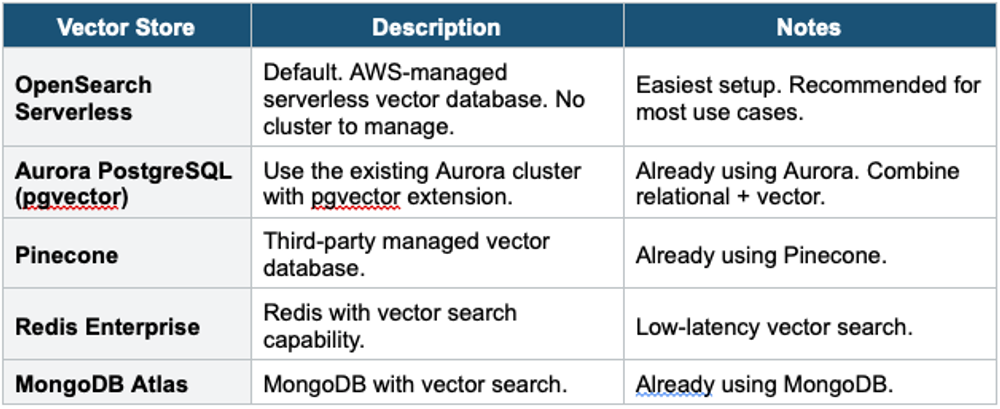
  Vector Store:
    • Amazon OpenSearch Serverless (default)
    • Amazon Aurora PostgreSQL (pgvector)
    • Pinecone, Redis Enterprise, MongoDB Atlas

QUERY (per request):
  User Question: "What is our return policy?"
       |
  1. Convert the question to an embedding
  2. Search the vector store for similar chunks
  3. Retrieve top-K relevant document passages
  4. Inject passages into the FM prompt as context
  5. FM generates an answer grounded in documents
  6. Return answer + source citations
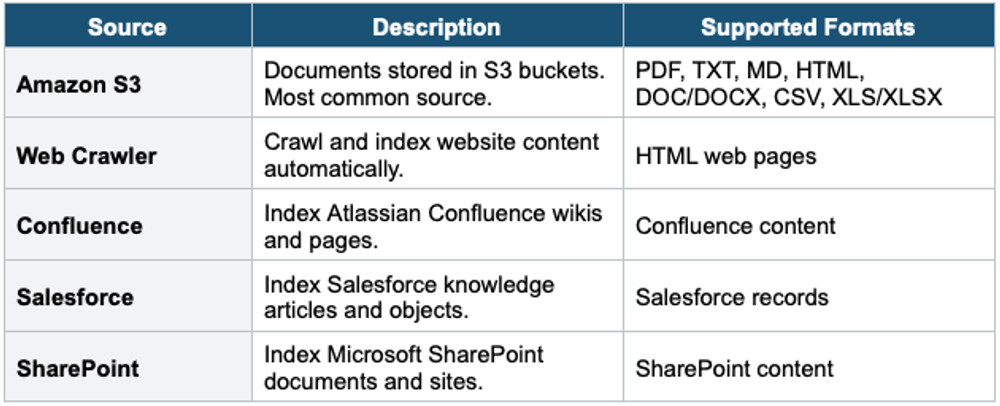
Supported Data Sources
Vector Stores
Knowledge Base Key Features
- Automatic chunking: splits documents into optimal-sized passages
- Automatic embedding: generates vector embeddings using the selected embedding model
- Sync: schedule or on-demand re-ingestion when documents change
- Source attribution: responses include citations pointing to source documents
- Filtering: metadata filters to narrow retrieval (e.g., department=HR, year=2024)
- No retraining: update documents in S3, re-sync — model answers from latest data
RAG Benefits 1) No model retraining (fast to set up). 2) Data stays current (update docs, re-sync). 3) Source citations (verifiable answers). 4) Reduce hallucination (grounded in documents). 5) Data stays in your account (privacy). RAG is the #1 recommended way to use enterprise data with foundation models.
2. Bedrock Agents
Bedrock Agents enable foundation models to take actions — not just generate text, but actually DO things like query databases, call APIs, and execute multi-step tasks.
Core Concept Without Agents: FM can only generate text. With Agents: FM can reason about a task, decide which actions to take, call APIs/databases, process results, and respond with actionable outcomes. Example: "Book me a flight to Tokyo next week" → Agent searches flights, picks the best, calls booking API, confirms.
How Agents Work
Bedrock Agent Architecture:

User: "What were our top 5 products last quarter?"
       |
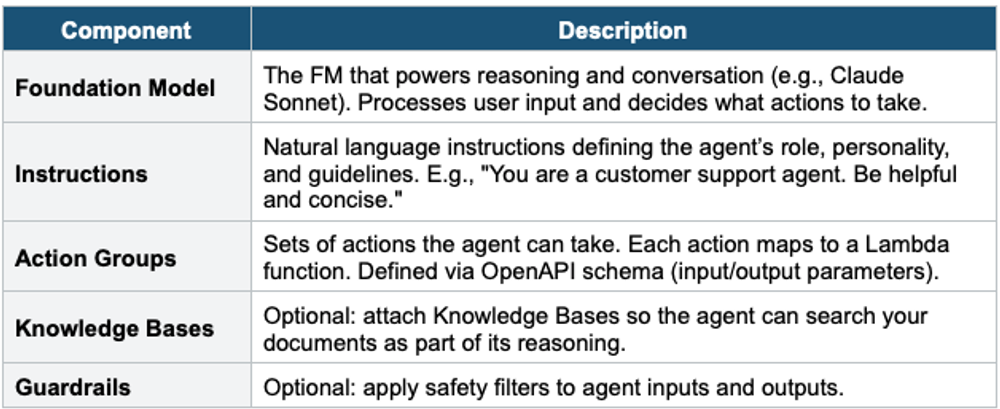
  Agent (FM with instructions + action groups)
    1. REASON: "I need to query the sales database."
    2. PLAN: "Call the get_sales_data action."
    3. ACT: Invoke Lambda function (get_sales_data)
       → Lambda queries RDS/DynamoDB
       → Returns: [{product: 'Widget A', revenue: 50000}, ...]
    4. OBSERVE: Process the returned data
    5. RESPOND: "Your top 5 products last quarter were:
       1. Widget A ($50K), 2. Gadget B ($45K)..."

Agent = FM reasoning + Action Groups (Lambda functions)
Agent Components
Action Groups
- Each action group contains one or more actions (API operations)
- Actions are defined by an OpenAPI schema (parameters, descriptions)
- Each action group maps to a Lambda function that executes the logic
- Agent decides WHICH actions to call based on user request (autonomous reasoning)
- Multi-step: the agent can chain multiple actions in sequence to complete complex tasks
Agent Action Group Example:

Action Group: "OrderManagement"
  Action: get_order_status
    Input: { order_id: string }
    Output: { status: string, delivery_date: string }
    Lambda: order-service-lambda

  Action: cancel_order
    Input: { order_id: string, reason: string }
    Output: { success: boolean, message: string }
    Lambda: order-service-lambda

  Action: list_recent_orders
    Input: { customer_id: string, limit: number }
    Output: { orders: [{ id, product, date, status }] }
    Lambda: order-service-lambda

User: "Cancel my order #12345, I found it cheaper elsewhere"
Agent: Calls cancel_order(order_id='12345', reason='price')
       Returns: "Order #12345 has been cancelled. Refund within 5 days."
Agent + Knowledge Base Combined
Combined Agent Architecture:

User: "Does our warranty cover water damage on Widget X?"
       |
  Agent reasons:
    1. "I need product warranty info → search Knowledge Base."
    2. Query KB: retrieve warranty document chunks for Widget X
    3. "The warranty docs say water damage is excluded, BUT there
        is a premium plan that covers it. Let me check if this
        customer has a premium."
    4. Call action: check_customer_plan(customer_id)
    5. Lambda returns: { plan: 'standard' }
    6. RESPOND: "Standard warranty doesn't cover water damage.
       You can upgrade to Premium for $29.99/year, which includes
       water damage coverage. Would you like me to upgrade?"

Agent = Reasoning + Knowledge Base (RAG) + Actions (Lambda)
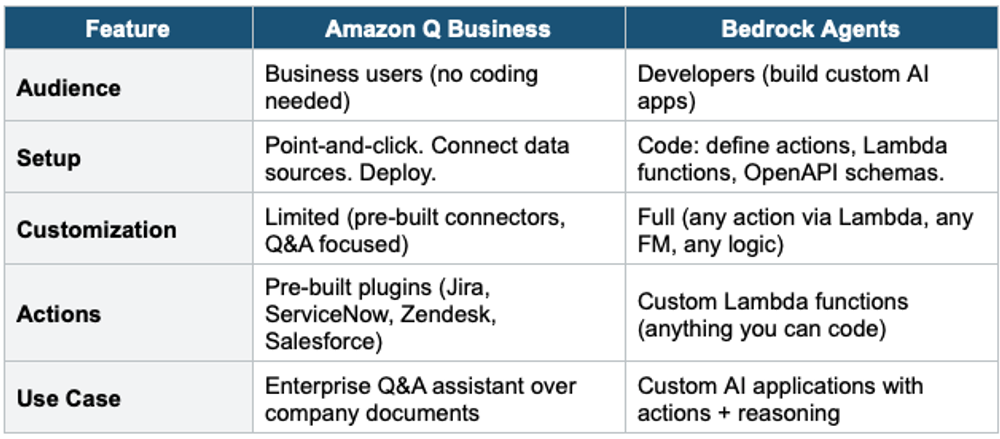
3. Amazon Q vs Bedrock Agents
4. Bedrock Security & Compliance
- Data isolation: your data is NOT shared with model providers or used to train base models
- Encryption: data encrypted in transit (TLS) and at rest (KMS)
- VPC: access Bedrock via VPC Endpoint (PrivateLink) for private connectivity
- IAM: fine-grained access control (which users/roles can invoke which models)
- CloudTrail: all API calls logged for auditing
- Guardrails: content filtering, PII redaction, denied topics, grounding checks
- Custom model isolation: fine-tuned models stored in your account, encrypted with your KMS key
- Compliance: SOC, HIPAA-eligible, ISO, PCI DSS, GDPR
5. Complete Bedrock Decision Table
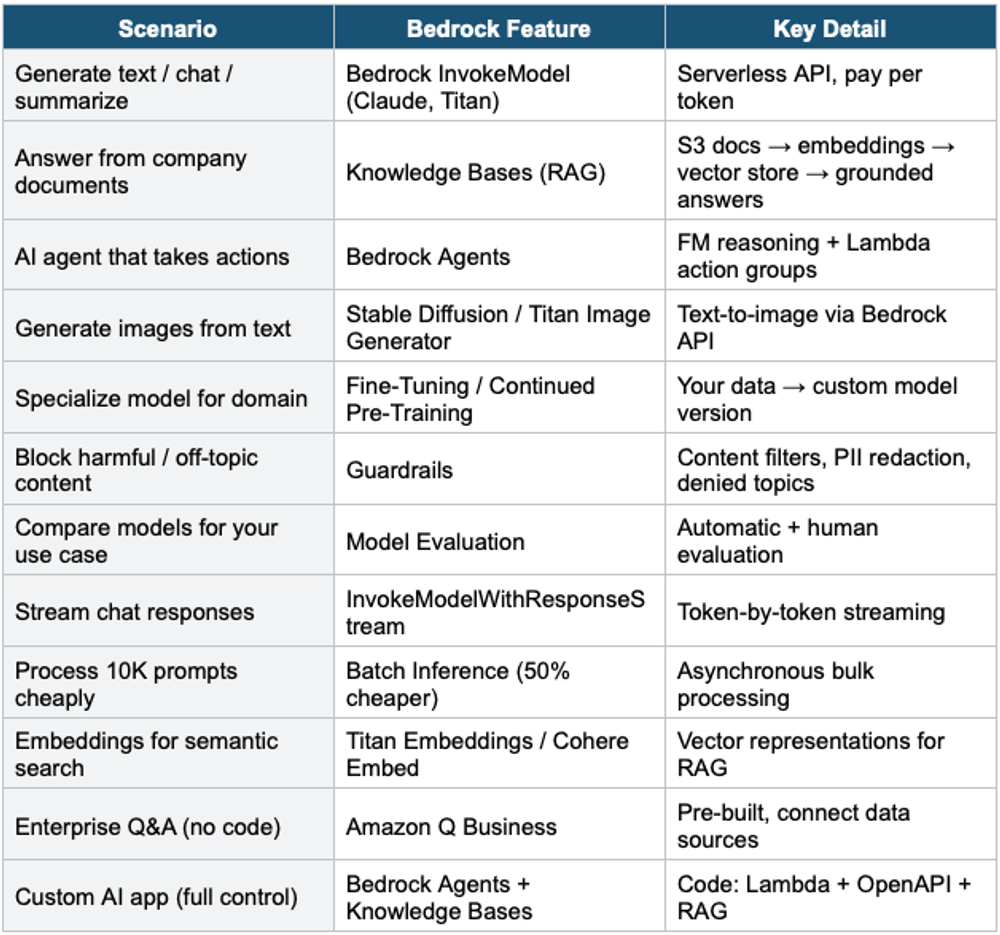
Exam Tip Bedrock KB & Agents: "Answer from company docs" = Knowledge Bases (RAG). "AI agent that takes actions" = Bedrock Agents (Lambda action groups). "Enterprise Q&A no code" = Amazon Q Business. "Custom AI app" = Bedrock Agents. KB uses vector store (OpenSearch Serverless default). Agents use OpenAPI + Lambda. Combined: Agent + KB = reasoning + docs + actions. Guardrails for safety. Data NOT used to train base models.