1. Overview
Configuration management ensures that your infrastructure and applications are configured consistently, reproducibly, and automatically. AWS provides several services and patterns for managing configuration at scale.
IaC vs Configuration Management Infrastructure as Code (CloudFormation/CDK/SAM): provisions AWS resources (creates the servers, databases, and networks). Configuration Management (SSM, OpsWorks, user data): configures what runs ON those resources (installs software, sets up apps, manages OS settings). You need both for a fully automated environment.
2. EC2 Configuration Options
EC2 User Data
- Shell script or cloud-init directives that run ONCE at an instance's first boot
- Use for: install packages, download code, start services, configure agent
- Runs as root. Output logged to /var/log/cloud-init-output.log
- Max size: 16 KB (base64 encoded). For larger: download script from S3.
- Does NOT re-run on stop/start (only first boot unless cloud-init configured)
EC2 User Data Example:
#!/bin/bash
yum update -y
yum install -y httpd
systemctl start httpd
systemctl enable httpd
echo "<h1>Hello from $(hostname)</h1>" > /var/www/html/index.html
CloudFormation cfn-init
- More structured than User Data: declare packages, files, services, commands in metadata
- Defined in CloudFormation template metadata (AWS::CloudFormation::Init)
- Runs via the cfn-init helper script (called from User Data)
- Supports: packages (yum, apt, pip), files (create/download), services (start/enable), commands
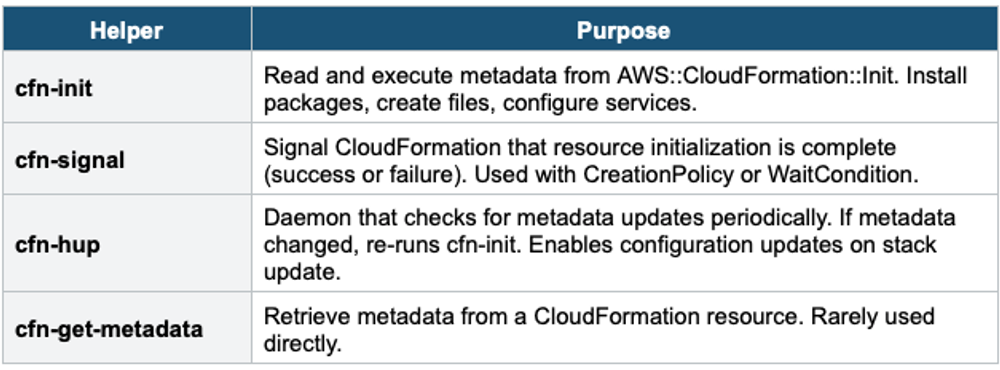
- cfn-signal: signal CloudFormation that initialization completed (with CreationPolicy/WaitCondition)
- cfn-hup: daemon that detects metadata changes and re-runs cfn-init (for updates, not just first boot)
CloudFormation cfn-init Metadata:

Metadata:
  AWS::CloudFormation::Init:
    config:
      packages:
        yum:
          httpd: []
          php: []
      files:
        /var/www/html/index.html:
          content: "<h1>Hello World</h1>"
      services:
        sysvinit:
          httpd:
            enabled: true
            ensureRunning: true

# In UserData:
UserData:
  Fn::Base64: !Sub |
    #!/bin/bash
    /opt/aws/bin/cfn-init -s ${AWS::StackId} -r WebServer --region ${AWS::Region}
    /opt/aws/bin/cfn-signal -e $? --stack ${AWS::StackId} --resource WebServer --region ${AWS::Region}
cfn-init vs User Data User Data = bash script (imperative, fragile, no error handling). cfn-init = declarative metadata (packages, files, services). cfn-init is idempotent and structured. cfn-signal tells CF whether init succeeded (so CF knows to rollback if it failed). cfn-hup watches for metadata changes on stack updates. Use cfn-init for production.
CloudFormation Helper Scripts Summary
3. AWS OpsWorks
AWS OpsWorks is a configuration management service that uses Chef or Puppet to automate server configuration.
OpsWorks Flavors
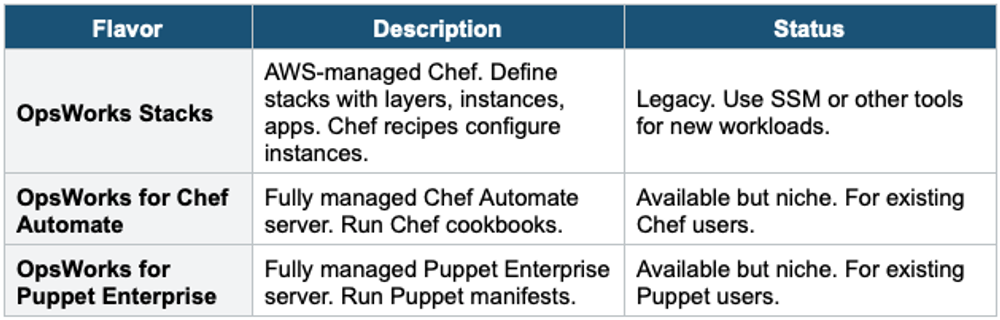
- OpsWorks is for organizations already using Chef or Puppet who want managed infrastructure for these tools
- For new workloads, AWS recommends SSM (Systems Manager) instead of OpsWorks
- Exam: if the question mentions "Chef" or "Puppet" = OpsWorks
4. AWS Elastic Beanstalk Configuration
Elastic Beanstalk provides platform-level configuration management for web applications.
- .ebextensions/: folder in your source bundle containing .config files (YAML) for customizing the EB environment
- Configure: packages, files, services, commands, container commands, option settings, resources
- Platform hooks: scripts in .platform/hooks/ that run at specific lifecycle events
- Saved Configurations: save environment config as a named template for reuse
- Environment manifest (env.yml): define linked environments, environment group names
.ebextensions Example (.ebextensions/01-packages.config):

packages:
  yum:
    git: []
    jq: []

commands:
  01_create_dir:
    command: mkdir -p /var/app/logs

option_settings:
  aws:elasticbeanstalk:application:environment:
    NODE_ENV: production
    DB_HOST: mydb.cluster.amazonaws.com
5. Amazon EC2 Image Builder
EC2 Image Builder automates the creation, maintenance, and testing of custom AMIs and container images.
- Define image pipelines: base image → build components → test components → output AMI/container
- Build components: scripts that install software, configure OS, harden security
- Test components: validate the image (check installed software, run security scans)
- Schedule: build images on a schedule (weekly, monthly) or on-demand
- Distributes: output AMI to multiple Regions and accounts automatically
- Integration: use output AMI in Auto Scaling Groups, Launch Templates
- Use for: golden AMI pipelines, security-hardened images, patched base images
EC2 Image Builder Pipeline:

Base AMI (Amazon Linux 2023)
  → Build Component: install CloudWatch Agent
  → Build Component: install application runtime
  → Build Component: CIS security hardening
  → Test Component: verify packages installed
  → Test Component: run security benchmark
  → Output: Golden AMI (distributed to 3 Regions)
  → Used by: ASG Launch Template
Golden AMI Pattern A Golden AMI is a pre-configured, tested, security-hardened AMI used as the base for all EC2 instances. EC2 Image Builder automates creating and updating Golden AMIs. Combined with User Data or cfn-init for instance-specific config, this is the recommended production pattern: Golden AMI (slow, pre-baked) + User Data (fast, instance-specific).
6. AWS AppConfig
AWS AppConfig (part of Systems Manager) is a feature flag and configuration deployment service for applications.
- Deploy configuration changes independently from code deployments
- Feature flags: toggle features on/off without redeploying
- Gradual rollout: deploy config changes with Canary, Linear, or All-at-Once strategies
- Validation: JSON Schema or Lambda validator ensures config is valid before deployment
- Rollback: automatic rollback if CloudWatch alarm triggers during deployment
- Supports: Lambda, EC2, ECS, EKS (any application with the AppConfig agent)
- Use for: feature toggles, operational tuning, A/B experiments, kill switches
AppConfig Use Cases:

Feature Flags:
  { "new_checkout_flow": true, "dark_mode": false }
  → Deploy to 10% of users (Canary)
  → Monitor error rate
  → Roll to 100% or rollback

Operational Config:
  { "max_connections": 100, "timeout_ms": 3000 }
  → Change without code deploy
  → Instant rollback if issues
7. Complete Configuration Management Decision Table
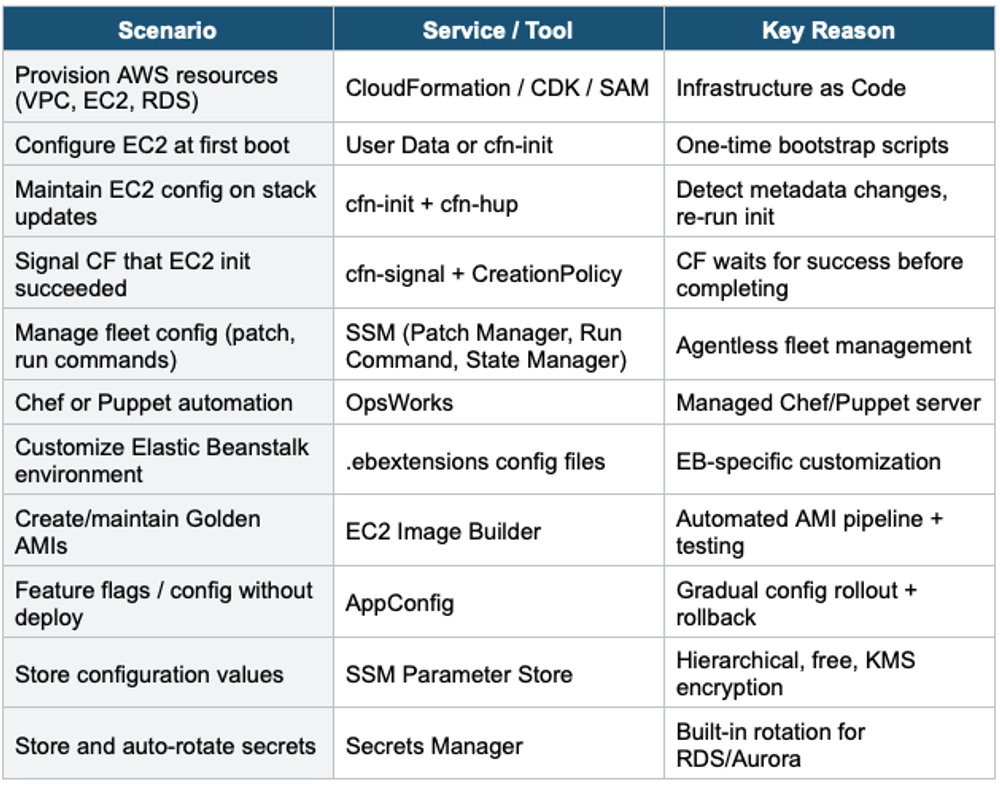
Exam Tip Configuration Management: "Configure EC2 at boot" = User Data (simple) or cfn-init (structured). "Signal CF that init worked" = cfn-signal. "Re-run config on stack update" = cfn-hup. "Chef/Puppet" = OpsWorks. "Create golden AMI" = Image Builder. "Feature flags" = AppConfig. "Fleet management" = SSM. Golden AMI + User Data = best practice production pattern.