1. Overview
Cross-account access is a common pattern in AWS multi-account architectures. It allows principals in one account to access resources in another account securely, without creating duplicate IAM users.
2. Pattern 1: IAM Role Assumption (Most Common)
This is the most common and recommended pattern for cross-account access.
How It Works
- Account A (Trusting): Creates a role with a trust policy that allows Account B to assume it.
- Account B (Trusted): IAM user/role in Account B calls sts:AssumeRole to get temporary credentials for the role in Account A.
Setup Steps
In Account A (Resource Account): Create a role with:
- Permissions policy: what the role can do (e.g., S3 access)
- Trust policy: who can assume it (Account B’s account ID or specific role/user ARN)
// Trust policy in Account A
{
  "Version": "2012-10-17",
  "Statement": [{
    "Effect": "Allow",
    "Principal": {
      "AWS": "arn:aws:iam::111122223333:root"
    },
    "Action": "sts:AssumeRole",
    "Condition": {
      "StringEquals": {
        "sts:ExternalId": "unique-external-id"
      }
    }
  }]
}
In Account B (Caller Account): Grant the user/role permission to assume the role in Account A:
// Identity policy in Account B
{
  "Version": "2012-10-17",
  "Statement": [{
    "Effect": "Allow",
    "Action": "sts:AssumeRole",
    "Resource": "arn:aws:iam::444455556666:role/CrossAccountRole"
  }]
}
External ID
- An External ID is a secret string used in the trust policy Condition
- Prevents the "confused deputy" problem — where a third party tricks a service into accessing your account
- Commonly required when granting access to third-party vendors
- Not a security mechanism by itself — it’s an anti-confusion mechanism
Confused Deputy Problem
Without External ID: A malicious Account C could trick a service (the "deputy") into using its permissions to access YOUR Account A, because the deputy’s role trusts "any customer." With External ID: The trust policy requires a unique secret. Only Account B (who knows the secret) can assume the role. Account C cannot guess the External ID.
3. Pattern 2: Resource-Based Policies
Some AWS resources support resource-based policies that can directly grant cross-account access:
Supported Resources
- S3 buckets (bucket policies)
- SQS queues (queue policies)
- SNS topics (topic policies)
- Lambda functions (function policies)
- KMS keys (key policies)
- ECR repositories
- Secrets Manager secrets
Key Difference from Role Assumption
- The caller does NOT need to assume a role — they use their own identity
- The resource policy in Account A directly grants access to a principal in Account B
- Both the identity policy (Account B) AND the resource policy (Account A) must allow
- Simpler setup for specific resources, but less flexible than role assumption
S3 Bucket Policy Example
{
  "Version": "2012-10-17",
  "Statement": [{
    "Effect": "Allow",
    "Principal": {
      "AWS": "arn:aws:iam::111122223333:role/AppRole"
    },
    "Action": "s3:GetObject",
    "Resource": "arn:aws:s3:::shared-bucket/*"
  }]
}
4. Pattern 3: AWS Organizations (SCP + Trusted Access)
- Within an Organization, some services have "trusted access" that automatically works across accounts
- Examples: CloudTrail (org trail), AWS Config (org aggregator), GuardDuty (org detector)
- No manual role setup needed for these integrated services
- AWS RAM (Resource Access Manager) can share resources across accounts in an Organization
5. Pattern 4: IAM Identity Center
- Users log into the SSO portal and select any account they have access to
- Identity Center creates and manages roles in target accounts automatically
- No manual cross-account role setup needed
- Best for human users accessing multiple accounts
6. Cross-Account Patterns Comparison
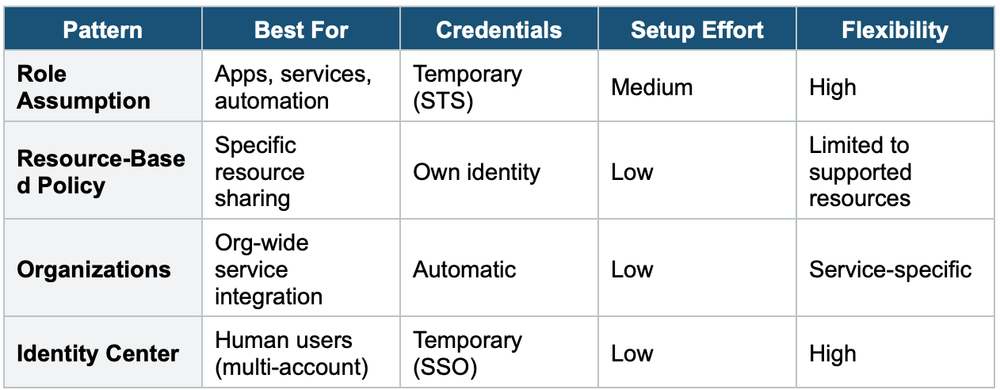
7. AWS Resource Access Manager (RAM)
AWS RAM lets you share AWS resources with other accounts or within your Organization without creating duplicate resources.
Shareable Resources (Common Examples)
- VPC Subnets — share subnets across accounts (most common use case)
- Transit Gateway
- Route 53 Resolver rules
- License Manager configurations
- Aurora DB clusters
- Within an Organization, sharing is automatic (no invitation needed)
- Outside an Organization, the receiving account must accept the share invitation
Exam Tip
Cross-account questions: For apps/services, the answer is role assumption (AssumeRole). For humans, the answer is IAM Identity Center. For specific resources (S3, SQS, KMS), resource-based policies work. External ID prevents the confused deputy problem. RAM is for sharing VPC subnets, Transit Gateways across accounts.