1. What is a Data Pipeline?
A data pipeline is an automated workflow that ingests data from sources, transforms it, and delivers it to destinations for storage, analytics, or consumption. AWS provides services for every stage of the pipeline.
Pipeline Stages Every data pipeline follows: INGEST (collect data) → STORE (land in data lake) → TRANSFORM (clean, enrich, aggregate) → CONSUME (query, visualize, ML). The choice of services at each stage depends on: data volume, velocity (batch vs real-time), variety (structured vs unstructured), and latency requirements.
2. The Data Lake Architecture
AWS Data Lake Architecture (Layered Zones):

RAW ZONE (Landing)
  • Data arrives as-is from sources
  • Format: CSV, JSON, logs, images, raw API responses
  • No transformation. Immutable copy of source data.
  • Location: s3://data-lake/raw/

PROCESSED ZONE (Cleansed)
  • Data cleaned, validated, deduplicated
  • Format: converted to Parquet/ORC (columnar, compressed)
  • Partitioned by date/region/category
  • Location: s3://data-lake/processed/

CURATED ZONE (Business-Ready)
  • Aggregated, joined, business logic applied
  • Optimized for specific analytics use cases
  • Ready for BI dashboards, ML models, reports
  • Location: s3://data-lake/curated/

Security: Lake Formation governs access across all zones
Three Zones Best Practice Raw = untouched source copy (audit trail, reprocessing). Processed = clean Parquet (broad analytics). Curated = business-specific (dashboards, ML). This separation enables: data lineage, reprocessing from raw if logic changes, and different access controls per zone.
3. Batch Pipeline Patterns
Pattern 1: Simple ETL Pipeline
S3 (raw CSV) → Glue Crawler (discover schema)
             → Glue ETL (transform to Parquet, partition)
             → S3 (processed zone)
             → Athena (SQL queries)
             → QuickSight (dashboards)

Trigger: Glue scheduled job (nightly) or EventBridge (on S3 upload)
Best for: Simple batch analytics, log processing, periodic reports
Pattern 2: Database to Data Lake
RDS/Aurora → DMS (Full Load + CDC) → S3 (raw zone, JSON/CSV)
                                     → Glue ETL (Parquet, partition)
                                     → S3 (processed zone)
                                     → Athena / Redshift

Trigger: DMS continuous replication (CDC)
Best for: Replicate operational DB to analytics lake
Pattern 3: Data Warehouse Pipeline
Multiple Sources:
  S3 files, RDS (via DMS), APIs (via Lambda)
       \         |         /
        S3 Data Lake (raw zone)
              |
        Glue ETL (transform, aggregate)
              |
        Redshift (COPY from S3)
              |
        QuickSight (executive dashboards)

Trigger: Step Functions orchestrates multi-step workflow
Best for: Enterprise BI, complex multi-source analytics
Pattern 4: Large-Scale Big Data
S3 Data Lake (petabytes)
     |
EMR (Spark/Hive/Presto)
  • Complex transformations
  • ML feature engineering
  • Multi-TB joins and aggregations
     |
S3 (curated zone, Parquet)
     |
Redshift Spectrum or Athena (query)
     |
QuickSight or SageMaker (consume)

Trigger: Step Functions + EMR transient clusters (spin up, process, terminate)
Best for: Petabyte-scale processing, ML pipelines
4. Real-Time Pipeline Patterns
Pattern 5: Streaming to Data Lake
IoT Devices / App Events / Clickstream
       |
Kinesis Data Streams (real-time ingestion)
       |
Kinesis Data Firehose (near real-time delivery)
  • Optional: Lambda transform (enrich, filter)
  • Buffer: 60–900 seconds, 1–64 MB
  • Convert to Parquet (Firehose built-in)
       |
S3 Data Lake (processed zone, partitioned by time)
       |
Athena / Redshift Spectrum (query)

Best for: IoT telemetry, clickstream, log streaming to data lake
Pattern 6: Real-Time Analytics
App Events / IoT
       |
Kinesis Data Streams
       |
Kinesis Data Analytics (Flink / SQL)
  • Real-time aggregation, windowing, anomaly detection
  • Sliding windows: avg temp last 5 min
  • Alerts: if metric > threshold → SNS
       |
  Output: Kinesis Data Streams → Lambda → DynamoDB (real-time state)
          Kinesis Data Firehose → S3 (historical archive)

Best for: Real-time dashboards, alerting, IoT processing
Pattern 7: Streaming to OpenSearch
Application Logs / CloudWatch Logs
       |
Kinesis Data Firehose (or CW Subscription Filter)
       |
OpenSearch Service
       |
OpenSearch Dashboards (real-time log visualization)

Best for: ELK replacement, centralized log analytics, real-time search
Pattern 8: Event-Driven Processing
S3 Upload Event
       |
EventBridge (or S3 Event Notification)
       |
Step Functions (orchestrate multi-step workflow)
  • Step 1: Lambda — validate file format
  • Step 2: Lambda — extract metadata
  • Step 3: Glue ETL — transform and load
  • Step 4: Lambda — notify downstream (SNS)
  • Error: Lambda — move to quarantine bucket

Best for: File processing pipelines, automated data ingestion
5. Pipeline Orchestration
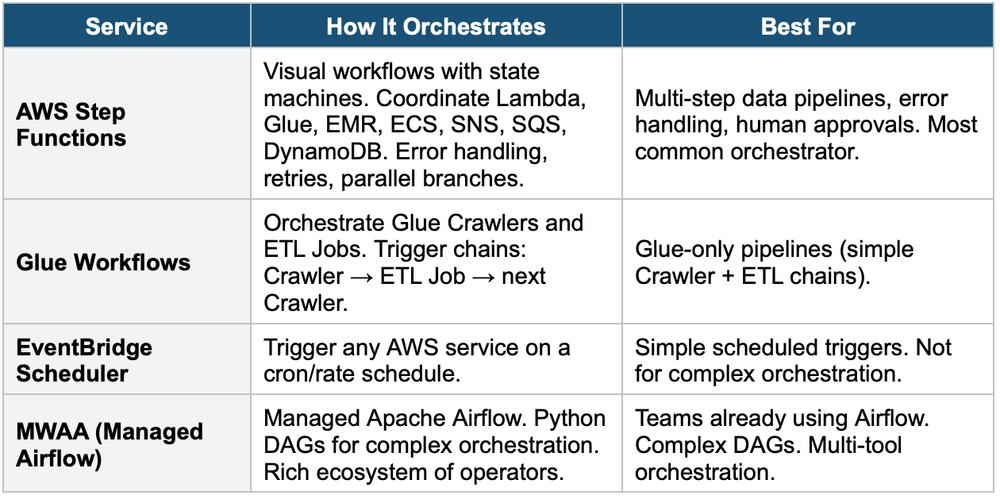
Step Functions = Default Choice For most AWS data pipelines, Step Functions is the recommended orchestrator. It provides: a visual workflow designer, native integration with 200+ AWS services, error handling + retries, parallel execution, wait states, human approval steps, and pay per state transition. Use MWAA only if you already use Airflow.
6. Service Selection Guide
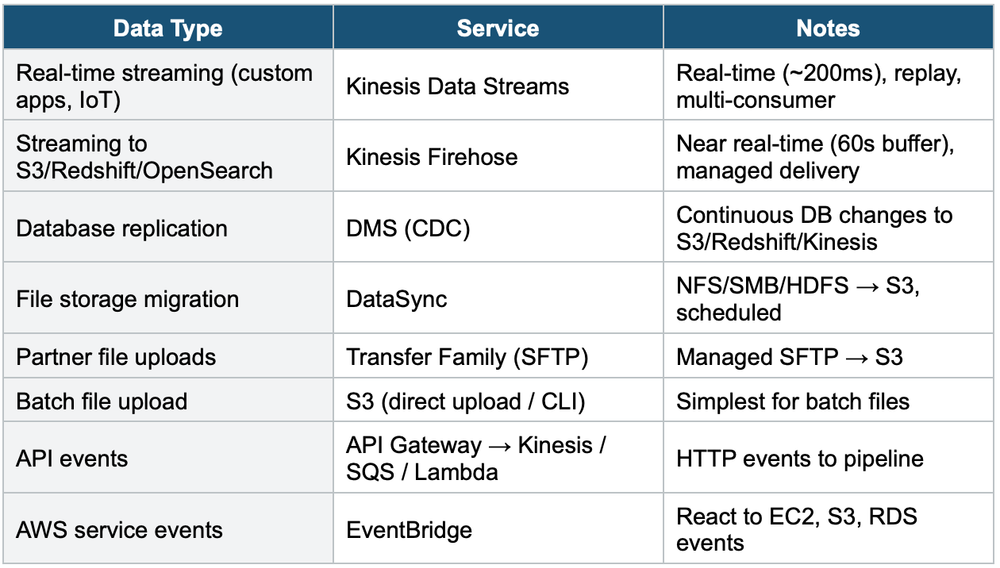
Ingestion: How to Get Data In
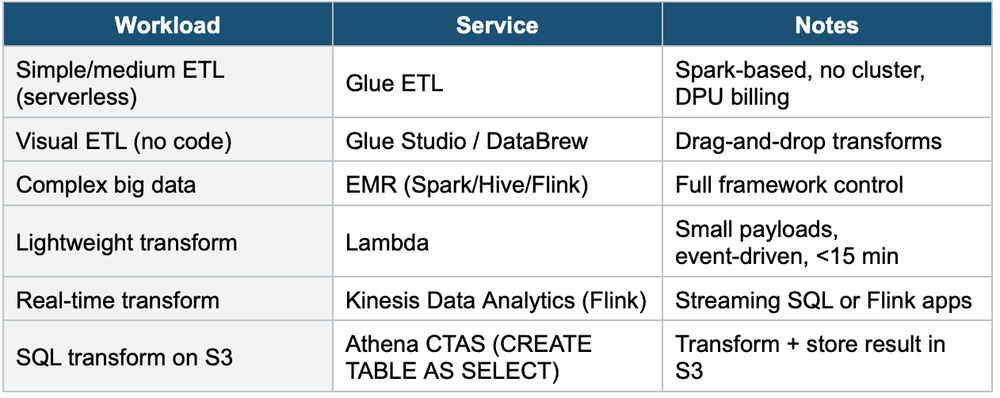
Transform: How to Process Data
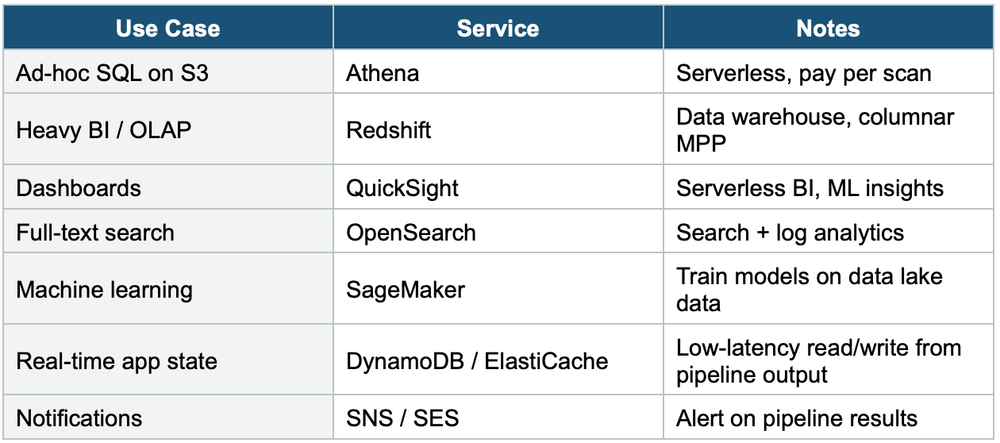
Consume: How to Use Data
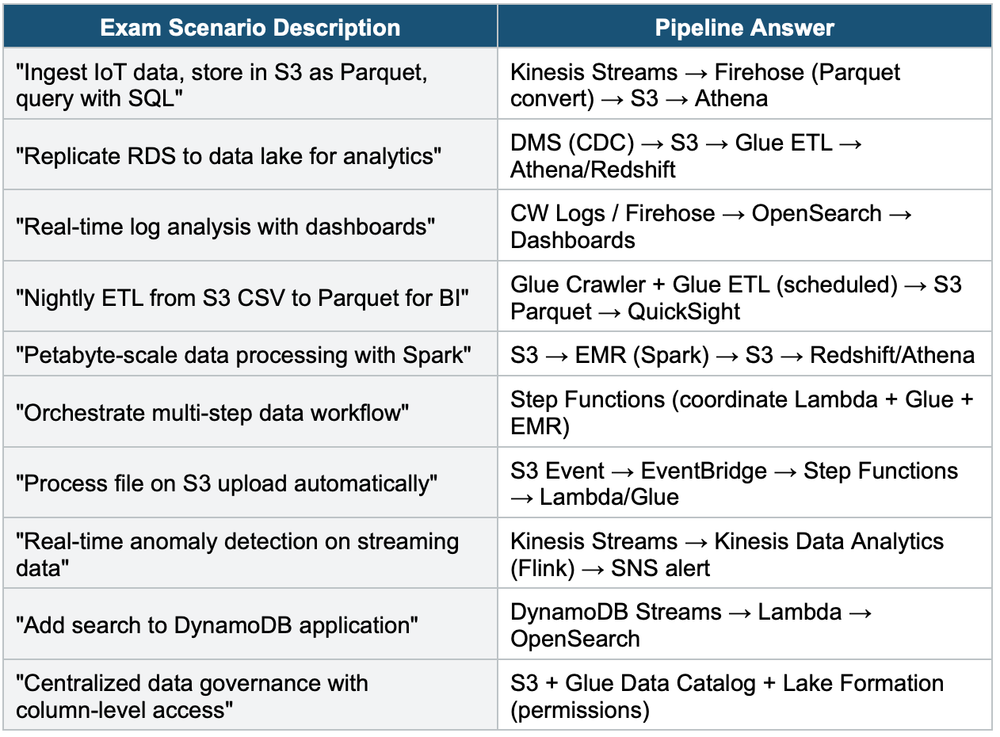
7. Exam Scenario Quick-Match
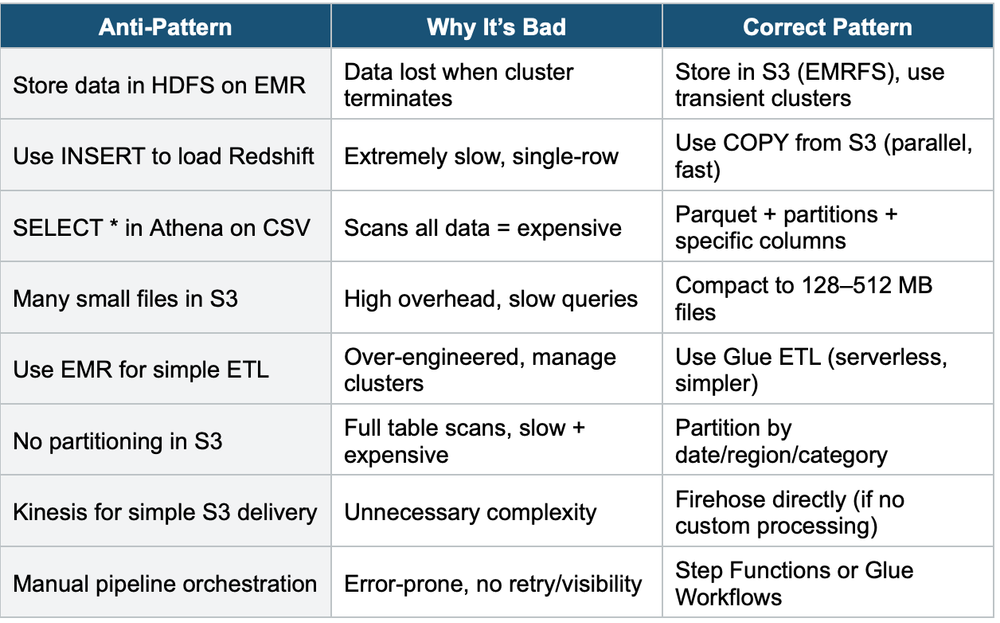
8. Anti-Patterns to Avoid
Exam Tip Pipeline Patterns: "IoT to S3 Parquet" = Kinesis → Firehose → S3. "RDS to data lake" = DMS CDC → S3 → Glue. "Real-time logs" = Firehose → OpenSearch. "Orchestrate multi-step" = Step Functions. "Simple ETL" = Glue. "Complex big data" = EMR. "File processing on upload" = EventBridge → Step Functions. "Data lake zones" = Raw → Processed → Curated. "Column-level access" = Lake Formation.