1. Why Deployment Strategies Matter
The way you deploy new application versions directly affects availability, risk, rollback speed, and cost. AWS provides multiple deployment strategies across different services. Choosing the right strategy depends on your tolerance for downtime, risk appetite, and infrastructure type.
Core Principle Deployment strategy = how you get new code into production safely. The key tradeoffs are: speed vs safety, cost vs reliability, simplicity vs control. More sophisticated strategies (Blue/Green, Canary) cost more but offer zero downtime and instant rollback.
2. Complete Deployment Strategies
All-at-Once (Big Bang)
All-at-Once:

  v1  v1  v1  v1       v2  v2  v2  v2
  [A] [B] [C] [D]  →  [A] [B] [C] [D]

  All instances updated simultaneously.
  Downtime: YES (during deployment).
  Rollback: Re-deploy v1 (slow).
  Cost: No extra infrastructure.
- Fastest deployment. Simplest to implement.
- Downtime during update. Not suitable for production.
- Use for: dev/test environments, non-critical workloads
Rolling
Rolling (batch size = 1):

  Step 1: [v2] [v1] [v1] [v1]  (update A)
  Step 2: [v2] [v2] [v1] [v1]  (update B)
  Step 3: [v2] [v2] [v2] [v1]  (update C)
  Step 4: [v2] [v2] [v2] [v2]  (update D)

  Reduced capacity during deployment.
  Both versions are running simultaneously.
  Rollback: rolling re-deploy v1 (slow).
- No downtime but reduced capacity during rollout
- Two versions run simultaneously (must handle compatibility)
- Rollback is slow (must roll forward or re-deploy the previous version)
- Use for: when you can tolerate reduced capacity and mixed versions
Rolling with Additional Batch
Rolling with Additional Batch:

  Step 0: [v1] [v1] [v1] [v1] + [v2]  (launch extra batch)
  Step 1: [v2] [v1] [v1] [v1] + [v2]  (update A)
  Step 2: [v2] [v2] [v1] [v1] + [v2]  (update B)
  ... continues until all are updated
  Final:  [v2] [v2] [v2] [v2]  (remove extra batch)

  Maintains full capacity throughout.
  Slightly slower + extra cost during deployment.
- Maintains full capacity throughout deployment
- Extra instances launched temporarily (slightly higher cost during deploy)
- Use for: production workloads that cannot lose capacity
Immutable
Immutable:

  Step 1: Launch an entirely new ASG with v2 instances
  Step 2: New instances pass health checks
  Step 3: Move new instances into the original ASG
  Step 4: Terminate old v1 instances

  Full capacity at all times.
  Quick rollback: terminate new instances.
  Higher cost: double the capacity during deployment.
- Creates brand new instances (never modifies existing)
- Full capacity throughout. Quick rollback (terminate new instances).
Higher cost during deployment (double the Canary:

  Step 1: [v1] [v1] [v1] [v1] [v1]  (100% on v1)
             + [v2]                  (deploy 1 canary)

  Step 2: Route 5-10% traffic to v2 canary
  Step 3: Monitor for errors, latency, and anomalies
  Step 4a: Metrics OK → gradually shift to 100% v2
  Step 4b: Metrics BAD → immediately rollback to 100% v1

  Lowest risk. Catch issues with real traffic before full rollout.
infrastructure temporarily)
- Use for: when you want guaranteed clean deployments, quick rollback
Blue/Green
Blue/Green:

  BLUE (current):  [v1] [v1] [v1] [v1]  ← traffic (100%)
  GREEN (new):     [v2] [v2] [v2] [v2]  ← no traffic

  Step 1: Deploy v2 to the Green environment
  Step 2: Test Green independently
  Step 3: Swap traffic: Route 53 / ALB → Green
  Step 4: Green is now live. Blue is on standby.
  Step 5: Terminate Blue (or keep for instant rollback)

  Zero downtime. Instant rollback (swap back to Blue).
  Double the cost during deployment (two full environments).
- Two identical environments. Swap traffic via DNS (Route 53) or ALB
- Zero downtime. Instant rollback (redirect traffic back to Blue)
- Most expensive (double infrastructure during deploy, possibly longer)
- Use for: critical production systems requiring zero downtime + instant rollback
Canary
- Deploy to a small subset first, validate with real traffic
- Gradually shift traffic if healthy. Instant rollback if not.
- Requires good monitoring and automated rollback triggers
- Use for: high-risk changes, production safety, regulated environments
A/B Testing (Traffic Splitting)
- Similar to Canary but driven by business metrics, not just health
- Route specific user segments to different versions (by header, cookie, geography)
- Measure business outcomes: conversion rate, revenue, engagement
- Use Route 53 Weighted or ALB Weighted Target Groups
- Use for: feature experiments, UX testing, business-driven decisions
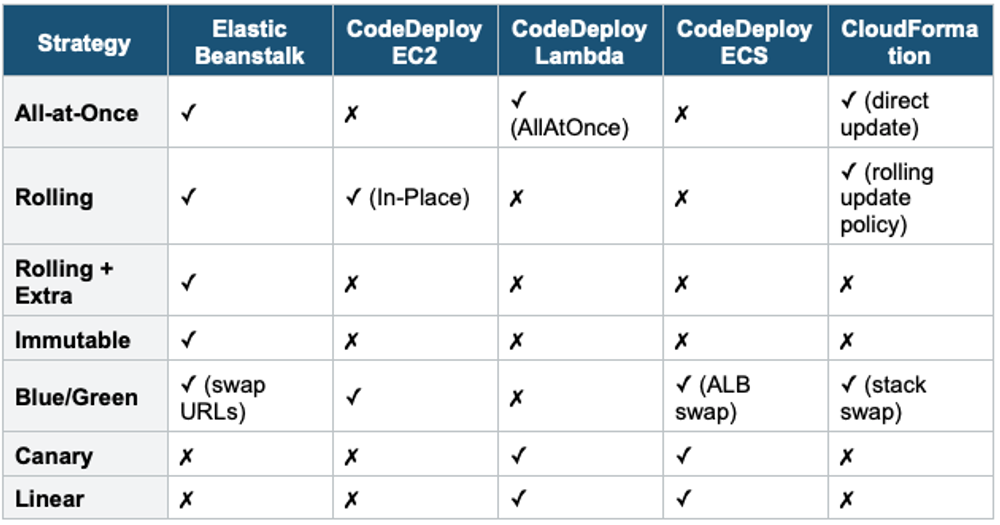
3. Deployment Strategies by AWS Service
4. Master Comparison Table
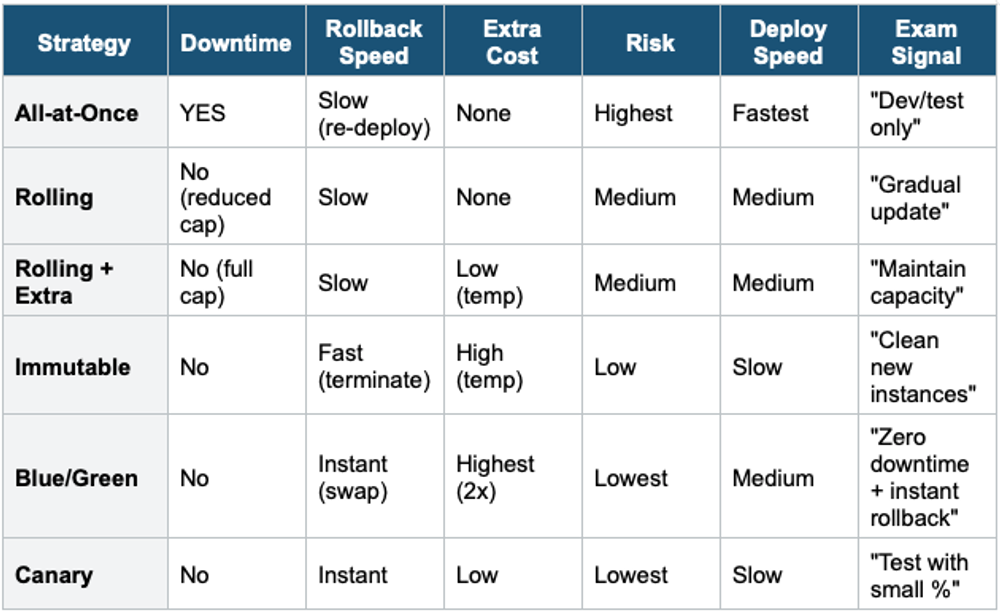
Exam Tip Deployment Strategies: "Zero downtime + instant rollback" = Blue/Green. "Test with small traffic %" = Canary. "Maintain full capacity" = Rolling with Additional Batch or Immutable. "Fastest, accept downtime" = All-at-Once. "Gradual Lambda traffic shift" = Canary or Linear (CodeDeploy). "ECS deployment" = Blue/Green with ALB (CodeDeploy). Elastic Beanstalk supports the most strategy options.