1. Direct Connect Architecture
AWS Direct Connect (DX) establishes a dedicated, private network connection between your on-premises data center and AWS. Unlike VPN (over the internet), DX provides consistent latency, higher bandwidth, and lower per-GB data transfer costs.
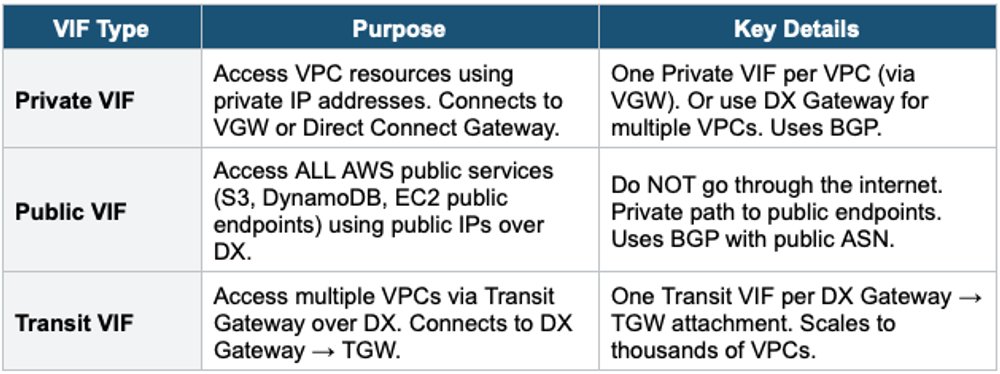
Core Architecture Your data center router connects to an AWS Direct Connect location (co-location facility) via a cross-connect (physical cable). From there, AWS provides a dedicated port to the AWS backbone. You create Virtual Interfaces (VIFs) on this connection to access VPCs (private VIF) or AWS public services (public VIF).
Direct Connect Physical Architecture:

  Your Data Center
       |
  Your Router (Customer Gateway)
       |
  Cross-Connect (physical cable at DX Location)
       |
  AWS Direct Connect Router (at DX Location)
       |
  AWS Backbone (private network)
       |
  ┌───────┼───────┼───────┐
  VPC-A   VPC-B   VPC-C   AWS Public Services
  (via    (via    (via    (via Public VIF:
  Private Private Private  S3, DynamoDB, etc.)
  VIF)    VIF)    VIF)
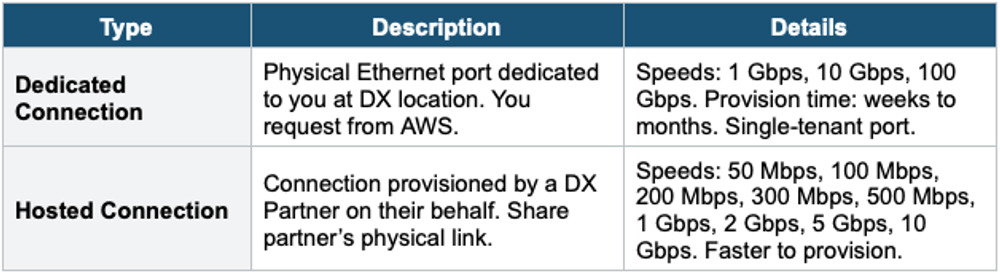
2. Connection Types
3. Virtual Interfaces (VIFs)
4. Direct Connect Gateway
A Direct Connect Gateway is a globally available resource that enables you to connect your DX connection to VPCs in multiple Regions or to Transit Gateways.
Direct Connect Gateway Architecture:

  On-Premises
       |
  DX Connection (at DX Location)
       |
  Direct Connect Gateway (global)
       |
  ┌───────┼───────┼───────┐
  VGW        VGW        TGW
  (VPC-A     (VPC-B     (us-east-1)
  us-east-1) eu-west-1)

  One DX connection → DX Gateway → VPCs in multiple Regions
Without DX Gateway: need separate DX per Region- DX Gateway is a global resource (not Region-specific)
- Associates with: Virtual Private Gateways (VGWs) in any Region, OR Transit Gateways
- One DX Gateway can connect to up to 20 VGWs or up to 6 TGWs (across different accounts/Regions)
- Traffic between on-premises and VPCs does NOT transit through the DX Gateway Region — routed directly
- Free (no additional charge for DX Gateway itself)
5. DX Resiliency Models
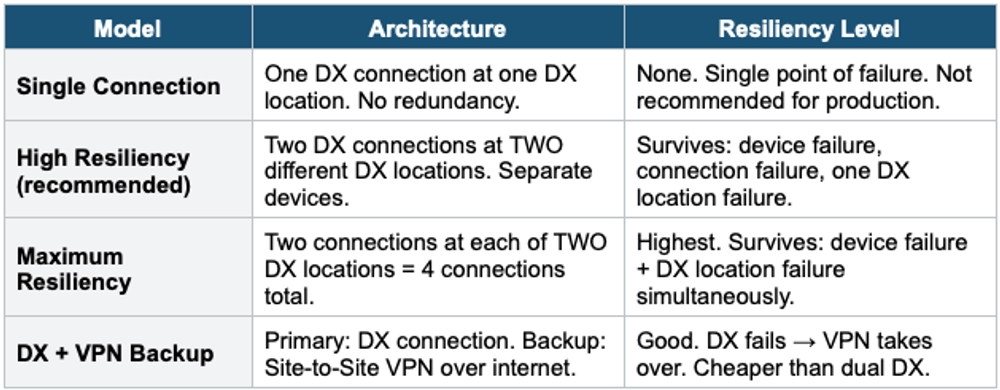
Important Warning A single Direct Connect connection is a single point of failure. For production, ALWAYS have redundancy: either dual DX connections at separate locations (High/Maximum Resiliency) or DX + VPN backup. The exam often asks about DX redundancy. "Cost-effective DX backup" = Site-to-Site VPN.
6. DX Encryption
- DX is NOT encrypted by default (private but unencrypted at Layer 2)
- Option 1: VPN over DX — create an IPsec VPN tunnel running OVER the DX public VIF. Adds encryption.
- Option 2: MACsec (IEEE 802.1AE) — Layer 2 encryption at the DX connection level. 10 Gbps and 100 Gbps dedicated connections only.
- Exam: "Encrypt DX traffic" = VPN over DX (most common answer) or MACsec (if 10G/100G).
7. Link Aggregation Group (LAG)
- Bundle multiple DX connections into a single managed connection
- All connections in an LAG must be the same bandwidth and terminate at the same DX location
- Increased bandwidth: 4 x 1 Gbps = 4 Gbps aggregate
- Maximum: 4 connections per LAG (for 1G or 10G connections)
- If one link fails, traffic continues on the remaining links
8. DX Pricing
- Port hours: charged per hour based on connection speed + DX location
- Data transfer OUT: lower rates than internet data transfer (~$0.02/GB vs ~$0.09/GB)
- Data transfer IN: free (same as the internet)
- No data processing charges (unlike NAT Gateway or TGW)
- DX is cost-effective for high-volume, steady data transfer between on-premises and AWS
Exam Tip DX Advanced: "Private dedicated connection" = Direct Connect. "Access VPC privately" = Private VIF. "Access S3/public services privately" = Public VIF. "Multiple VPCs" = Transit VIF (via DX Gateway → TGW). "Multi-Region VPCs" = DX Gateway. "Encrypt DX" = VPN over DX or MACsec. "DX redundancy" = 2 connections at 2 locations (High Resiliency). "Cheap DX backup" = Site-to-Site VPN. "Bundle DX" = LAG (up to 4 links).