1. DynamoDB Streams
DynamoDB Streams captures a time-ordered sequence of item-level modifications in a table and stores this information for up to 24 hours.
- Captures: INSERT, MODIFY, DELETE events
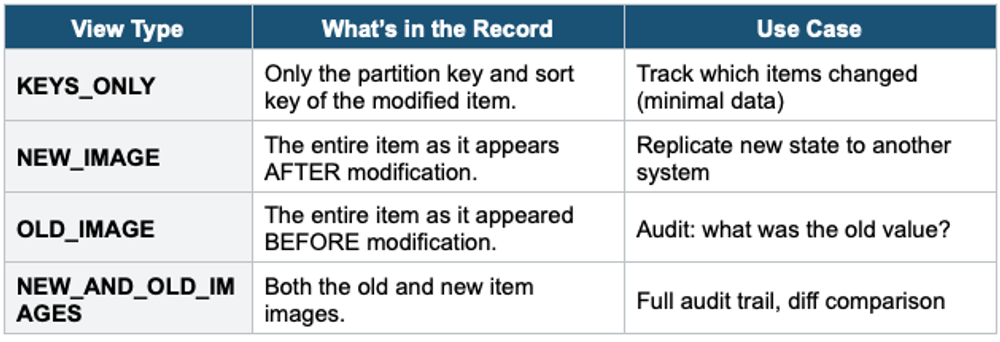
- Each record contains: the primary key, and optionally, the old/new item image
- Ordered per partition key (items with the same PK are ordered; across PKs, no guaranteed order)
- Retention: 24 hours
- Can trigger AWS Lambda functions (event source mapping)
Stream View Types
Common Stream Patterns
- React to changes: DynamoDB → Stream → Lambda → (send email, update search index, sync to another table)
- Cross-Region replication: DynamoDB Streams powers Global Tables
- Analytics pipeline: Stream → Kinesis Data Firehose → S3/Redshift
- Materialized views: maintain precomputed aggregations updated by stream events
2. DynamoDB Global Tables
- Fully managed, multi-Region, multi-active (read/write in any Region) replication
- Uses DynamoDB Streams under the hood to replicate changes
- Replication latency: typically <1 second
- All replicas can accept writes (no primary/secondary distinction)
- Last-writer-wins conflict resolution
- Must use On-Demand or have Auto Scaling enabled on all replicas
- Must enable DynamoDB Streams with NEW_AND_OLD_IMAGES
Use for: Globally distributed applications, disaster recovery, and low-latency access for global users.
3. DynamoDB Accelerator (DAX)
DAX is a fully managed, in-memory cache for DynamoDB. It delivers up to 10x performance improvement — from single-digit milliseconds to microseconds.
- In-memory cache sitting in front of DynamoDB
- Microsecond latency for cached reads
- Compatible with existing DynamoDB API calls (no code changes for reads)
- Write-through cache: writes go through DAX to DynamoDB
- TTL: configurable (default 5 minutes for items, 5 minutes for queries)
- Multi-AZ: up to 10 nodes (1 primary + up to 9 replicas)
- Runs in your VPC (must deploy EC2/Lambda in the same VPC)
- Does NOT support strongly consistent reads (only eventually consistent from cache)
DAX vs ElastiCache
DAX = purpose-built DynamoDB cache. No code changes. Sits between app and DynamoDB transparently. ElastiCache = general-purpose cache for any data source. Requires code changes. If the question is specifically about DynamoDB caching, the answer is DAX. If caching results from multiple sources or caching aggregated/computed data, the answer is ElastiCache.
4. DynamoDB Transactions
- ACID transactions across multiple items and tables
- Two operations: TransactWriteItems (up to 100 items) and TransactGetItems (up to 100 items)
- All-or-nothing: either all actions succeed, or all fail
- Costs 2x the normal RCU/WCU (because DynamoDB prepares + commits)
- Use for: financial transactions, order processing, any operation needing atomicity across items
5. DynamoDB TTL (Time to Live)
- Automatically delete expired items at no extra cost
- You specify an attribute containing the expiration timestamp (Unix epoch seconds)
- Items are typically deleted within 48 hours after expiration (not instant)
- Expired items appear in Streams as DELETE events
- No WCU consumed for TTL deletions
- Use for: session data, temporary tokens, event logs, shopping carts
6. DynamoDB Backups
On-Demand Backups
- Full backup at any time, retained until you delete it
- No performance impact during backup
- Can be restored to a new table (same or different Region)
Point-in-Time Recovery (PITR)
- Continuous backups of the last 35 days
- Restore to any second within the 35-day window
- Must be explicitly enabled (not on by default)
- Restores to a new table
- Uses DynamoDB Streams internally
7. DynamoDB Export to S3
- Export table data to S3 in JSON or Apache Ion format
- Does NOT consume RCU (uses PITR data)
- Enables querying with Athena, data lake integration, and archival
- PITR must be enabled
- Export is a point-in-time snapshot (not real-time)
8. DynamoDB Import from S3
- Import data from S3 into a NEW DynamoDB table
- Supported formats: CSV, DynamoDB JSON, Amazon Ion
- Does NOT consume WCU (import goes directly to storage)
- Creates a new table (cannot import into an existing table)
9. DynamoDB PartiQL
- SQL-compatible query language for DynamoDB
- Use familiar SELECT, INSERT, UPDATE, and DELETE syntax
- Runs in Console, CLI, SDK, and NoSQL Workbench
- Under the hood, it still uses DynamoDB’s Query/Scan/PutItem APIs
- Does NOT change DynamoDB’s underlying behavior or limitations
Exam Tip
DynamoDB Advanced: Streams = 24-hour event log (INSERT/MODIFY/DELETE). Global Tables = multi-Region, multi-active, <1s replication. DAX = microsecond DynamoDB cache, no code changes, eventually consistent only. Transactions = 2x cost, ACID. TTL = auto-delete expired items, free. PITR = 35 days continuous, must enable. Export to S3 = no RCU (uses PITR). "Improve DynamoDB read latency" = DAX. "Global low-latency writes" = Global Tables.