1. What is Amazon EC2?
Amazon Elastic Compute Cloud (EC2) is a web service that provides resizable compute capacity in the cloud. It allows you to launch virtual servers (instances) on demand with full control over the operating system, networking, and storage.
Core Concept EC2 is the foundation of AWS compute. An EC2 instance is a virtual machine running on AWS physical hardware. You choose the instance type, OS, storage, and network settings. You pay only for the compute time you use.
2. Instance Naming Convention
EC2 instance types follow a specific naming pattern:
Example: m5.xlarge

m    = Instance family (General Purpose)
5    = Generation (newer = better price/performance)
.    = separator
xlarge = Size (determines vCPUs, memory, network)

Other examples:
c7g.2xlarge  = Compute optimized, Gen 7, Graviton, 2x large
r6i.4xlarge  = Memory optimized, Gen 6, Intel, 4x large
t3.micro     = Burstable, Gen 3, micro size
Additional Letters (after generation number)
- g = Graviton (AWS ARM-based processor — better price/performance)
- a = AMD processor
- i = Intel processor
- n = Enhanced networking
- d = Local NVMe instance store
- b = Block storage optimized
- e = Extra memory or storage
3. Instance Size Scale
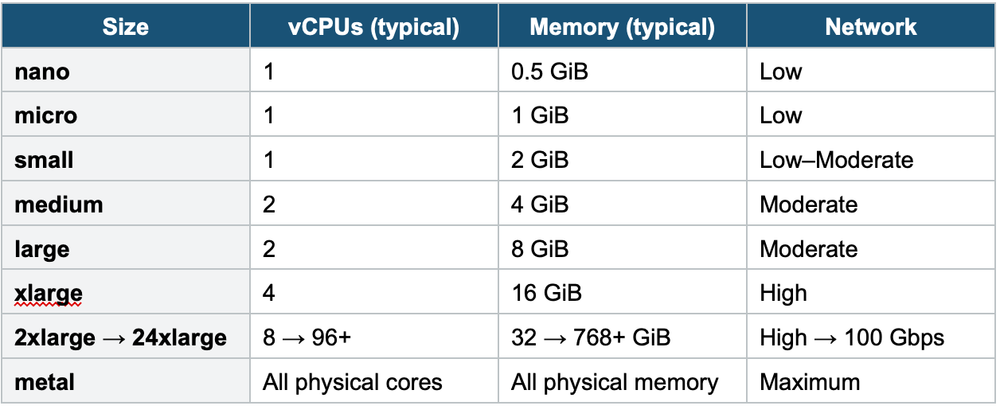
4. Instance Families
General Purpose (M, T)
Balanced compute, memory, and networking. Good for a wide variety of workloads.
- M-series (m5, m6i, m7g): Steady-state workloads. Web servers, app servers, small/medium databases, and development environments.
- T-series (t3, t3a, t4g): Burstable performance. Earn CPU credits when idle, spend them when busy. Ideal for variable workloads.
T-series Burstable Performance T instances have a baseline CPU level (e.g., 20% for t3.micro). When below baseline, you earn credits. When above, you spend credits. If credits run out, performance drops to baseline. Enable Unlimited mode to burst beyond credits (you pay for extra burst).
Compute Optimized (C)
Highest compute-to-memory ratio. Best for CPU-intensive tasks.
- C-series (c5, c6i, c7g): Batch processing, media transcoding, HPC, scientific modeling, machine learning inference, gaming servers, ad serving.
Memory Optimized (R, X, z)
Designed for workloads that process large datasets in memory.
- R-series (r5, r6i, r7g): High-performance databases (RDS), in-memory caches (ElastiCache/Redis), real-time big data analytics.
- X-series (x1, x2idn): Extreme memory (up to 4 TiB). SAP HANA, large in-memory database.
- z-series (z1d): High frequency compute + memory. EDA, financial simulations.
Storage Optimized (I, D, H)
High sequential read/write access to very large datasets on local storage.
- I-series (i3, i4i): High random I/O. NoSQL databases (Cassandra, MongoDB), data warehousing.
- D-series (d2, d3): Dense storage. Hadoop, distributed file systems, and data processing.
- H-series (h1): High disk throughput. MapReduce, HDFS.
Accelerated Computing (P, G, Inf, Trn, DL)
Hardware accelerators (GPUs, custom chips) for specialized workloads.
- P-series (p4d, p5): GPU. Machine learning training, HPC.
- G-series (g5, g6): GPU. Graphics rendering, video encoding, ML inference.
- Inf-series (inf2): AWS Inferentia chips. Cost-effective ML inference.
- Trn-series (trn1): AWS Trainium chips. ML training.
5. Instance Family Summary
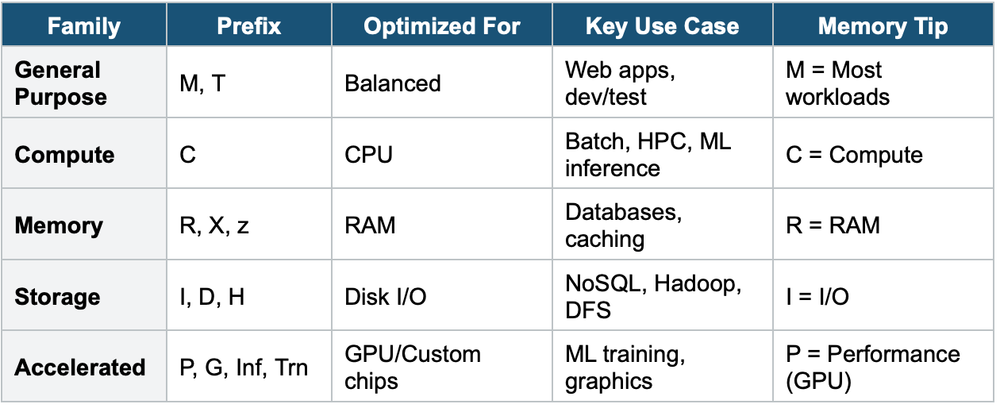
6. When to use
Use the right instance family to match your workload's compute, memory, storage, or networking requirements.
Key exam triggers:
- "compute-intensive"
- "memory-intensive"
- "storage-optimized"
- "general purpose"
- "GPU"
- "right-sizing"
- "cost optimization"
Exam Tip Instance family questions: "CPU-intensive batch processing" = C (Compute). "In-memory database" = R (Memory). "Large dataset on local disk" = I or D (Storage). "ML training with GPUs" = P (Accelerated). "Variable traffic web server" = T (Burstable). Graviton (g suffix) = best price/performance for ARM-compatible workloads.