1. Launching an EC2 Instance
When you launch an EC2 instance, you configure these settings:
- AMI: Amazon Machine Image — the template containing the OS and pre-installed software.
- Instance Type: The hardware configuration (vCPUs, memory, network).
- Key Pair: SSH key for secure login (Linux) or to decrypt the password (Windows).
- Network: VPC, subnet, public IP assignment.
- Storage: Root volume (EBS) and additional volumes.
- Security Group: Virtual firewall rules (inbound/outbound).
- IAM Role: Instance Profile for AWS service access (no access keys needed).
- User Data: Bootstrap script that runs once at first launch (install software, configure settings).
2. User Data (Bootstrap Script)
User Data is a script that runs automatically when the instance first starts. It runs as the root user.
#!/bin/bash
yum update -y
yum install -y httpd
systemctl start httpd
systemctl enable httpd
echo "<h1>Hello from $(hostname -f)</h1>" > /var/www/html/index.html
- Runs ONLY on the first boot (not on stop/start)
- Used for: installing packages, downloading files, starting services
- Logs are in /var/log/cloud-init-output.log
- Can be shell scripts (Linux) or PowerShell/batch (Windows)
3. Security Groups
A Security Group acts as a virtual firewall for your EC2 instance, controlling inbound and outbound traffic at the instance level.
Security Groups = Stateful Firewalls
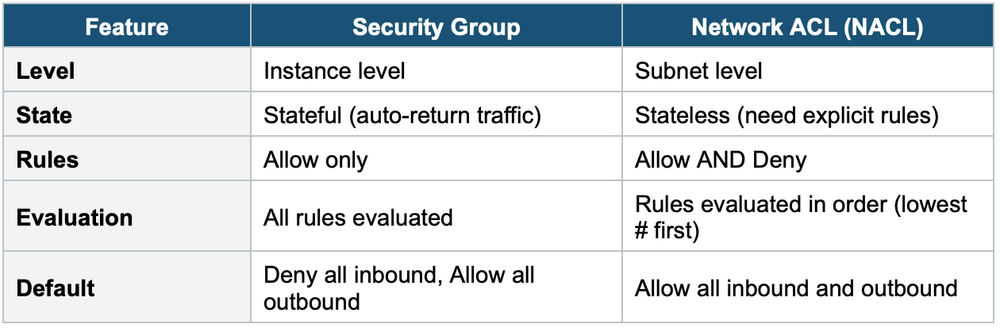
Security Groups are STATEFUL: if you allow inbound traffic, the response is automatically allowed outbound (and vice versa). You don’t need to create separate inbound and outbound rules for the same connection.
Key Rules
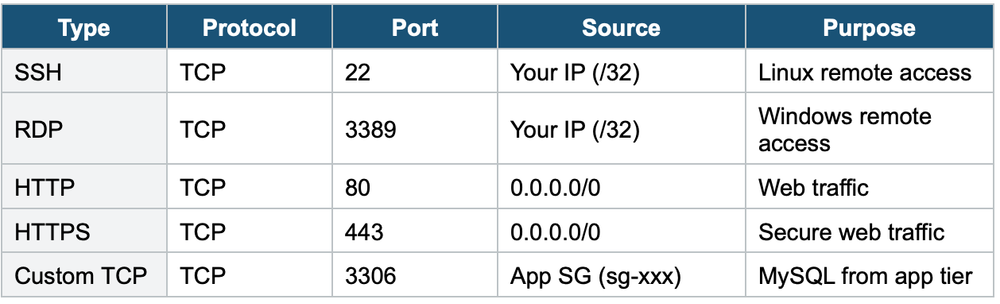
- All inbound traffic is DENIED by default
- All outbound traffic is ALLOWED by default
- Security Groups only have ALLOW rules — you cannot create Deny rules
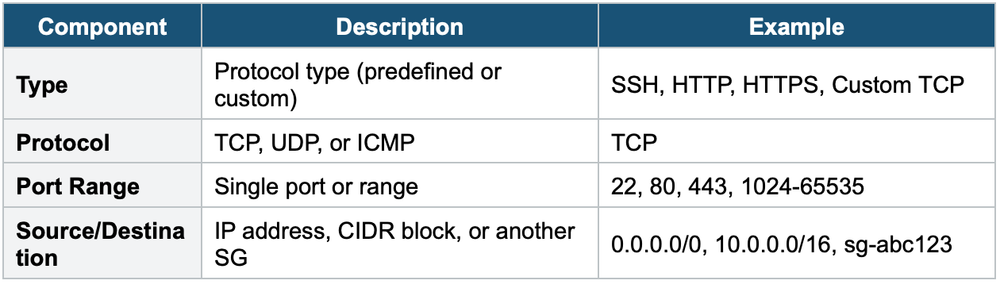
- You can reference another Security Group as a source (instead of an IP)
- Changes take effect immediately
- An instance can have up to 5 Security Groups
- Security Groups are scoped to a VPC (cannot be used across VPCs)
Security Group Rule Components
Common Security Group Rules
Security Group vs NACL
4. Key Pairs
- Key pairs are used for secure SSH access to Linux instances and to decrypt Windows passwords
- Consists of a public key (stored by AWS on the instance) and a private key (downloaded by you ONCE)
- You CANNOT retrieve the private key after creation — if lost, you cannot SSH into the instance
- Key pair types: RSA (default) or ED25519
- You can use the same key pair across multiple instances
- Alternative: EC2 Instance Connect (browser-based SSH) or SSM Session Manager (no SSH/key needed)
Important Warning
Never share your private key. If you lose it, you must stop the instance, detach the root volume, attach it to another instance, modify the authorized_keys file, and reattach. Better approach: use SSM Session Manager which requires no key pairs or open SSH ports.
5. EC2 Instance Connect & SSM Session Manager
- EC2 Instance Connect: Browser-based SSH in the AWS Console. Pushes a temporary SSH key. Requires port 22 open in the Security Group. Quick and easy for Linux instances.
- SSM Session Manager: Browser-based shell access via AWS Systems Manager. No SSH port needed (port 22 can be closed). No key pairs needed. Supports Linux AND Windows. Logs session activity to CloudTrail/S3/CloudWatch. Requires the SSM Agent (pre-installed on Amazon Linux and most recent AMIs) and an IAM role with SSM permissions.
6. When to use
Use these to launch EC2 instances securely with proper network access control and SSH/RDP authentication.
Key exam triggers:
- "launch an instance."
- "Allow traffic on port 80/443."
- "SSH access"
- "firewall rules"
- "key pair"
- "inbound/outbound rules"
Exam Tip
If the exam asks: "How to access EC2 without opening SSH port?" The answer is SSM Session Manager. If the exam mentions "no key pair management" or "audit session logs," the answer is also SSM Session Manager. Security Groups are STATEFUL (no need for return rules). NACLs are STATELESS. SGs have Allow only, NACLs have Allow + Deny.