1. Overview
EC2 offers multiple pricing models to optimize cost based on your workload pattern. Choosing the right model is one of the most tested topics on the exam.
2. On-Demand Instances
- Pay per second (Linux/Windows) or per hour (other OS)
- No upfront payment, no commitment
- Most expensive per-hour rate, but most flexible
- Launch and terminate anytime
- Ideal for: short-term, unpredictable workloads, testing, first-time applications
3. Reserved Instances (RI)
Commit to a specific instance type in a specific Region for 1 or 3 years in exchange for a significant discount (up to 72% vs On-Demand).
RI Options
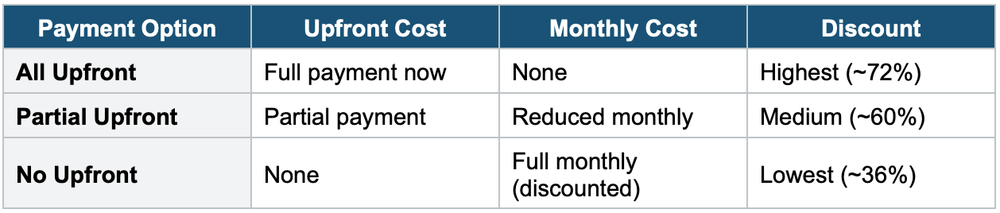
RI Types
- Standard RI: Locked to instance type, Region, OS, tenancy. Cannot change instance family. Can sell on the RI Marketplace.
- Convertible RI: Can change instance family, OS, tenancy, and scope. More flexible. Lower discount (~54% vs ~72%). Cannot sell on Marketplace.
- Scope: Regional (applies to any AZ in the Region, capacity not reserved) or Zonal (specific AZ, capacity reserved)
- RIs apply to usage automatically — no need to "attach" them to instances
4. Savings Plans
Commit to a consistent amount of compute usage ($/hour) for 1 or 3 years. More flexible than RIs.
Savings Plan Types
- Compute Savings Plan: Most flexible. Applies to EC2, Lambda, and Fargate. Any instance, family, size, Region, OS, tenancy. Up to 66% off.
- EC2 Instance Savings Plan: Locked to a specific instance family and Region. More discount (up to 72%). Can change size, OS, tenancy.
- Usage beyond the commitment is billed at On-Demand rates
- Savings Plans are recommended over RIs for most new commitments
5. Spot Instances
Use spare EC2 capacity at up to 90% discount vs On-Demand. AWS can reclaim (interrupt) your instance with 2 minutes' notice when it needs the capacity back.
- You define a maximum price you’re willing to pay
- If the spot price exceeds your max price, your instance is interrupted
- AWS sends a 2-minute warning before interruption
- Best for: batch processing, data analysis, image rendering, CI/CD, distributed workloads
Important Warning
NEVER use Spot Instances for critical workloads, databases, or anything that cannot tolerate interruption. Spot is for fault-tolerant, flexible workloads only. The exam will try to trick you into choosing Spot for databases — always reject this.
Spot Strategies
- Spot Fleet: Request a collection of Spot Instances (and optionally On-Demand) to meet the target capacity. Automatically replaces interrupted instances.
- Spot Block (Deprecated): Was used for 1–6 hour blocks. No longer available for new requests.
6. Dedicated Hosts
- A physical EC2 server dedicated entirely to you
- Most expensive EC2 option
- Gives visibility into sockets, cores, and host ID
- Required for: Bring Your Own License (BYOL) for software with per-socket/per-core licensing (e.g., Windows Server, SQL Server, Oracle)
- Compliance requirements that mandate physical server isolation
- Available as On-Demand or Reserved (1 or 3 years)
7. Dedicated Instances
- Instances run on hardware dedicated to your account (not shared with other accounts)
- May share hardware with other instances from YOUR account
- No visibility into physical host details (unlike Dedicated Hosts)
- Cannot use BYOL
- Cheaper than Dedicated Hosts but more expensive than shared tenancy
8. Capacity Reservations
- Reserve capacity in a specific AZ for any duration
- No billing discount — you pay On-Demand rates whether you use it or not
- Guarantees you’ll have capacity when you need it
- Combine with Savings Plans or Regional RIs for capacity + discount
- Ideal for: short-term guaranteed capacity for critical events
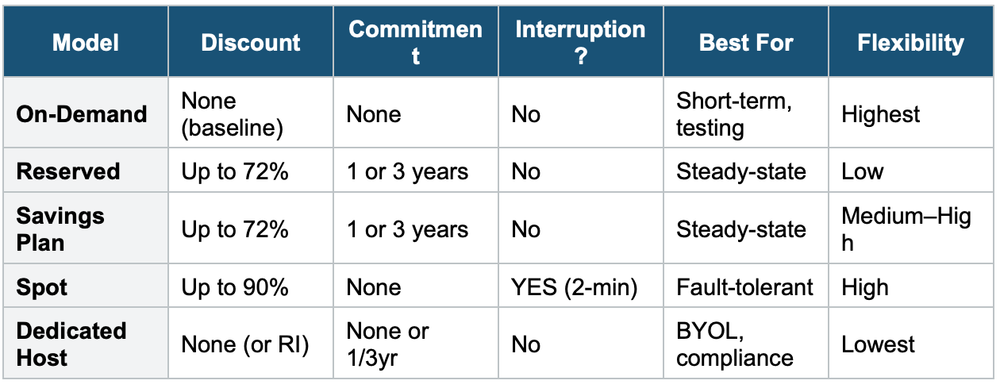
9. Pricing Models Comparison
Exam Tip
Pricing model questions: "Cheapest but can tolerate interruption" = Spot. "Steady-state 3-year workload" = Reserved or Savings Plan. "BYOL licensing" = Dedicated Host (not Dedicated Instance). "Short-term unpredictable" = On-Demand. "Flexible commitment across services" = Compute Savings Plan. Spot Instances can save up to 90% but NEVER for databases or critical workloads.