1. Overview
EC2 instances need storage. AWS provides two main types of block storage for EC2: Amazon EBS (network-attached, persistent) and Instance Store (physically attached, ephemeral).
2. Amazon EBS (Elastic Block Store)
EBS is a network-attached block storage service that provides persistent storage volumes for EC2 instances. Think of it as a virtual hard drive that can be attached to your instance.
Key Characteristics
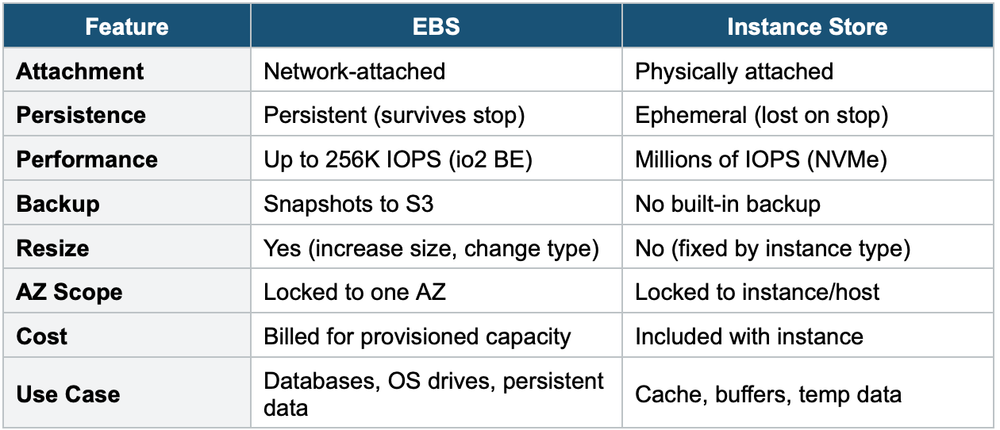
- Network-attached — uses the network to communicate with the instance (slight latency)
- Persistent — data survives instance stop/start and termination (if configured)
- Can be detached from one instance and attached to another (in the same AZ)
- Locked to a single AZ — an EBS volume in us-east-1a cannot be attached to an instance in us-east-1b
- Provisioned capacity — you specify size (GiB) and IOPS
- You are billed for provisioned capacity, even if unused
- Can be resized (increase size, change type) while attached
- Supports encryption (AES-256, managed by KMS)
Delete on Termination
- Root volume: Delete on Termination is ENABLED by default
- Additional volumes: Delete on Termination is DISABLED by default
- You can change this setting at launch or while running
3. EBS Volume Types
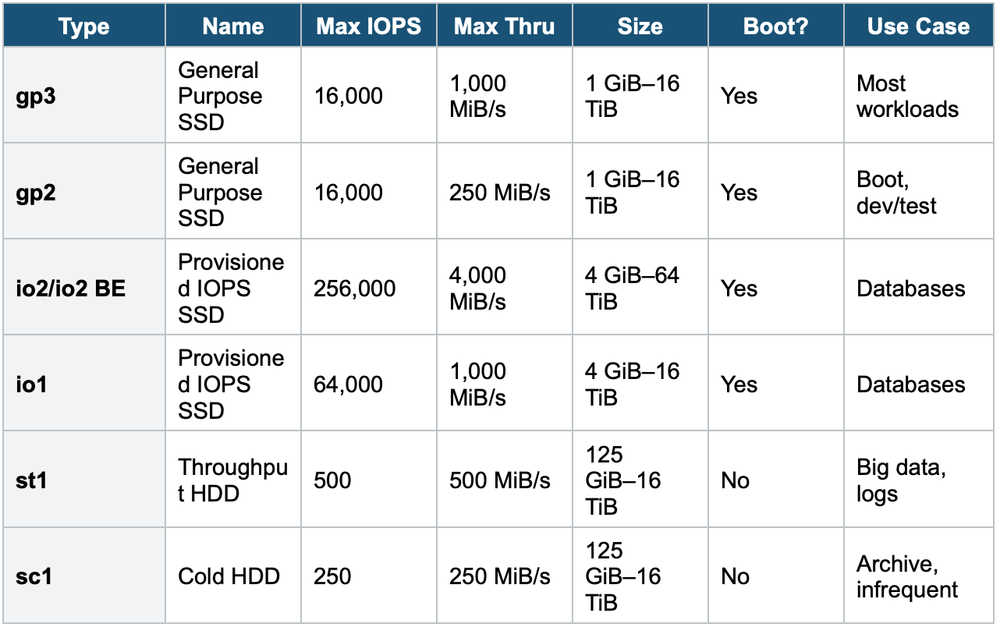
gp3 vs gp2
- gp3: Baseline 3,000 IOPS and 125 MiB/s included. You can independently scale IOPS and throughput.
- gp2: IOPS scales with volume size (3 IOPS per GiB, burst to 3,000). Cannot set IOPS independently.
- gp3 is recommended for new volumes — cheaper and more flexible than gp2
io2 Block Express (io2 BE)
- Highest-performance EBS volume: up to 256,000 IOPS and 4,000 MiB/s
- Sub-millisecond latency
- Supports Multi-Attach (attach to up to 16 Nitro instances in the same AZ)
- 99.999% durability (vs 99.8–99.9% for other types)
- Use for: mission-critical databases requiring extreme IOPS
EBS Multi-Attach io1 and io2 volumes support Multi-Attach, allowing the same EBS volume to be attached to up to 16 Nitro EC2 instances in the SAME AZ simultaneously. Each instance has full read/write permissions. Use case: clustered applications (e.g., Teradata). Applications must manage concurrent writes.
4. EBS Snapshots
- A point-in-time backup of an EBS volume stored in S3 (managed by AWS)
- Snapshots are incremental — only changed blocks are stored after the first snapshot
- Can create a new EBS volume from a snapshot in any AZ (enables cross-AZ migration)
- Can copy snapshots across Regions (enables cross-Region migration/DR)
- Can create AMIs from snapshots
Snapshot Features
- EBS Snapshot Archive: Move snapshots to an archive tier — 75% cheaper. Retrieval takes 24–72 hours.
- Recycle Bin: Protect against accidental deletion. Set retention rules (1 day to 1 year). Deleted snapshots go to the bin and can be recovered.
- Fast Snapshot Restore (FSR): Pre-warms snapshot data so volumes created from it have full performance immediately. No initialization lag. Expensive.
5. EC2 Instance Store
Instance Store provides temporary block storage that is physically attached to the host machine. It offers the highest possible I/O performance.
Key Characteristics
- Physically attached to the host — not network-attached (very high I/O)
- EPHEMERAL — data is lost when the instance is stopped, terminated, or the hardware fails
- Data survives instance reboot (but NOT stop or termination)
- Cannot be detached or reattached
- Size is determined by the instance type (you cannot change it)
- Free (included with the instance cost)
Important Warning Instance Store data is LOST on stop, termination, or hardware failure. NEVER store important data on Instance Store alone. Use it for temporary data: buffers, caches, scratch data, temp files. Back up important data to EBS or S3.
6. EBS vs Instance Store
7. When to use
Use these when you need to attach block storage to EC2 instances — each option has very different persistence and performance characteristics.
- EBS (Elastic Block Store): gp3 — IOPS and throughput are independently configurable. Better value than gp2. gp2 — IOPS tied to volume size (3 IOPS per GB). Burst up to 3,000 IOPS. io1/io2 — only types supporting multi-attach (attach to multiple instances in the same AZ). st1/sc1 — cannot be boot volumes. Only SSD types (gp/io) can boot. Encryption — can encrypt any EBS volume using KMS. Snapshots of encrypted volumes are also encrypted.
- Instance Store: Temporary data — scratch files, buffers, caches, temp processing. Extreme I/O performance — millions of IOPS for high-performance workloads. Data that's replicated elsewhere — e.g., distributed databases like Cassandra, HDFS that handle their own replication.
Exam Tip Storage questions: "Persistent block storage" = EBS. "Highest I/O, temporary data" = Instance Store. "gp3 vs gp2" = gp3 is cheaper and recommended. "Database with high IOPS" = io2 Block Express. "Cross-AZ migration" = EBS Snapshot → restore in new AZ. "HDD volumes cannot be boot volumes" (st1, sc1). EBS Multi-Attach = io1/io2 only, same AZ, up to 16 instances.