1. Overview
Elastic Load Balancing (ELB) automatically distributes incoming application traffic across multiple targets (EC2 instances, containers, IP addresses, Lambda functions) in one or more Availability Zones. It increases the availability and fault tolerance of your application
Why Use a Load Balancer?
1) Distribute traffic across multiple instances.
2) Expose a single DNS endpoint to users.
3) Seamlessly handle failure of downstream instances (health checks).
4) Provide SSL/TLS termination.
5) Enforce session stickiness.
6) Separate public traffic from private traffic.
7) Integrate with Auto Scaling for elastic architectures.
2. Application Load Balancer (ALB) — Layer 7
ALB operates at Layer 7 (HTTP/HTTPS). It is the most feature-rich load balancer and the best choice for modern web applications.
Key Features
- HTTP/HTTPS/gRPC traffic only (Layer 7)
- Path-based routing: route /api/* to one target group, /images/* to another
- Host-based routing: route api.example.com vs www.example.com to different target groups
- Query string / header-based routing
- Fixed response and redirect rules
- Supports WebSockets
- Native integration with AWS WAF (Web Application Firewall)
- Supports Lambda functions as targets
- Native authentication (OIDC, Cognito, SAML)
Target Types
- EC2 instances (by instance ID)
- IP addresses (including private IPs in peered VPCs)
- Lambda functions
- Containers (ECS tasks)
Key Concepts
- Target Group: A group of targets (instances, IPs, Lambdas) that receive traffic. Each target group has its own health check settings.
- Listener: A process that checks for connection requests. Configured with a protocol and port (e.g., HTTPS:443). Has rules that route to target groups.
- Listener Rules: Conditions (path, host, header, query) that determine which target group receives the request. Rules are evaluated in priority order.
Sticky Sessions (Session Affinity)
- Ensures a user is always routed to the same target instance
- Uses a cookie: application-based (custom) or duration-based (AWSALB)
- Can cause uneven load distribution if one user generates heavy traffic
- Configured at the target group level
Cross-Zone Load Balancing
- Distributes traffic evenly across all registered targets in ALL AZs
- ALB: Enabled by default, no charge
- Without cross-zone: each AZ’s load balancer node only sends traffic to targets in its own AZ
X-Forwarded-For Header
- ALB terminates the client connection and opens a new one to the target
- The target sees the ALB’s IP as the source, not the client’s IP
- ALB adds the X-Forwarded-For header containing the original client IP
- Also sets X-Forwarded-Port and X-Forwarded-Proto
3. Network Load Balancer (NLB) — Layer 4
NLB operates at Layer 4 (TCP/UDP/TLS). Designed for extreme performance and ultra-low latency.
Key Features
- TCP, UDP, TLS traffic (Layer 4)
- Handles millions of requests per second
- Ultra-low latency (~100 microseconds vs ~400ms for ALB)
- Static IP per AZ (1 Elastic IP per AZ)
- Preserves the client’s source IP address (no X-Forwarded-For needed)
- Supports TLS termination
- Cross-zone: disabled by default (charges apply if enabled)
Target Types
- EC2 instances
- IP addresses
- ALB (NLB in front of ALB — for static IP + Layer 7 features)
When to Use NLB
- Extreme performance/millions of requests per second
- Ultra-low latency requirements
- You need a static IP or Elastic IP for your load balancer
- TCP/UDP protocols (non-HTTP)
- You need to preserve the source IP address
4. Gateway Load Balancer (GWLB) — Layer 3
GWLB operates at Layer 3 (IP level). It is designed to deploy, scale, and manage third-party network virtual appliances (firewalls, IDS/IPS, deep packet inspection).
Key Features
- Operates at Layer 3 (IP packets)
- Uses the GENEVE protocol on port 6081
- Transparent to the traffic — all traffic flows through the appliances
- Single entry/exit point for all traffic
- Distributes traffic across the virtual appliance fleet
- Scales appliances up/down automatically
How It Works
- Step 1: Traffic enters the VPC through an Internet Gateway
- Step 2: Route table sends traffic to the GWLB endpoint
- Step 3: GWLB forwards traffic to the appliance fleet (target group)
- Step 4: Appliances inspect/filter the traffic and send it back to GWLB
- Step 5: GWLB sends the traffic to the final destination
Use Cases
- Third-party firewalls (Palo Alto, Fortinet, Check Point)
- Intrusion Detection / Prevention Systems (IDS/IPS)
- Deep Packet Inspection
- Network traffic analysis
5. Classic Load Balancer (CLB) — Legacy
CLB is the original AWS load balancer. It supports both Layer 4 and Layer 7, but with limited features. AWS recommends migrating to ALB or NLB.
- Supports HTTP, HTTPS, TCP, and SSL
- No path-based or host-based routing
- No target groups — instances are registered directly
- Health checks are basic (TCP or HTTP)
- Fixed response and redirect are not supported
- Cross-zone: disabled by default (no charge if enabled)
- DEPRECATED for new applications — use ALB or NLB
Important Warning CLB is legacy. Never choose CLB for new architectures on the exam. If a question mentions Layer 7 features (path routing, host routing), the answer is ALB. If it mentions Layer 4, static IP, or ultra-low latency, the answer is NLB. CLB may appear as a distractor.
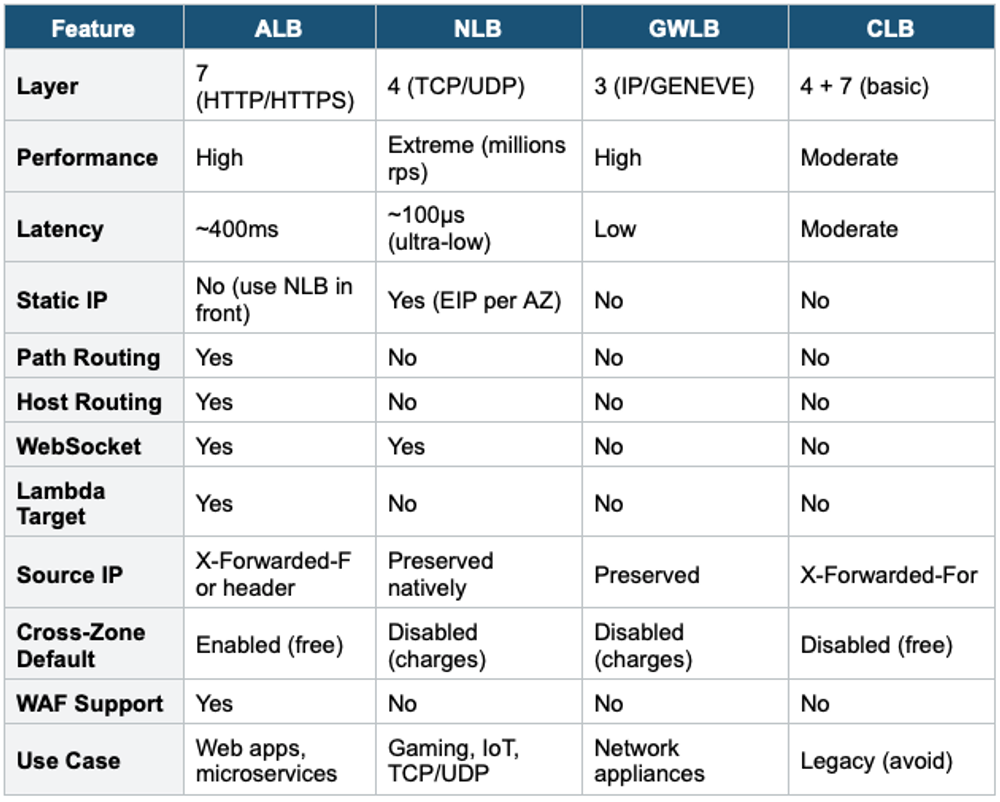
6. Load Balancer Comparison
7. SSL/TLS Termination
- Load balancers can terminate SSL/TLS connections (decrypt HTTPS traffic)
- Uses AWS Certificate Manager (ACM) to provision and manage SSL certificates for free
- ALB: supports multiple SSL certificates via Server Name Indication (SNI) — one cert per target group
- NLB: supports SNI as well
- CLB: supports only ONE SSL certificate per CLB
Server Name Indication (SNI) SNI allows a load balancer to serve multiple SSL certificates on a single listener. The client indicates which hostname it’s connecting to in the TLS handshake, and the LB selects the correct certificate. Only ALB and NLB support SNI. CLB does not — you need one CLB per certificate.
8. Connection Draining / Deregistration Delay
- When an instance is being deregistered or becomes unhealthy, the LB stops sending NEW requests to it
- Existing in-flight requests are given time to complete (deregistration delay)
- Default: 300 seconds. Range: 0–3600 seconds.
- Set to 0 for short-lived requests. Set higher for long-running requests.
- Called "Connection Draining" in CLB, "Deregistration Delay" in ALB/NLB
9. ELB + Auto Scaling Integration
ELB and Auto Scaling work together as the foundation of elastic, highly available architectures:
- ASG registers new instances with the ELB target group automatically
- ASG deregisters terminating instances from the ELB automatically
- ELB health checks can be used by ASG to detect and replace unhealthy instances
- This combination provides: automatic scaling + load distribution + health-based replacement
Classic HA Architecture:

Users → Route 53 (DNS)
       → ALB (multi-AZ, SSL termination)
          → Target Group
             → ASG (multi-AZ, min 2, desired 4, max 10)
                → EC2 instances (spread across AZs)
                   → EBS volumes
                   → RDS Multi-AZ (database)
Exam Tip ELB questions: "HTTP path-based routing" = ALB. "Static IP" = NLB. "Third-party firewall appliances" = GWLB. "Ultra-low latency TCP" = NLB. "Lambda as target" = ALB. "Multiple SSL certificates" = ALB or NLB with SNI (not CLB). "Preserve source IP natively" = NLB. Cross-zone is free for ALB, charges for NLB/GWLB. CLB = legacy, never use for new architectures. ALB + ASG = most common HA pattern.