1. AWS-Recommended IAM Best Practices
AWS provides official best practices for IAM. These are frequently tested on the exam:
1. Lock Away the Root User Access Keys
- Do NOT create access keys for the root user
- Enable MFA on the root user immediately
- Use the root user only for tasks that require it
2. Create Individual IAM Users
- Never share credentials between people
- Each person gets their own IAM user
- This provides individual audit trails in CloudTrail
3. Use Groups to Assign Permissions
- Attach policies to groups, not individual users
- Add/remove users from groups to manage permissions
- Makes permission management scalable
4. Grant Least Privilege
- Start with minimum permissions and grant additional as needed
- Do NOT start with full access and then try to restrict
- Use AWS Access Analyzer to identify unused permissions
- Regularly review and remove unnecessary permissions
Principle of Least Privilege Every user, role, and application should have ONLY the minimum permissions necessary to perform their specific task. This is the most important IAM security principle and is tested extensively on the exam.
5. Enable MFA (Multi-Factor Authentication)
- Enable MFA for the root user — mandatory best practice
- Enable MFA for all IAM users, especially those with console access
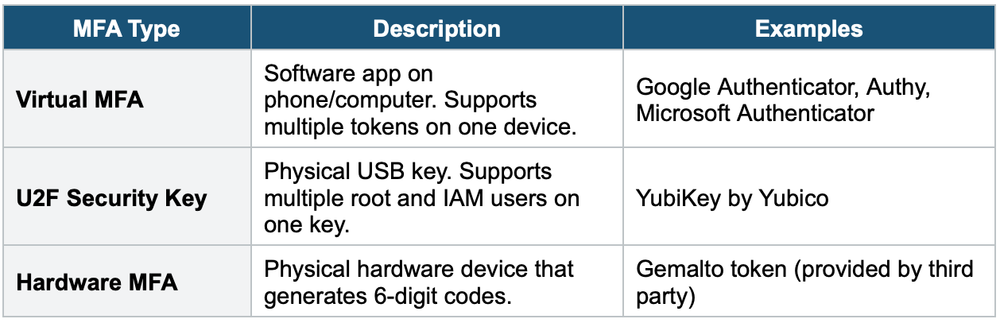
- Use a virtual MFA device (Google Authenticator, Authy), hardware MFA, or U2F security key
6. Use Roles for Applications on EC2
- Never embed access keys in application code or EC2 instances
- Use IAM roles via Instance Profiles
- Roles provide temporary, auto-rotated credentials
7. Rotate Credentials Regularly
- Rotate access keys periodically
- Use the IAM Credential Report to audit credential age
- Set a password policy that requires rotation
8. Use IAM Access Analyzer
- Identifies resources shared with external entities
- Validates policies against best practices
- Generates least-privilege policies based on access activity
2. Password Policy
IAM lets you set a custom password policy for your account:
- Minimum password length
- Require specific character types (uppercase, lowercase, numbers, symbols)
- Allow/prevent users from changing their own passwords
- Require password expiration (e.g., every 90 days)
- Prevent password reuse (remember the last N passwords)
3. MFA Deep Dive
4. IAM Security Tools
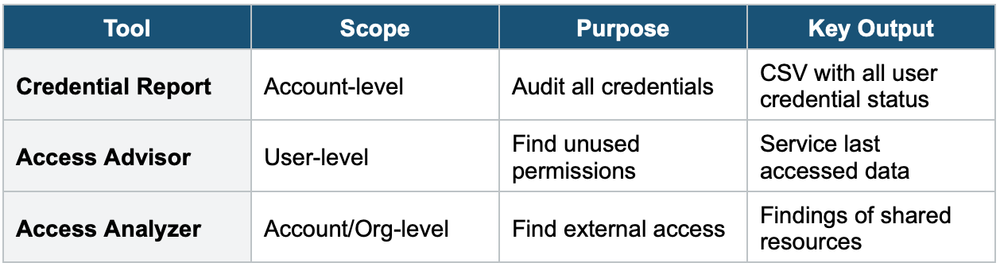
IAM Credential Report (Account-Level)
- Lists all IAM users and the status of their credentials
- Shows: password age, access key age, MFA status, last login, last key usage
- Use it to audit and identify unused or old credentials
- Download as CSV from the IAM Console
IAM Access Advisor (User-Level)
- Shows the services a specific user has accessed and when they last accessed them
- Helps you identify unused permissions that can be removed
- Supports the principle of least privilege
IAM Access Analyzer
- Identifies resources that are shared with external entities (e.g., S3 buckets, IAM roles, KMS keys, Lambda functions, SQS queues)
- Helps you identify unintended access from outside your account
- Can generate least-privilege policies based on CloudTrail access logs
- Validates your policies against IAM best practices
5. IAM Security Tools Comparison
6. IAM Conditions
Conditions let you add fine-grained control to your policies. Common condition keys:
- aws:SourceIp — Restrict access to specific IP addresses or CIDR ranges
- aws:RequestedRegion — Restrict actions to specific AWS Regions
- aws:MultiFactorAuthPresent — Require MFA for certain actions
- aws:PrincipalTag — Match tags on the IAM principal
- aws:CurrentTime — Restrict access based on time of day
- s3:prefix — Restrict S3 actions to specific key prefixes
Example: Require MFA for Certain Actions
{
  "Effect": "Deny",
  "Action": "ec2:TerminateInstances",
  "Resource": "*",
  "Condition": {
    "BoolIfExists": {
      "aws:MultiFactorAuthPresent": "false"
    }
  }
}
This denies terminating EC2 instances unless MFA is present in the session.
7. IAM Permission Boundaries
A permissions boundary is an advanced feature that sets the MAXIMUM permissions an IAM user or role can have. It does NOT grant permissions — it limits what policies CAN grant.
- Permissions boundary + Identity policy = effective permissions (intersection of both)
- Used to delegate administration safely — allow junior admins to create users/roles but cap their maximum permissions
- Only applies to users and roles, NOT groups
8. When to use
Use IAM best practices when you need to control who can access what in your AWS account securely.
Common scenarios:
- Setting up a new AWS account — Apply security foundations from day one.
- Managing users and permissions — Ensure least privilege across the organization.
- Audit and compliance — Prove access controls meet security standards.
- Multi-account environments — Centralize identity management across AWS Organizations.
- Incident prevention — Reduce attack surface by limiting unnecessary access.
Permission Boundaries Analogy Think of a permission boundary as a fence around a yard. The identity policy defines where you can walk inside the yard. The boundary defines the edges of the yard. Even if your identity policy says you can go anywhere, you cannot go beyond the fence (boundary).
Exam Tip The exam tests: Credential Report = account-level audit. Access Advisor = user-level last accessed. Access Analyzer = find external sharing. For security questions, the answer often involves: least privilege, MFA, roles instead of keys, and Credential Report for auditing. Permission Boundaries are tested as a way to limit delegated admin powers.