1. Overview
Understanding how AWS evaluates policies is critical for passing any AWS exam and for designing secure architectures. When a principal (user, role) makes a request, AWS evaluates all applicable policies to determine whether to allow or deny the request.
2. The Full Evaluation Flow
AWS evaluates policies in this exact order. At each step, a Deny immediately stops the process:
- Step 1 — Explicit Deny Check: If ANY applicable policy has an explicit Deny for the action, the request is DENIED. Full stop. No other evaluation matters.
- Step 2 — SCP Check (Organizations): If the account is part of AWS Organizations, the Service Control Policy must allow the action. If the SCP doesn’t include an Allow, the request is denied (implicit deny from SCP).
- Step 3 — Resource-Based Policy: If the resource has a resource-based policy (e.g., S3 bucket policy) that allows the principal, access is granted. This can work even without an identity-based allow (for same-account access).
- Step 4 — Permission Boundary Check: If a permission boundary is set on the user/role, the action must be allowed by the boundary. If not, denied.
- Step 5 — Session Policy Check: If session policies exist (for assumed roles or federated users), the action must be allowed by the session policy.
- Step 6 — Identity-Based Policy: The user/role’s identity-based policies (managed + inline) are checked. If any Allow exists, access is granted. If no Allow exists, access is denied (implicit deny).
The Golden Rules
1) Explicit Deny ALWAYS wins over any Allow.
2) By default, everything is implicitly denied.
3) An explicit Allow overrides the implicit deny.
4) For access to be granted, all applicable policy layers must Allow (except resource-based policies which can grant access independently for same-account).
3. Policy Types and Where They Apply
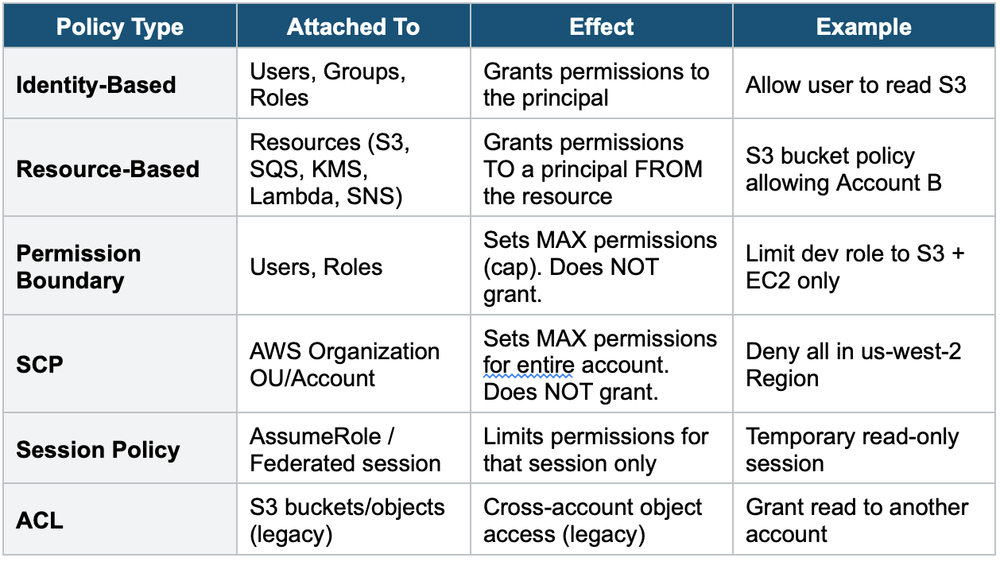
4. Same-Account vs. Cross-Account Access
Same-Account Access
When a principal and resource are in the SAME account:
- Either an identity-based policy OR a resource-based policy can grant access
- If the identity policy allows OR the resource policy allows, access is granted
- This is a UNION (OR logic) of permissions
Cross-Account Access
When a principal and resource are in DIFFERENT accounts:
- BOTH the identity-based policy (in the caller’s account) AND the resource-based policy (in the resource’s account) must Allow
- This is an INTERSECTION (AND logic) of permissions
- Exception: If the resource policy specifies the IAM role ARN as the principal (not the account), only the resource policy is needed
Same-Account vs Cross-Account Same account: Identity OR Resource policy can grant access (union). Cross-account: Identity AND Resource policy must both grant access (intersection). This is one of the most tested IAM concepts on the SA Associate exam.
5. The "Effective Permissions" Intersection
When multiple policy layers exist, the effective permissions are the INTERSECTION of all layers:
Effective Permissions =
  SCP
  ∩ Permission Boundary
  ∩ Session Policy
  ∩ Identity-Based Policy

If ANY layer does not Allow, the action is denied.
An explicit Deny in ANY layer overrides everything.
6. Common Exam Scenarios
- Scenario 1: User has Allow on s3:*, but SCP denies s3:DeleteBucket. Result: DeleteBucket is DENIED (SCP overrides).
- Scenario 2: User has no identity policy, but the S3 bucket policy allows the user. Result: ALLOWED (same account, resource policy is sufficient).
- Scenario 3: User in Account A tries to access S3 in Account B. User has Allow, but the bucket has no policy for Account A. Result: DENIED (cross-account needs both).
- Scenario 4: User has Allow on ec2:*, permission boundary only allows s3:*. Result: EC2 actions DENIED (boundary caps permissions).
Exam Tip Policy evaluation is tested on every AWS exam. The key patterns:
1) Explicit Deny always wins.
2) Same-account = OR logic.
3) Cross-account = AND logic.
4) SCP and Permission Boundary are caps, not grants.
5) Effective permissions = intersection of all layers.