1. What is an IAM Role?
An IAM role is an AWS identity with specific permissions, but instead of being associated with a specific person, a role is intended to be assumable by anyone or anything that needs it. Roles provide temporary security credentials.
Key Difference: User vs Role
IAM User = long-term credentials (password, access keys) for a specific person or application. IAM Role = temporary credentials that can be assumed by users, services, or external accounts. Think of a role like a "hat" you can put on temporarily to gain specific permissions.
2. Key Characteristics of Roles
- Roles do NOT have long-term credentials (no passwords, no permanent access keys)
- When a role is assumed, AWS STS provides temporary security credentials (access key, secret key, session token)
- Temporary credentials expire automatically (default: 1 hour, configurable up to 12 hours)
- Multiple entities can assume the same role
- A role has two types of policies: trust policy and permissions policy
3. Two Policies on Every Role
Trust Policy (Who Can Assume the Role)
Defines WHO is allowed to assume this role. This is a JSON policy document attached to the role.
{
  "Version": "2012-10-17",
  "Statement": [
    {
      "Effect": "Allow",
      "Principal": {
        "Service": "ec2.amazonaws.com"
      },
      "Action": "sts:AssumeRole"
    }
  ]
}
This trust policy allows the EC2 service to assume the role.
Permissions Policy (What the Role Can Do)
Defines WHAT the role is allowed to do once assumed. This is a standard IAM policy (same structure as user/group policies).
{
  "Version": "2012-10-17",
  "Statement": [
    {
      "Effect": "Allow",
      "Action": "s3:GetObject",
      "Resource": "arn:aws:s3:::my-bucket/*"
    }
  ]
}
4. Common Use Cases for Roles
Use Case 1: EC2 Instance Role (Most Common)
- You want an EC2 instance to access other AWS services (e.g., read from S3)
- Create a role with S3 permissions, attach it to the EC2 instance via an Instance Profile
- The application on EC2 uses the role’s temporary credentials automatically — no access keys needed
- This is the PREFERRED way to grant AWS access to EC2 instances
Important Warning
NEVER put access keys on an EC2 instance. Always use IAM roles instead. Embedding access keys is a security risk — if the instance is compromised, the keys are exposed. Roles provide temporary, automatically rotated credentials.
Use Case 2: Cross-Account Access
- Account A needs to access resources in Account B
- Account B creates a role with the necessary permissions and a trust policy allowing Account A
- Users in Account A "assume" the role in Account B to gain temporary access
- No need to create IAM users in Account B
Use Case 3: AWS Service Roles
- Lambda functions assuming a role to access DynamoDB
- ECS tasks assuming a role to access S3
- CloudFormation assumes a role to create resources
Use Case 4: Identity Federation
- External users (e.g., corporate Active Directory, Google, Facebook) assume a role to access AWS
- No IAM user needed — federated identity maps to a role
- Uses SAML 2.0, OIDC, or AWS SSO (now IAM Identity Center)
5. How AssumeRole Works
The process of assuming a role involves the AWS Security Token Service (STS):
- Step 1: The caller (user, service, or application) sends an sts:AssumeRole request to AWS STS.
- Step 2: STS checks the role’s trust policy to verify that the caller is allowed.
- Step 3: If allowed, STS returns temporary security credentials (Access Key ID, Secret Access Key, Session Token).
- Step 4: The caller uses these temporary credentials to make API calls with the role’s permissions.
- Step 5: Credentials expire after the session duration (default 1 hour).
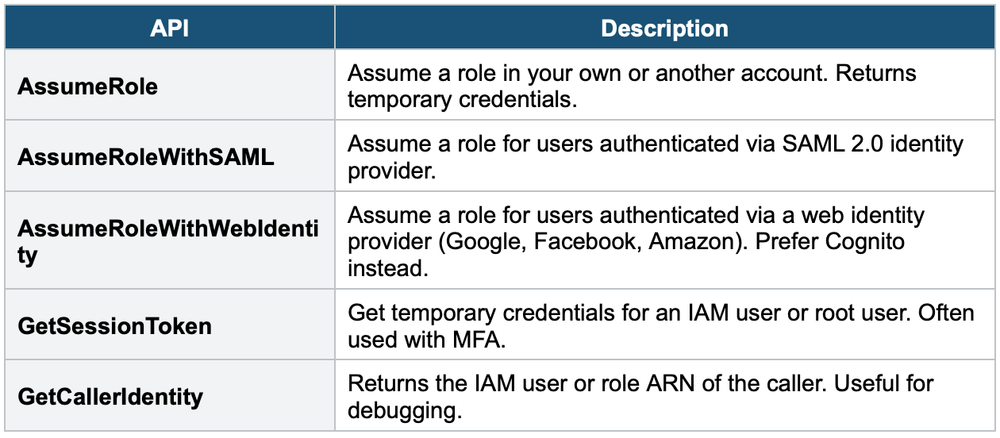
6. STS (Security Token Service) Key APIs
7. Instance Profiles
An Instance Profile is a container for an IAM role that you can use to pass role information to an EC2 instance at launch.
- When you create a role in the Console for EC2, an Instance Profile is automatically created with the same name
- In CLI/SDK, you must create the Instance Profile separately and add the role to it
- One Instance Profile = one role. One role can be in multiple Instance Profiles.
Exam Tip
The exam often asks: "How should an EC2 instance access S3 securely?" The answer is ALWAYS an IAM role (via Instance Profile). Never access keys. For cross-account access, the answer is always AssumeRole. For federated users, the answer is a role with SAML or OIDC.