1. Incident Response Framework
Incident response (IR) is the process of detecting, investigating, containing, eradicating, and recovering from security incidents. AWS follows NIST SP 800-61 and provides native services for each IR phase.
Core Principle
On AWS, incident response is fundamentally different from on-premises. You can: automate detection (GuardDuty, Security Hub), instantly isolate resources (Security Groups, IAM), capture forensic evidence programmatically (EBS snapshots, memory dumps), and rebuild infrastructure from IaC instead of cleaning infected systems. Automation is key.
2. IR Phases on AWS
NIST Incident Response Lifecycle on AWS:

Phase 1: PREPARATION
  • Enable: GuardDuty, Security Hub, CloudTrail, Config, VPC Flow Logs
  • Create: IR runbooks (SSM Automation), response team, escalation paths
  • Pre-provision: forensic VPC, IR IAM roles, isolated subnets
  • Practice: regular IR drills, tabletop exercises

Phase 2: DETECTION & ANALYSIS
  • GuardDuty: threat detection (recon, instance compromise, credential abuse)
  • Security Hub: aggregated findings, compliance status
  • CloudTrail: who did what (API audit)
  • VPC Flow Logs: network traffic analysis
  • CloudWatch: anomalous metrics, log pattern alerts
  • Detective: investigate and visualize relationships

Phase 3: CONTAINMENT, ERADICATION & RECOVERY
  • Contain: isolate via SG (deny all), disable IAM keys, revoke sessions
  • Preserve: EBS snapshot, memory dump, CloudTrail logs to S3
  • Eradicate: terminate compromised instances, rotate credentials
  • Recover: rebuild from AMI/IaC, restore from clean backup

Phase 4: POST-INCIDENT ACTIVITY
  • Lessons learned, update runbooks, improve detection rules
  • Root cause analysis with Detective, CloudTrail, Athena
3. AWS Services for Each IR Phase
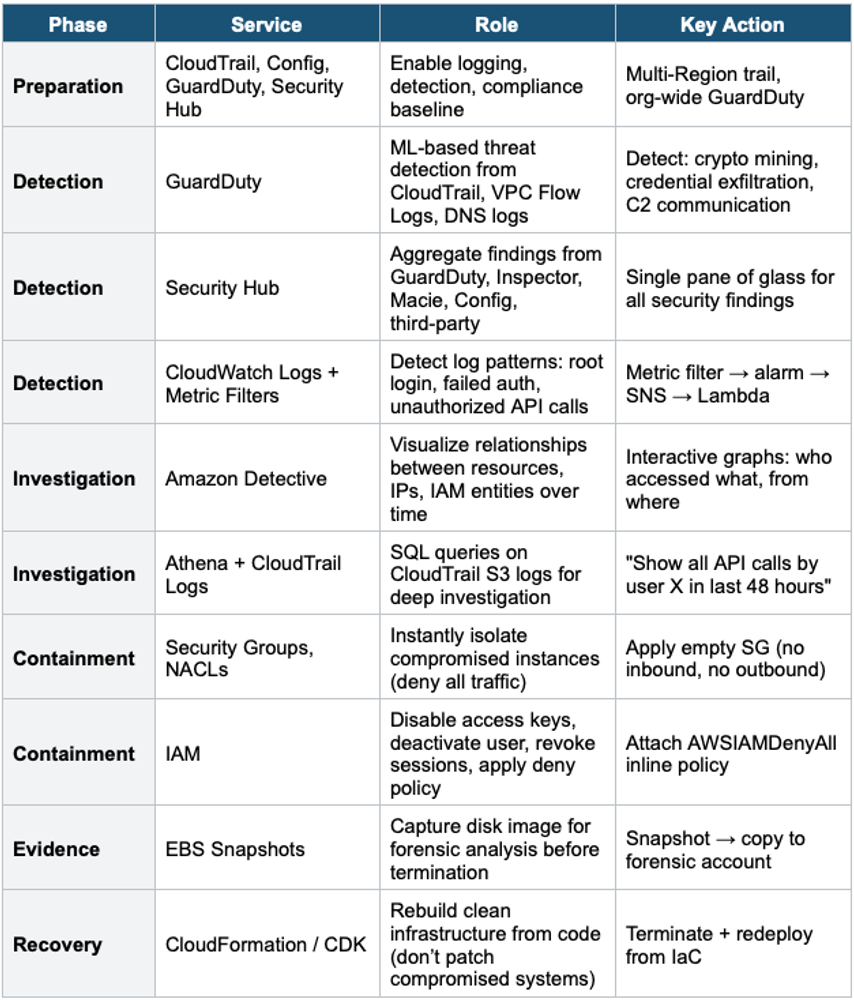
4. Common Incident Scenarios
Scenario 1: Compromised EC2 Instance
Incident: GuardDuty detects CryptoCurrency:EC2/BitcoinTool.B!DNS

Response Steps:
  1. ISOLATE: Apply "forensic" SG (no inbound, no outbound)
     - Do NOT terminate yet (preserve evidence)
  2. PRESERVE:
     - Create EBS snapshot of all volumes
     - Capture metadata: instance ID, SG, IAM role, VPC, AZ
     - Copy snapshot to isolated forensic account
  3. INVESTIGATE:
     - CloudTrail: What API calls did the instance role make?
     - VPC Flow Logs: what IPs did it communicate with?
     - Detective: visualize the blast radius
  4. CONTAIN:
     - Detach IAM instance role (stop further API abuse)
     - Block C2 IPs in NACL
  5. ERADICATE:
     - Terminate the compromised instance
     - Rotate any credentials the role had access to
  6. RECOVER:
     - Launch new instance from clean AMI via ASG / IaC
     - Verify with Inspector scan before returning to production
Scenario 2: Compromised IAM Credentials
Incident: GuardDuty detects UnauthorizedAccess:IAMUser/ConsoleLogin
         from unusual location + new API calls

Response Steps:
  1. DISABLE: Deactivate the access key immediately
     aws iam update-access-key --status Inactive
  2. REVOKE SESSIONS:
     Attach inline policy: { "Effect": "Deny", "Action": "*",
       "Resource": "*", "Condition": {"DateLessThan":
         {"aws:TokenIssueTime": "<compromise_time>"}} }
  3. INVESTIGATE:
     - CloudTrail: all API calls by this user in the last 72 hours
     - Athena query: SELECT * FROM cloudtrail WHERE
       userIdentity.userName = 'compromised_user'
     - What resources were created/modified/deleted?
  4. ERADICATE:
     - Delete compromised access keys, create new ones
     - Reset password + enforce MFA
     - Review and revoke any resources created by the attacker
  5. RECOVER:
     - Verify account is clean
     - Enable MFA on all IAM users
     - Review IAM policies for over-permissive access
Scenario 3: S3 Data Exposure
Incident: Macie detects PII in a public S3 bucket

Response Steps:
  1. CONTAIN: Block public access immediately
     - S3 Block Public Access: enable at bucket level
     - Bucket policy: explicit deny for public access
  2. INVESTIGATE:
     - S3 Access Logs / CloudTrail: who accessed the data?
     - Macie: What sensitive data was exposed? (SSN, credit cards?)
     - How long was it public? (Config timeline)
  3. ASSESS:
     - Determine scope of exposure
     - Check if data was cached by search engines/CDNs
  4. ERADICATE:
     - Remove any remaining public policies/ACLs
     - Enable S3 Block Public Access at the account level
  5. NOTIFY:
     - If PII exposed: legal/compliance notification may be required
     - Notify affected users if applicable
  6. PREVENT:
     - Config Rule: s3-bucket-public-read-prohibited
     - SCPs: deny s3:PutBucketPolicy with public access
Key IR Principle: Rebuild, Don’t Patch
On AWS, it’s faster and safer to REBUILD from IaC than to try to clean a compromised instance. Terminate the bad instance, deploy a new one from a known-good AMI or CloudFormation template. Patching a compromised system risks missing backdoors. This is the #1 AWS IR best practice.
Exam Tip
IR Phase 1: "Detect threats" = GuardDuty. "Aggregate findings" = Security Hub. "Investigate relationships" = Detective. "Audit API calls" = CloudTrail + Athena. "Isolate instance" = empty Security Group. "Disable credentials" = deactivate access keys + deny policy. "Preserve evidence" = EBS snapshot. "Rebuild" = IaC (don’t patch). "S3 exposure" = Block Public Access + Macie.