1. Why Multi-Account?
AWS best practice is to use multiple accounts to isolate workloads, environments, teams, and billing. A single account for everything creates security, blast radius, and governance problems.
Core Principle Multiple accounts = isolation. Separate accounts for: production vs dev/staging, security vs application, logging vs workloads, different teams/business units. If one account is compromised, others are protected. AWS Organizations manages all accounts centrally.
2. AWS Organizations
- Management Account: root of the organization. Creates/invites member accounts. Pays the bill.
- Organizational Units (OUs): hierarchical groupings (e.g., Production OU, Dev OU, Security OU)
- Service Control Policies (SCPs): permission guardrails applied to OUs/accounts. Restrict what accounts CAN do.
- Consolidated Billing: one bill for all accounts. Volume discounts. RI/SP sharing.
- Delegated Administrators: delegate service management to non-management accounts
Recommended OU Structure
AWS Organizations Structure:

  Root
    ├─ Security OU
    │    ├─ Log Archive Account (centralized CloudTrail, Config, Flow Logs)
    │    └─ Security Tooling Account (GuardDuty, Security Hub, Detective)
    ├─ Infrastructure OU
    │    ├─ Networking Account (Transit Gateway, VPCs, Direct Connect)
    │    └─ Shared Services Account (CI/CD, AD, DNS)
    ├─ Sandbox OU
    │    └─ Developer sandbox accounts (experimentation, learning)
    ├─ Workloads OU
    │    ├─ Production OU
    │    │    ├─ App A Prod Account
    │    │    └─ App B Prod Account
    │    └─ Non-Production OU
    │         ├─ App A Dev Account
    │         └─ App A Staging Account
    └─ Suspended OU (decommissioned accounts with deny-all SCP)
3. AWS Control Tower
- Automates multi-account setup following AWS best practices (landing zone)
- Sets up: Organizations, OUs, accounts, SCPs, SSO, CloudTrail, Config, VPC
- Guardrails: preventive (SCPs that block actions) and detective (Config rules that detect violations)
- Account Factory: self-service account provisioning with pre-configured templates
- Dashboard: centralized compliance view across all accounts
- Use for: getting started with a multi-account. Recommended for all new AWS environments.
4. Cross-Account Patterns
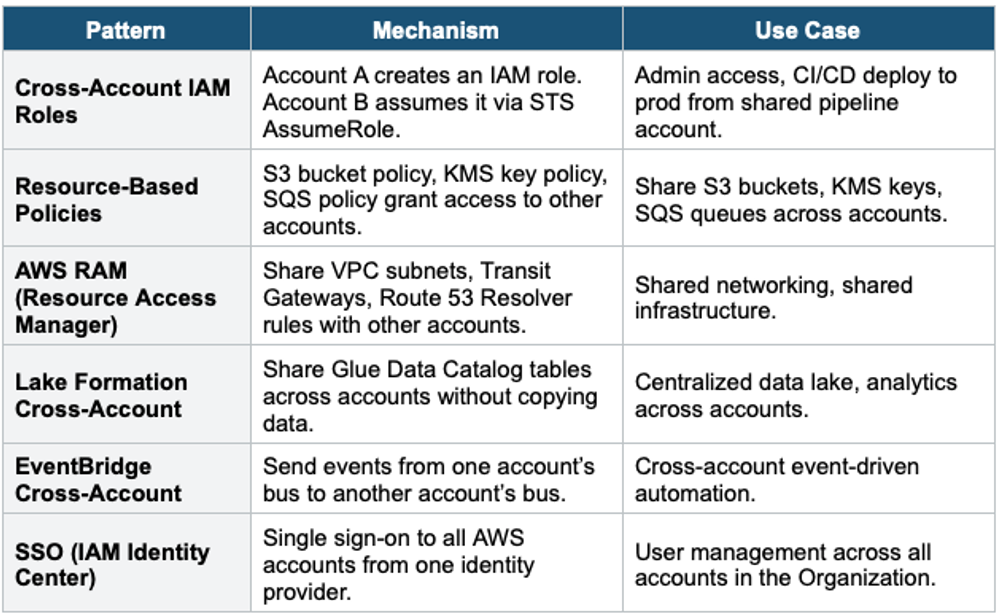
5. Multi-Region Architecture
When to Go Multi-Region 1) Disaster Recovery: protect against Region outage (Pilot Light, Warm Standby, Active-Active). 2) Low Latency: serve users from the nearest Region (global applications). 3) Data Residency: comply with data sovereignty laws (data must stay in a specific country). 4) Compliance: regulations requiring geographic separation. Multi-Region is expensive — only used when one of these four requirements exists.
Multi-Region Services
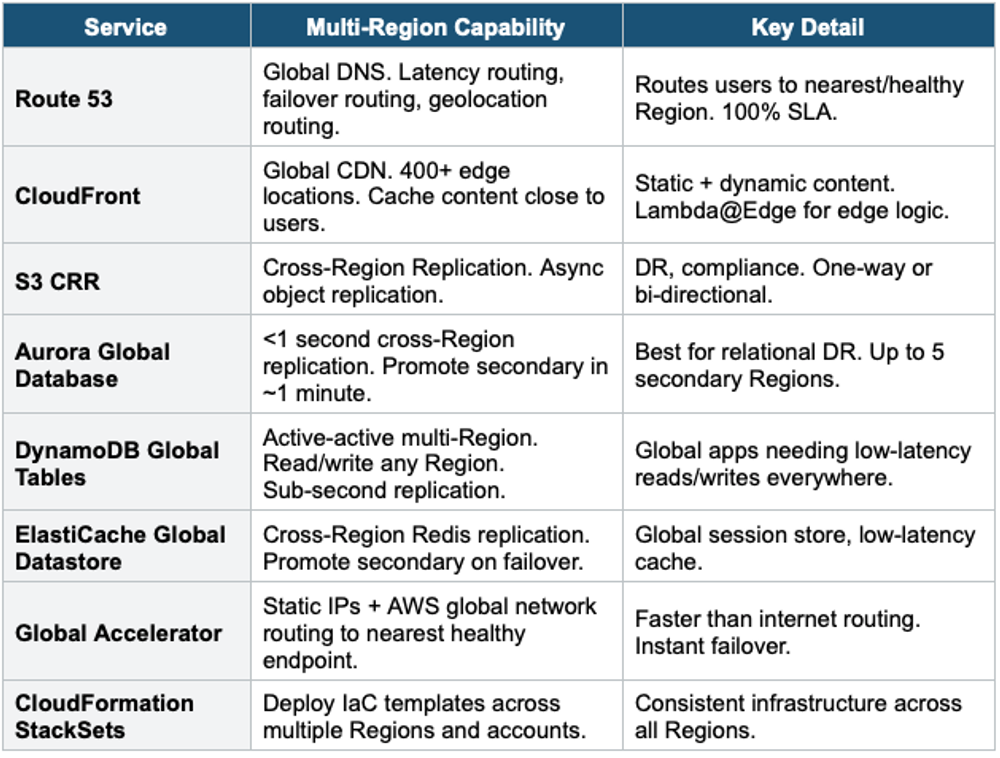
Global Application Architecture
Global Active-Active Architecture:

  Users (worldwide)
       |
  Route 53 (latency-based routing)
    |──────────────────|
  us-east-1              eu-west-1
  CloudFront             CloudFront
  ALB → ECS              ALB → ECS
  Aurora (writer)        Aurora (reader, promote on DR)
       |                      |
  Aurora Global Database (replication <1s)
  DynamoDB Global Tables (active-active)
  S3 + CRR (bidirectional)

  IAM Identity Center: SSO across all accounts + Regions
  AWS Config Aggregator: compliance across all accounts + Regions
  CloudTrail Organization Trail: audit across all accounts + Regions
Exam Tip Multi-Account/Region: "Multi-account best practice" = AWS Organizations + Control Tower. "Guardrails" = SCPs (preventive) + Config rules (detective). "Self-service accounts" = Control Tower Account Factory. "Share VPC subnets" = RAM. "SSO across accounts" = IAM Identity Center. "Global users" = Route 53 latency + CloudFront + DynamoDB Global Tables. "Relational DR" = Aurora Global DB. "Active-active NoSQL" = DynamoDB Global Tables.