1. Why NAT?
Instances in private subnets have no direct internet access. However, they often need outbound internet access for software updates, API calls, or downloading packages. NAT (Network Address Translation) solves this by allowing outbound internet traffic while blocking inbound connections from the internet.
NAT = Outbound Only NAT allows private instances to INITIATE connections to the internet (outbound), but the internet CANNOT initiate connections to the private instances (inbound). This is the key security benefit: your private instances can reach the internet, but the internet cannot reach them directly.
2. NAT Gateway (Recommended)
NAT Gateway is an AWS-managed, highly available NAT service. It is the recommended way to provide internet access to private subnets.
Key Characteristics
- AWS-managed: no patching, no maintenance
- Created in a specific AZ. Uses an Elastic IP.
- Must be deployed in a PUBLIC subnet (it needs internet access via IGW)
- Private subnet route table: 0.0.0.0/0 → NAT Gateway
- Bandwidth: starts at 5 Gbps, auto-scales up to 100 Gbps
- High availability within an AZ (redundant within the AZ)
- NOT resilient across AZs — if the AZ goes down, NAT Gateway goes down
- No Security Group needed (NAT Gateway doesn’t have one)
- Supports TCP, UDP, and ICMP
NAT Gateway HA Architecture
HA NAT Gateway Setup:

AZ-a:  NAT GW-a (in public subnet-a)
       Private subnet-a route: 0.0.0.0/0 → NAT GW-a

AZ-b:  NAT GW-b (in public subnet-b)
       Private subnet-b route: 0.0.0.0/0 → NAT GW-b

AZ-c:  NAT GW-c (in public subnet-c)
       Private subnet-c route: 0.0.0.0/0 → NAT GW-c

If AZ-a fails, only AZ-a loses NAT. AZ-b and AZ-c are unaffected.
No cross-AZ failover needed (each AZ is independent).
NAT Gateway Pricing
- Hourly charge (~$0.045/hour = ~$32/month per NAT GW)
- Data processing charge (~$0.045/GB processed)
- Can be expensive for high-traffic workloads
- Cost optimization: use VPC Endpoints for AWS service traffic (S3, DynamoDB) to avoid NAT charges
Important Warning NAT Gateway costs can be surprisingly high. All traffic from private subnets to the internet (including to S3, DynamoDB, and other AWS services) goes through NAT and is charged per GB. Use Gateway VPC Endpoints (free for S3 and DynamoDB) to bypass NAT for AWS service traffic and save significant costs.
3. NAT Instance (Legacy)
A NAT Instance is a regular EC2 instance configured to perform NAT. It is the legacy approach — NAT Gateway is preferred for all new deployments.
Key Characteristics
- EC2 instance running Amazon Linux AMI with NAT configuration
- You manage: patching, scaling, failover, monitoring
- Must disable Source/Destination Check on the instance
- Must be in a PUBLIC subnet with an Elastic IP
- Limited by the instance type’s bandwidth
- Single point of failure unless you script failover
- Has a Security Group (you manage inbound/outbound rules)
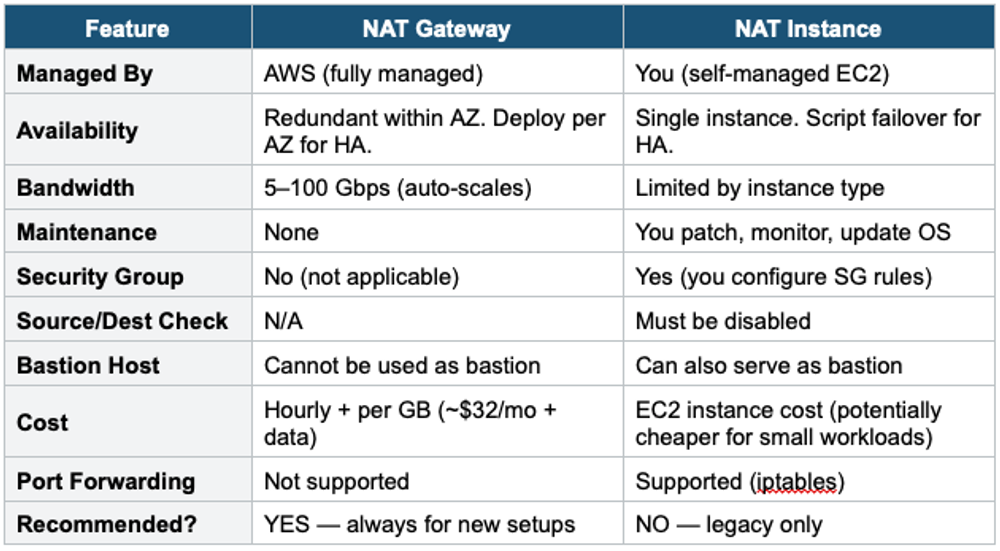
4. NAT Gateway vs NAT Instance
5. Egress-Only Internet Gateway
- Like a NAT Gateway but for IPv6 traffic
- Allows outbound IPv6 connections from VPC to the internet
- Blocks inbound IPv6 connections from the internet to the VPC
- Free (no hourly or data charge like NAT Gateway)
- IPv6 addresses are globally unique and public, so NAT is not needed — but egress-only filtering is
- Used instead of NAT Gateway for IPv6 (NAT Gateway does NOT support IPv6)
6. When to use
Use NAT when you need to give private subnet resources outbound internet access without exposing them to inbound traffic.
Common scenarios:
- Software updates — Instances in private subnets need to download patches or packages.
- API calls — Private Lambda/EC2 needs to call external APIs or AWS services.
- Security compliance — Resources must not be directly reachable from the internet, but still need outbound access.
- Database updates — RDS or backend instances need to reach external endpoints.
Exam Tip NAT questions: "Private instance needs internet for updates" = NAT Gateway in public subnet. "HA NAT" = one NAT GW per AZ. "Reduce NAT costs for S3 traffic" = S3 Gateway VPC Endpoint (free). NAT Gateway = managed, no SG, auto-scales. NAT Instance = legacy, has SG, disable source/dest check. "IPv6 outbound only" = Egress-Only IGW (not NAT GW). NAT Gateway is ALWAYS the recommended answer over NAT Instance on the exam.