1. Overview
AWS provides two layers of network security: Security Groups (instance-level) and Network ACLs (subnet-level). They work together as a defense-in-depth strategy.
Two Layers of Defense Traffic to/from an instance passes through BOTH the NACL (at the subnet boundary) AND the Security Group (at the instance). Both must allow the traffic. Think: NACL = the building’s front door security. Security Group = the apartment’s door lock. You need to pass both to get in.
2. Security Groups (Review)
- Operate at the instance/ENI level
- STATEFUL: if you allow inbound, return traffic is automatically allowed outbound
- Allow rules ONLY — cannot create Deny rules
- All rules are evaluated together (order doesn’t matter)
- Default: deny all inbound, allow all outbound
- Can reference another Security Group as source/destination
- Applied to instances (not subnets)
- Up to 5 SGs per instance
3. Network ACLs (NACLs)
NACLs are an optional layer of security that acts as a firewall at the subnet level. They control traffic entering and leaving a subnet.
Key Characteristics
- Operate at the SUBNET level (all instances in the subnet are affected)
- STATELESS: inbound and outbound rules are evaluated independently
- Support both Allow AND Deny rules
- Rules are evaluated in ORDER (lowest rule number first)
- First matching rule is applied; remaining rules are ignored
- Default NACL: allows all inbound and outbound traffic
- Custom NACL: denies all inbound and outbound by default
- One NACL per subnet. One subnet = one NACL. One NACL can cover multiple subnets.
NACL Rule Structure
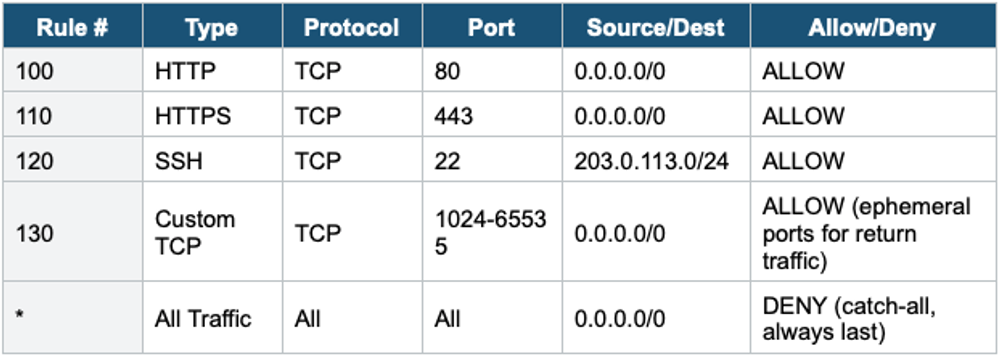
Important Warning Because NACLs are STATELESS, you MUST allow ephemeral ports (1024–65535) in the outbound rules (for server responses) and inbound rules (for client responses). If you forget ephemeral ports, return traffic will be blocked even if the initial request was allowed. This is the #1 NACL configuration mistake.
Ephemeral Ports Explained
- When a client connects to a server on port 80 (HTTP), the response comes back on a random high port (1024–65535) called an ephemeral port
- The client’s OS picks this port randomly for the return connection
- Different OS ranges: Linux (32768–60999), Windows (49152–65535), NAT GW (1024–65535)
- In NACL rules, you must allow the full range (1024–65535) for return traffic
- Security Groups handle this automatically (stateful), NACLs do not (stateless)
4. Security Groups vs NACLs: Complete Comparison
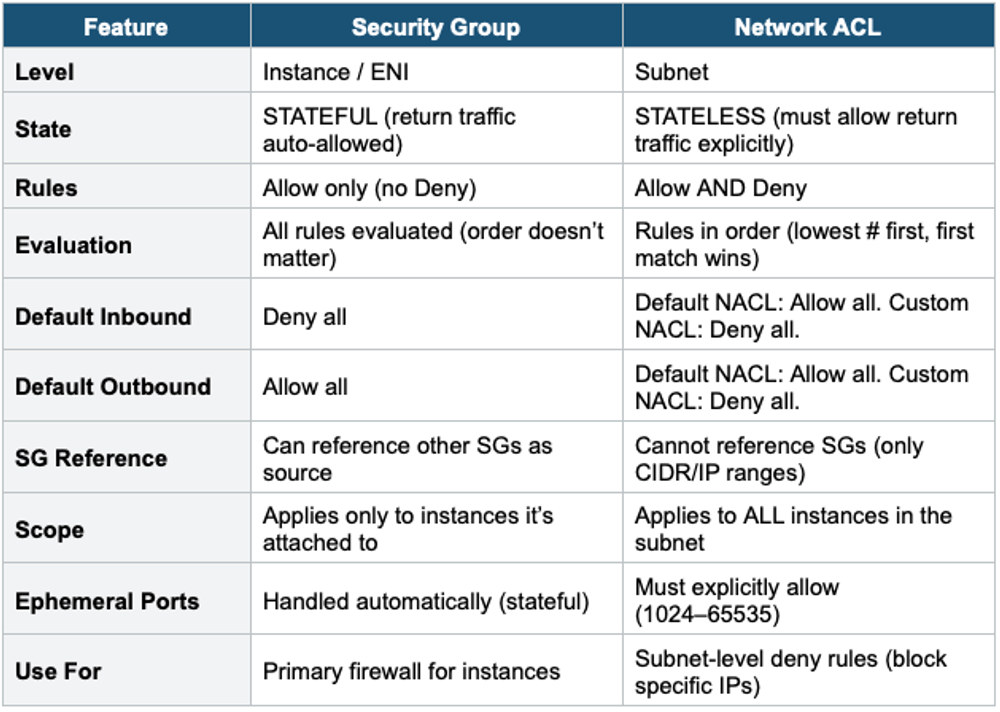
5. Common NACL Use Cases
- Block a specific IP: Add a DENY rule with the IP at a low rule number in the NACL. Security Groups cannot do this (allow-only).
- Block a country’s IP range: Add DENY rules for the country’s CIDR ranges in the NACL.
- Defense in depth: Use NACL as the first layer to block known bad IPs, then use SGs for fine-grained instance-level access.
- Compliance: Some compliance frameworks require both network-level and instance-level firewalls.
6. Traffic Flow Example
Inbound HTTP request to a web server:

Internet → IGW → NACL (inbound rules) → SG (inbound rules) → Instance

Response from web server:

Instance → SG (outbound: auto-allowed, stateful)
         → NACL (outbound rules: MUST explicitly allow ephemeral ports)
         → IGW → Internet

Both NACL and SG must allow the traffic in both directions.
SG handles return traffic automatically. NACL does NOT.
7. VPC Flow Logs
VPC Flow Logs capture information about IP traffic going to and from network interfaces in your VPC.
- Capture at 3 levels: VPC level, Subnet level, or ENI (instance) level
- Logs: source/destination IP, source/destination port, protocol, packets, bytes, action (ACCEPT/REJECT)
- Send to: CloudWatch Logs, S3, or Kinesis Data Firehose
- Does NOT capture: DNS queries to Route 53 Resolver, DHCP traffic, metadata (169.254.169.254), NTP traffic
- Use for: troubleshoot connectivity issues, monitor for security threats, and compliance auditing
- Can be queried with Athena (if stored in S3) or CloudWatch Logs Insights
Flow Log Record Fields
Example Flow Log Record:

2 123456789012 eni-abc123 10.0.1.5 52.94.76.89 443 49152 6 20 4000 1620000000 1620000060 ACCEPT OK

Fields:
  version account-id eni-id src-addr dst-addr src-port dst-port
  protocol packets bytes start end action log-status

ACCEPT = traffic was allowed by SG and NACL
REJECT = traffic was blocked (check SG and NACL)
8. When to use
Use these to control inbound and outbound traffic at different levels of your VPC — they work together as layered security.
Key exam triggers:
- "stateful vs stateless."
- "subnet-level firewall"
- "instance-level firewall"
- "block a specific IP."
- "allow/deny rules."
Troubleshooting with Flow Logs If the flow log shows ACCEPT but the app doesn’t work: the issue is at the application level (wrong port, app not running). If the flow log shows REJECT: check the Security Group and NACL rules. If inbound ACCEPT but outbound REJECT: likely a NACL issue (stateless, missing ephemeral port rule).
Exam Tip NACL vs SG: SG = stateful, allow-only, instance-level. NACL = stateless, allow+deny, subnet-level, rule order matters. "Block a specific IP" = NACL (SG can’t deny). Ephemeral ports (1024–65535) = MUST allow in NACL outbound. Default NACL = allow all. Custom NACL = deny all. VPC Flow Logs for troubleshooting (ACCEPT/REJECT). Both SG and NACL must allow traffic. This is the #1 most tested networking topic.