1. Overview
S3 supports encryption for data at rest (stored in S3) and data in transit (moving to/from S3). As of January 2023, all new objects uploaded to S3 are automatically encrypted at rest by default using SSE-S3.
Default Encryption
Since January 2023, ALL new objects in S3 are encrypted at rest by default with SSE-S3 (AES-256). You don’t need to configure anything. This applies to all storage classes. You can override the default to use SSE-KMS or SSE-C if you need more control.
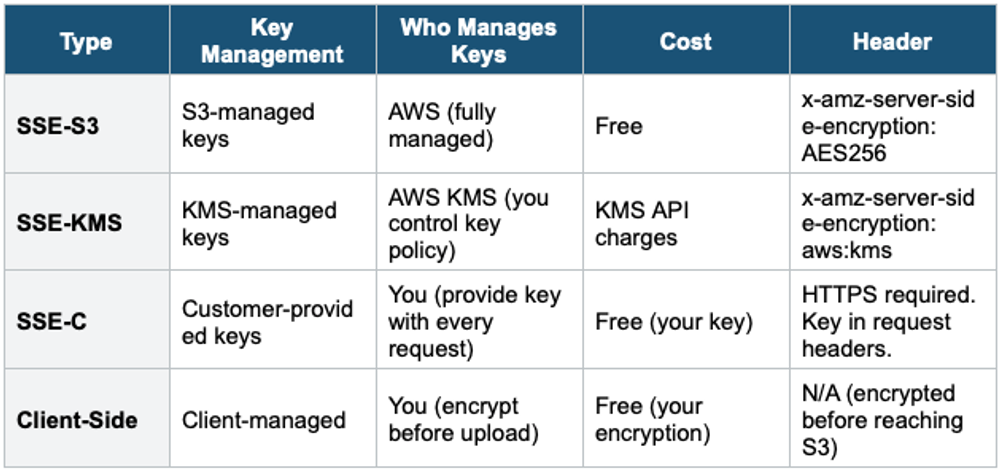
2. Encryption Types Overview
3. SSE-S3 (Server-Side Encryption with S3-Managed Keys)
- DEFAULT encryption for all new S3 objects
- Uses the AES-256 encryption algorithm
- AWS manages the encryption key, rotation, and lifecycle completely
- You have NO access to the encryption key — it’s fully opaque
- No additional cost
- No audit trail of key usage (since AWS manages everything)
- Set header: "x-amz-server-side-encryption": "AES256"
Use when: You need basic encryption at rest with zero management overhead and no audit requirements on key usage.
4. SSE-KMS (Server-Side Encryption with AWS KMS)
Uses AWS Key Management Service (KMS) to manage encryption keys. Provides more control and auditing capabilities than SSE-S3.
Key Features
- The encryption key is managed in AWS KMS
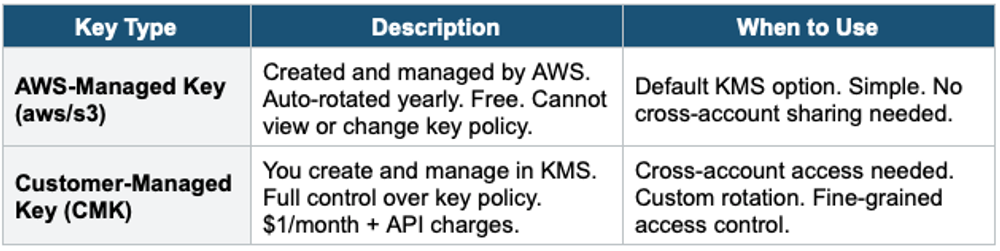
- You can use the AWS-managed key (aws/s3) or create your own Customer-Managed Key (CMK)
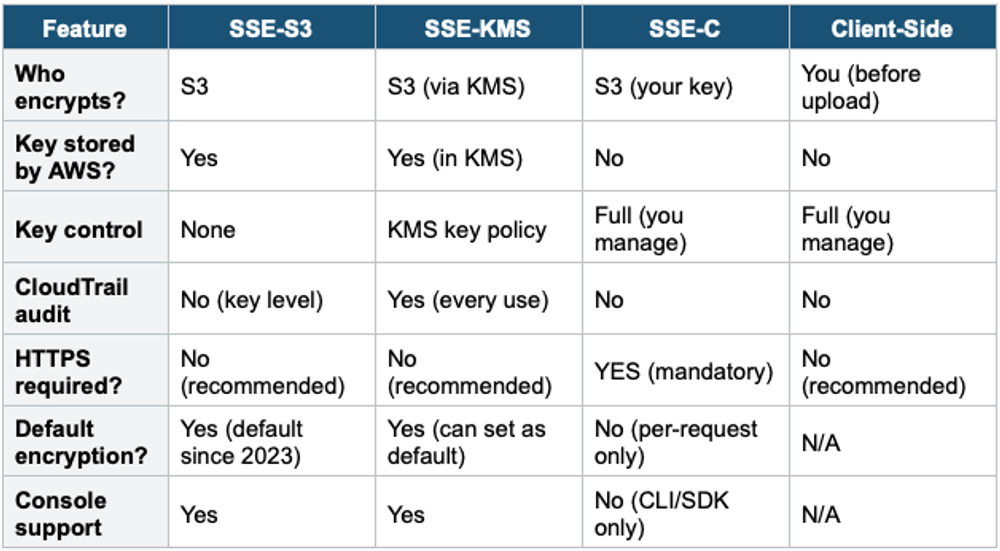
- Full audit trail in CloudTrail — every use of the key is logged
- You control who can use the key via the KMS key policy
- Supports key rotation (automatic for AWS-managed, configurable for CMK)
- Set header: "x-amz-server-side-encryption": "aws:kms."
SSE-KMS Limitations
- Every GET and PUT request calls the KMS API (GenerateDataKey for upload, Decrypt for download)
- KMS has API request quotas: 5,500 to 30,000 requests/second, depending on the region
- Very high-throughput buckets may hit KMS throttling
- Solution for throttling: use S3 Bucket Keys (see below)
S3 Bucket Keys
- Reduces KMS API calls by generating a bucket-level key that is cached in S3
- The bucket key encrypts individual object keys locally, reducing calls to KMS by up to 99%
- Reduces KMS costs significantly for high-volume buckets
- CloudTrail logs show the bucket ARN instead of the object ARN for KMS events
- Enabled at the bucket level. Recommended when using SSE-KMS.
SSE-KMS vs SSE-S3
Both encrypt at rest with AES-256. The difference: SSE-KMS gives you control over the key (who can use it, when to rotate, audit trail in CloudTrail). SSE-S3 is simpler, but you have no visibility into key usage. If the exam mentions "audit encryption key usage" or "control who can decrypt," the answer is SSE-KMS.
KMS Key Types for S3
5. SSE-C (Server-Side Encryption with Customer-Provided Keys)
- YOU provide the encryption key with every request
- S3 encrypts/decrypts using your key, but does NOT store the key
- HTTPS is mandatory (key is sent in request headers — must be encrypted in transit)
- You must manage key storage, rotation, and lifecycle yourself
- If you lose the key, your data is unrecoverable
- Cannot be set as default bucket encryption — must be specified per request
- Not available in the AWS Console — must use CLI or SDK
Important Warning
SSE-C: If you lose your encryption key, AWS CANNOT recover your data. There is no backup. You are fully responsible for key management. Use SSE-C only when regulatory requirements mandate that you retain full control of encryption keys, and they must never persist on AWS.
Use when: Compliance requires that encryption keys never persist in AWS. You must manage your own keys externally.
6. Client-Side Encryption
- You encrypt the data BEFORE uploading to S3
- S3 receives and stores already-encrypted data
- You decrypt after downloading
- AWS does not know about the encryption — fully opaque to S3
- You manage the entire encryption/decryption process and keys
- Can use AWS Encryption SDK or any encryption library
Use when: You need end-to-end encryption where even AWS cannot see your plaintext data. Highly regulated industries (healthcare, government).
7. Encryption Comparison
8. Encryption in Transit
Encryption in transit protects data as it moves between your application and S3 over the network.
- S3 supports both HTTP and HTTPS endpoints
- HTTPS uses TLS/SSL to encrypt data in transit
- Best practice: ALWAYS use HTTPS
- Enforce HTTPS via bucket policy with aws:SecureTransport condition (deny HTTP)
- SSE-C REQUIRES HTTPS (keys in headers must be encrypted in transit)
9. Default Encryption Settings
- Every bucket has a default encryption setting
- Options: SSE-S3 (default) or SSE-KMS (with a specific KMS key)
- Default encryption applies to objects uploaded WITHOUT specifying encryption
- If the upload request specifies a different encryption, it overrides the default
- You can enforce specific encryption via bucket policy (deny uploads without the required header)
10. DSSE-KMS (Dual-Layer Server-Side Encryption)
- Applies two layers of encryption using two separate KMS keys
- Meets compliance requirements for dual-layer encryption (e.g., certain financial regulations)
- Each layer independently encrypts the data with a different key
- Higher cost (double KMS charges) and higher latency
- Use only when regulations specifically require dual-layer encryption
11. S3 Object Lock & MFA Delete
S3 Object Lock
- Write Once Read Many (WORM) model — prevents objects from being deleted or overwritten
- Must enable versioning first
- Two retention modes:
- Governance Mode: Users with special permissions (s3:BypassGovernanceRetention) can override the lock. Protects against most deletions but allows admin override.
- Compliance Mode: NO ONE can delete or overwrite the object, not even the root user, until the retention period expires. The retention period cannot be shortened.
- Legal Hold: Like Compliance mode, but with no expiration date. Can be applied/removed by users with s3:PutObjectLegalHold permission. Used when data is under legal investigation.
MFA Delete
- Requires MFA authentication to permanently delete an object version or suspend versioning
- Can only be enabled/disabled by the bucket owner (root account) using the CLI
- Extra protection against accidental or malicious deletion
- Works with versioning enabled
Exam Tip
S3 Encryption: "Audit key usage" = SSE-KMS + CloudTrail. "AWS manages everything, no cost" = SSE-S3 (default). "Customer must control keys, keys never on AWS" = SSE-C or Client-Side. "HTTPS mandatory" = SSE-C. "Reduce KMS API calls" = S3 Bucket Keys. "Prevent deletion for compliance" = Object Lock Compliance Mode. "WORM model" = Object Lock. "Protect against accidental delete" = MFA Delete. All new objects are encrypted by default (SSE-S3) since Jan 2023.