1. S3 Event Notifications
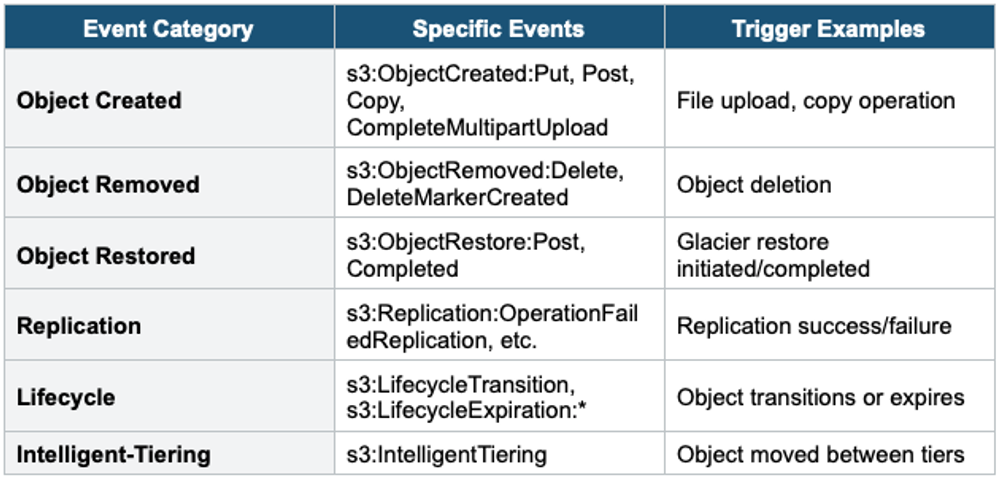
S3 can send notifications when specific events occur in your bucket (e.g., object created, deleted, restored from Glacier). These notifications trigger downstream processing automatically.
Supported Events
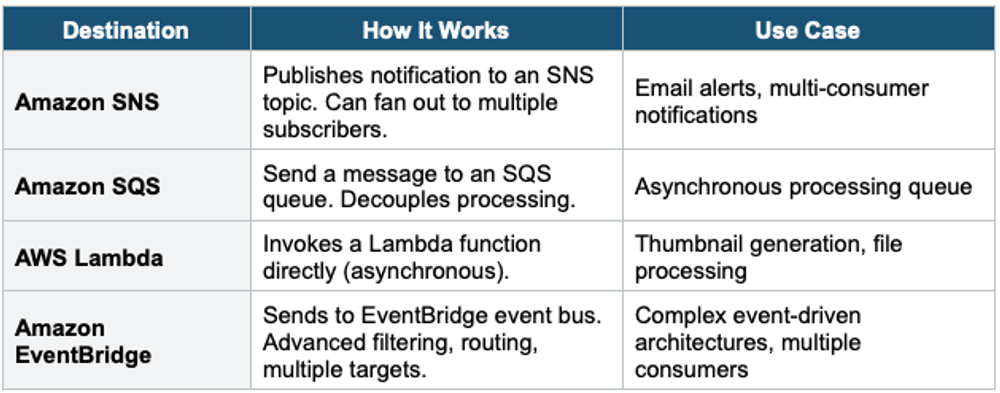
2. Notification Destinations
3. S3 Event Notifications vs EventBridge
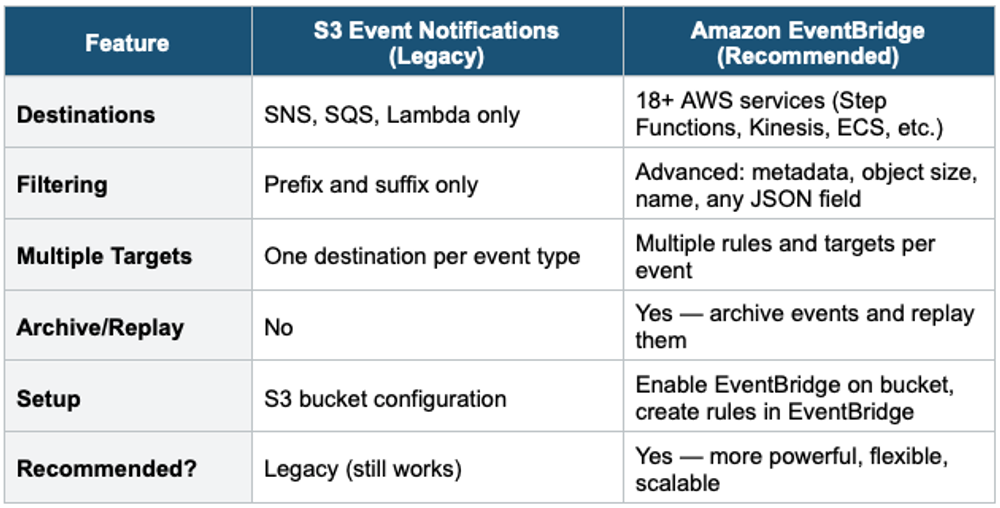
EventBridge is the Modern Choice AWS recommends using EventBridge for S3 event notifications in new architectures. It supports advanced filtering, multiple targets, event archive and replay, and integrates with 18+ AWS services. Legacy S3 notifications (SNS/SQS/Lambda) still work but offer limited filtering and single-destination routing.
4. Common S3 Event Patterns
Pattern 1: Image Processing Pipeline
S3 (image uploaded)
  → EventBridge (filter: *.jpg, *.png)
    → Lambda (generate thumbnail)
      → S3 (save thumbnail to thumbnails/ prefix)
      → DynamoDB (save metadata)
Pattern 2: Log Aggregation
S3 (log file created in source bucket)
  → SQS (buffer messages)
    → Lambda (process and transform)
      → S3 (centralized log bucket)
      → CloudWatch (metrics)
Pattern 3: Compliance Notification
S3 (object deleted in compliance bucket)
  → SNS (alert topic)
    → Email (security team)
    → Lambda (audit log + Slack notification)
5. S3 Analytics & Monitoring Tools
S3 Storage Class Analysis
- Analyzes access patterns to recommend Standard → Standard-IA transitions
- Takes 24–48 hours to start producing data
- Does NOT recommend Glacier transitions
- Use before creating lifecycle rules to make data-driven decisions
- Results viewable in Console or exportable to S3 as CSV
S3 Storage Lens
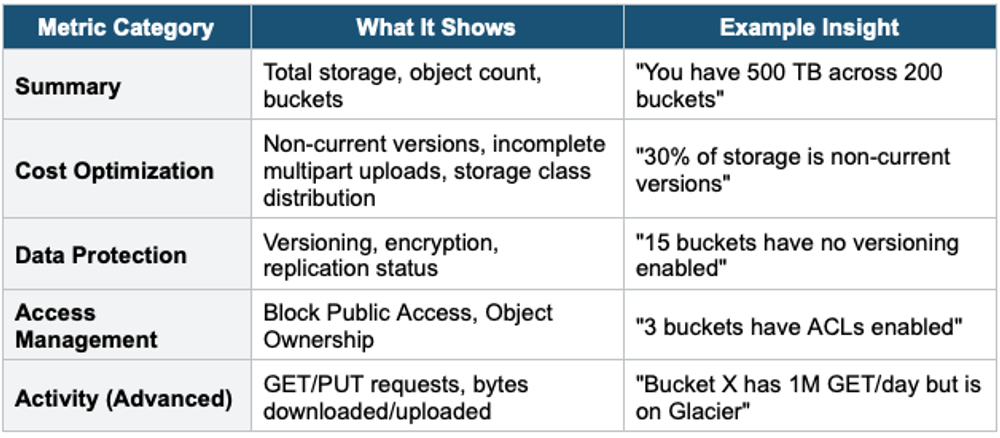
S3 Storage Lens is an analytics tool that provides organization-wide visibility into S3 storage usage, activity, and optimization opportunities.
- Dashboard with 60+ metrics: storage size, object count, request metrics, cost optimization
- Organization-level, account-level, bucket-level, and prefix-level granularity
- Default dashboard is free (included with S3)
- Advanced metrics (prefix-level, Activity metrics, Cost optimization) available for a fee
- Can aggregate across all accounts in an AWS Organization
- Data updated daily
Storage Lens Key Metrics
S3 Inventory
- Generates a scheduled report (daily or weekly) of all objects in a bucket
- Output: CSV, ORC, or Parquet to another S3 bucket
- Fields: key, size, last modified, storage class, encryption, replication status, etc.
- Use with Athena or QuickSight for analysis
- Use for: auditing, compliance, lifecycle planning, storage optimization
S3 Access Logs
- Detailed log of every request made to a bucket
- Written to a separate logging bucket
- Includes: requester, bucket, key, action, HTTP status, error code
- Use for: security audits, access pattern analysis, troubleshooting
- Not real-time — best-effort delivery with some delay
CloudWatch Metrics for S3
- Storage metrics (daily): BucketSizeBytes, NumberOfObjects (free)
- Request metrics (per minute): AllRequests, GetRequests, 4xxErrors, 5xxErrors, FirstByteLatency, TotalRequestLatency
- Request metrics must be explicitly enabled per bucket/prefix
- Use for: real-time monitoring, alarms, dashboards
CloudTrail for S3
- Logs S3 API calls (CreateBucket, PutBucketPolicy, etc.) at the management event level
- Data events (GetObject, PutObject) must be explicitly enabled in CloudTrail (additional cost)
- Use for: security auditing, who-did-what investigation
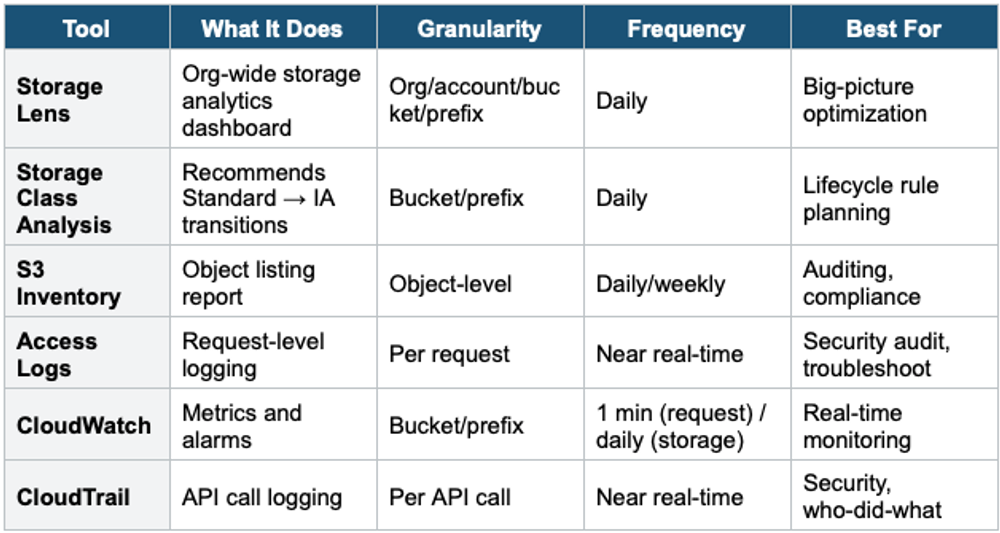
6 S3 Monitoring Tools Comparison
Exam Tip S3 Advanced Lesson 3: "React to file uploads" = S3 Event Notifications (use EventBridge for modern architectures). "Org-wide storage visibility" = S3 Storage Lens. "Recommend when to move to IA" = Storage Class Analysis. "List all objects in bucket" = S3 Inventory. "Who accessed my bucket?" = Access Logs or CloudTrail (data events). EventBridge > legacy S3 notifications for new architectures.