1. What are Lifecycle Rules?
S3 Lifecycle rules automate the transition of objects between storage classes and the expiration (deletion) of objects. They help optimize costs by automatically moving data to cheaper storage as it ages.
Core Concept Lifecycle rules let you define: "After 30 days, move to Standard-IA. After 90 days, move to Glacier. After 365 days, delete." This automation ensures you’re always paying the lowest price for data based on its age.
2. Lifecycle Rule Types
Transition Actions
- Move objects to a different storage class after a specified number of days
- Example: Move from Standard to Standard-IA after 30 days
- Example: Move from Standard-IA to Glacier Flexible after 90 days
Expiration Actions
- Delete objects after a specified number of days
- Delete expired delete markers (versioned buckets)
- Delete incomplete multipart uploads after a specified number of days
- Delete previous versions after a specified number of days
3. Transition Waterfall
Transition Order (top to bottom only):

S3 Standard
  ↓
S3 Standard-IA  /  S3 Intelligent-Tiering
  ↓
S3 One Zone-IA
  ↓
S3 Glacier Instant Retrieval
  ↓
S3 Glacier Flexible Retrieval
  ↓
S3 Glacier Deep Archive

You CANNOT transition upward (e.g., Glacier to Standard).
To move data back, you must COPY it to a new object.
4. Transition Constraints
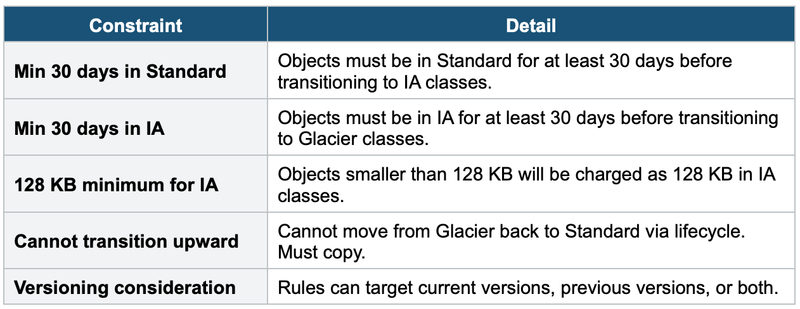
5. Lifecycle Rule Configuration
Rule Scope
- Apply to entire bucket or filter by prefix (e.g., logs/) or tags
- Multiple rules can apply to the same objects
- Maximum: 1,000 lifecycle rules per bucket
Example: Full Lifecycle Policy
Rule: "OptimizeLogStorage"
Filter: Prefix = logs/

Transitions (Current Version):
  Day 0  → S3 Standard (default)
  Day 30 → S3 Standard-IA
  Day 90 → S3 Glacier Flexible Retrieval
  Day 365 → S3 Glacier Deep Archive

Expiration:
  Day 2555 (7 years) → Delete object

Previous Versions:
  Day 30 → Delete previous versions

Incomplete Multipart Uploads:
  Day 7 → Abort and delete
6. S3 Analytics — Storage Class Analysis
- Analyzes access patterns over 30+ days and provides recommendations
- Helps you decide lifecycle transition timing
- Only works for Standard → Standard-IA recommendations
- Results viewable in Console or exported to S3 (CSV)
7. Common Lifecycle Patterns
Pattern 1: Log Management
- Day 0: Standard → Day 30: Standard-IA → Day 90: Glacier Flexible → Day 365: Delete
Pattern 2: Compliance Archive
- Day 0: Standard → Day 30: Standard-IA → Day 90: Glacier Deep Archive → Day 2555 (7yr): Delete
Pattern 3: Media Assets
- Day 0: Standard → Day 60: Intelligent-Tiering → No expiration
Pattern 4: Version Cleanup
- Current: keep in Standard. Previous: IA after 30d, delete after 90d. Abort multipart after 7d.
8. Cost Optimization Tips
- Always enable lifecycle rules for log buckets
- Use Intelligent-Tiering for unpredictable access patterns
- Abort incomplete multipart uploads — they silently accumulate costs
- Delete expired delete markers in versioned buckets
- Use S3 Analytics before creating lifecycle rules
- Remember minimum storage duration charges
9. When to use
Common scenarios:
- Cost optimization — Automatically move infrequently accessed data to cheaper storage classes (e.g., S3 Standard → S3 IA → Glacier) after a set number of days.
- Data retention policies — Auto-delete objects after a required retention period (e.g., delete logs after 90 days).
- Transition large datasets — Move old backups or archives to Glacier Deep Archive to save costs.
- Clean up incomplete multipart uploads — Delete failed/abandoned multipart uploads after X days.
- Versioned buckets — Expire or transition previous object versions separately from current versions.
Exam Tip Lifecycle questions: "Automatically move old data to cheaper storage" = Lifecycle Transition rules. "Delete after 7 years" = Lifecycle Expiration. "30 days before Standard-IA" = minimum constraint. "Cannot go from Glacier to Standard" = must copy. "Abort old multipart uploads" = Lifecycle Expiration action. "Unknown access pattern" = Intelligent-Tiering (no lifecycle needed). S3 Analytics helps decide WHEN to create transitions.