1. S3 Baseline Performance
S3 automatically scales to high request rates. Understanding the baseline performance helps you identify when optimization is needed.
S3 Performance Baseline S3 supports: 3,500 PUT/COPY/POST/DELETE requests per second per prefix. 5,500 GET/HEAD requests per second per prefix. There is no limit on the number of prefixes in a bucket. These limits are per prefix, so distributing objects across prefixes multiplies your throughput.
2. Prefix-Based Performance
Since S3 performance scales per prefix, the key design (prefix structure) directly affects throughput.
Example: Single prefix = limited throughput
  my-bucket/images/photo1.jpg
  my-bucket/images/photo2.jpg
  my-bucket/images/photo3.jpg
  Prefix: images/ → 3,500 writes/s, 5,500 reads/s total

Example: Multiple prefixes = multiplied throughput
  my-bucket/images/2024/01/photo1.jpg  (prefix: images/2024/01/)
  my-bucket/images/2024/02/photo2.jpg  (prefix: images/2024/02/)
  my-bucket/images/2024/03/photo3.jpg  (prefix: images/2024/03/)
  3 prefixes → 3 × 3,500 = 10,500 writes/s, 3 × 5,500 = 16,500 reads/s
3. Upload Optimization
Multipart Upload
- Required for objects > 5 GB. Recommended for objects > 100 MB.
- Splits the file into parts and uploads in parallel
- Each part can retry independently on failure
- Significantly faster than single-stream upload for large files
S3 Transfer Acceleration
- Uses CloudFront Edge Locations as entry points for uploads
- Data travels over AWS’s optimized private backbone network
- Best for: long-distance uploads (e.g., uploading from Asia to us-east-1)
- Endpoint: my-bucket.s3-accelerate.amazonaws.com
- Compatible with Multipart Upload
- Test with the S3 Transfer Acceleration Speed Comparison tool
4. Download Optimization
S3 Byte-Range Fetches
- Request specific byte ranges of an object instead of downloading the whole file
- Parallelize downloads by requesting multiple ranges simultaneously
- Resume failed downloads by re-requesting only the failed range
- Retrieve only partial data (e.g., first 50 bytes for a file header)
CloudFront (CDN) Integration
- Cache S3 content at 400+ Edge Locations worldwide
- Dramatically reduces latency for global users
- Reduces load on S3 (requests served from cache, not S3)
- Can restrict direct S3 access using OAC (Origin Access Control), so users must go through CloudFront
5. S3 Select & Glacier Select
S3 Select allows you to retrieve only a subset of data from an object using SQL expressions, rather than downloading the entire object.
Key Features
- Run simple SQL queries (SELECT, WHERE, LIMIT) directly on S3 objects
- Supported formats: CSV, JSON, Parquet
- Returns only the matching data — reduces data transfer and processing time
- Up to 400% faster and 80% cheaper than downloading and filtering the full object
- Works with GZIP and BZIP2 compressed files
Example: S3 Select SQL

-- File: sales-data.csv (10 GB)
SELECT s.product, s.revenue
FROM S3Object s
WHERE s.revenue > 10000
  AND s.region = 'US-East'

-- Instead of downloading 10 GB, you get only
-- the matching rows (maybe 50 MB). 200x less data!
Glacier Select
- Same concept, but for objects in Glacier storage
- Query archived data without restoring the entire object
- Useful for: compliance queries on archived data
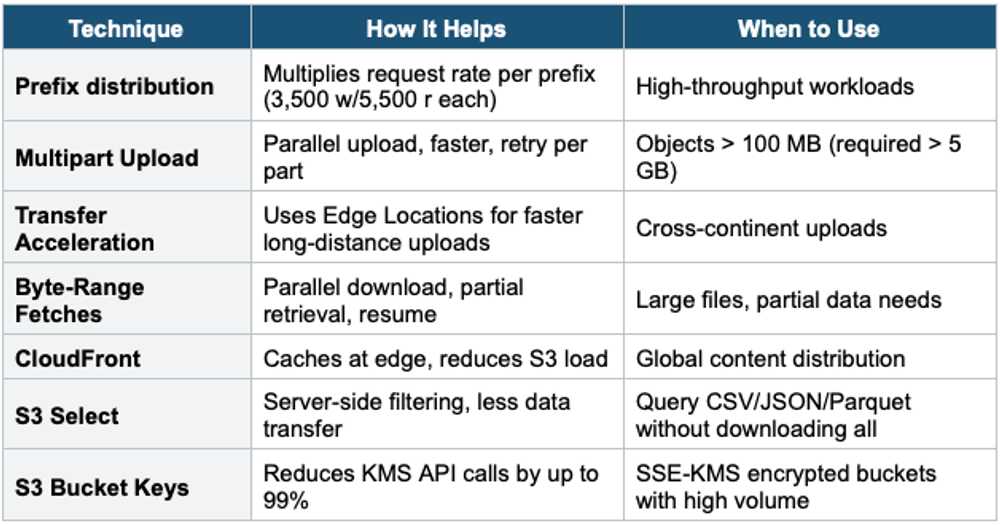
6. S3 Performance Best Practices Summary
7. KMS Throttling with SSE-KMS
- When using SSE-KMS, every upload calls GenerateDataKey, and every download call decrypts on KMS
- KMS has request quotas: 5,500–30,000 requests/second per Region
- High-throughput buckets can hit KMS throttling
- Solutions: 1) Enable S3 Bucket Keys (reduces calls by 99%). 2) Request a KMS quota increase.
Exam Tip S3 Performance: 3,500 PUT + 5,500 GET per second per prefix. More prefixes = more throughput. "Speed up large uploads" = Multipart Upload + Transfer Acceleration. "Speed up downloads" = Byte-Range Fetches + CloudFront. "Query data without downloading" = S3 Select. "KMS throttling" = enable S3 Bucket Keys. "Long-distance uploads" = Transfer Acceleration.