1. Overview
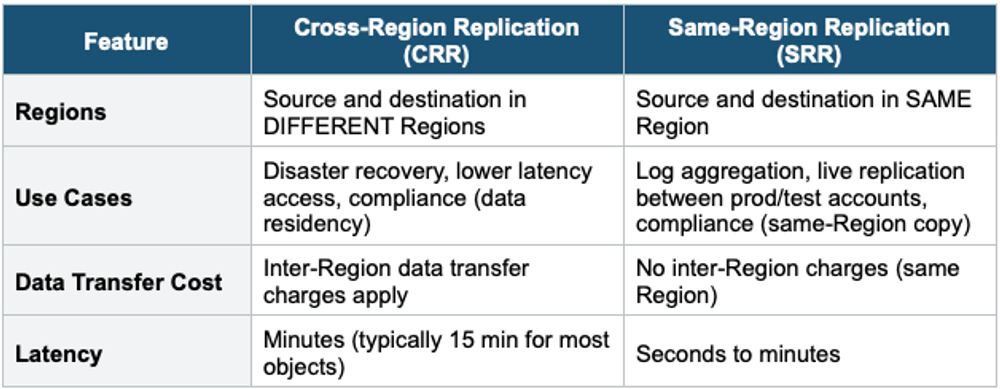
S3 Replication allows you to automatically copy objects between S3 buckets. It can work across AWS Regions (Cross-Region Replication) or within the same Region (Same-Region Replication).
Prerequisites for Replication 1) Versioning MUST be enabled on both source and destination buckets. 2) Source and destination can be in different accounts. 3) An IAM role must be configured that S3 can assume to replicate objects on your behalf. 4) Replication is asynchronous (not instant).
2. CRR vs SRR
3. Replication Key Rules
What IS Replicated
- New objects uploaded AFTER replication is enabled
- Object metadata and tags
- Object ACLs (if enabled)
- Object Lock settings (if configured)
- Objects encrypted with SSE-S3 (automatic)
- Objects encrypted with SSE-KMS (requires explicit opt-in and destination KMS key)
What is NOT Replicated
- Objects that existed BEFORE replication was enabled (use S3 Batch Replication for these)
- Objects encrypted with SSE-C (customer-provided keys)
- Delete markers (by default — can be optionally enabled)
- Permanent deletes of specific versions (version ID deletes are NOT replicated)
- Objects in the Glacier or Glacier Deep Archive storage class
- Lifecycle rule actions (lifecycle rules are not replicated)
Important Warning Replication is NOT retroactive. Enabling replication only copies NEW objects going forward. To replicate existing objects, you must use S3 Batch Replication (a separate one-time job). This is a very common exam question.
4. S3 Batch Replication
- Replicates EXISTING objects that were uploaded before replication was enabled
- Also replicates objects that previously failed replication
- One-time or on-demand job using S3 Batch Operations
- Separate from ongoing replication — ongoing replication handles new objects automatically
5. Replication Chaining
Replication does NOT chain. If Bucket A replicates to Bucket B, and Bucket B replicates to Bucket C, objects from A are NOT automatically replicated to C. You would need a separate replication rule from A to C.
6. Delete Marker Replication
- By default, delete markers are NOT replicated
- You can optionally enable delete marker replication
- Permanent deletes (specific version ID) are NEVER replicated (prevents malicious cross-account deletion)
7. S3 Replication Time Control (S3 RTC)
- Guarantees that 99.99% of objects are replicated within 15 minutes
- Provides replication metrics and event notifications
- Higher cost than standard replication
- Use for: compliance requirements with strict replication SLAs
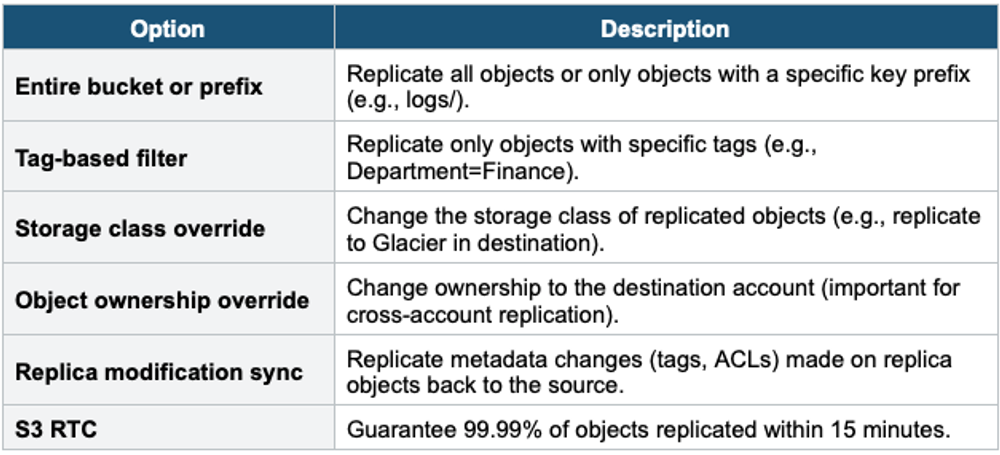
8. Replication Configuration Options
9. When to use
Use S3 Replication when you need to automatically copy objects between buckets — either across regions (CRR) or within the same region (SRR).
Common scenarios:
Cross-Region Replication (CRR):
- Compliance — Store copies of data in a different geographic region to meet regulatory requirements.
- Lower latency — Serve data closer to users in another region.
- Disaster recovery — Keep a backup in a separate region in case of regional failure.
- Cross-account replication — Copy data to a bucket owned by a different AWS account.
Same-Region Replication (SRR):
- Log aggregation — Merge logs from multiple buckets into one.
- Data redundancy within a region — Keep a second copy in the same region (e.g., different account).
- Live replication between environments — Replicate from production bucket to test/dev bucket.
Exam Tip Replication questions: "Copy data to another Region for DR" = CRR. "Aggregate logs from multiple accounts in same Region" = SRR. "Replicate existing objects" = S3 Batch Replication. "Versioning required" = yes, both buckets. "Delete markers replicated?" = not by default (opt-in). "Permanent deletes replicated?" = NEVER. "Guarantee 15-min SLA" = S3 RTC. No chaining: A→B→C does NOT replicate A to C.