1. S3 Access Control Overview
S3 provides multiple layers of access control. Understanding how they interact is critical for the exam and for securing your data.
Access Decision Rule
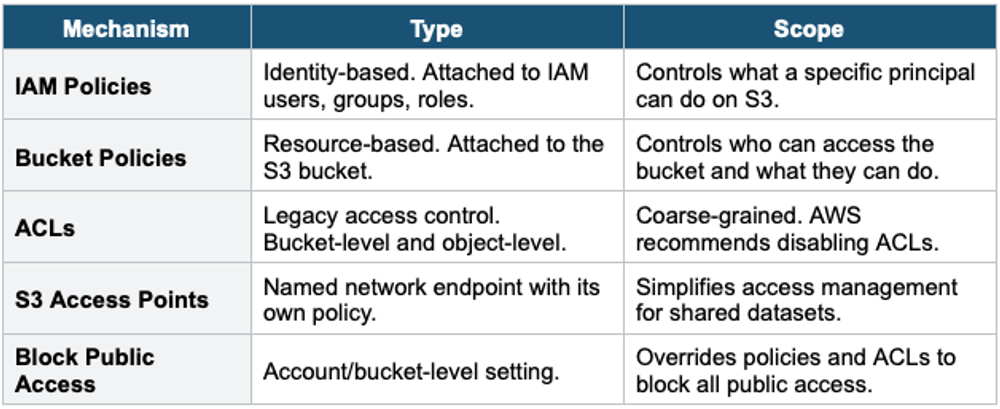
By default, all S3 buckets and objects are PRIVATE. Access is denied unless explicitly granted. When evaluating access, AWS checks: IAM policies (identity-based), Bucket policies (resource-based), ACLs, and S3 Access Points. An explicit Deny in ANY policy always wins.
Access Control Mechanisms
2. S3 Bucket Policies
{
  "Version": "2012-10-17",
  "Statement": [
    {
      "Sid": "AllowPublicRead",
      "Effect": "Allow",
      "Principal": "*",
      "Action": "s3:GetObject",
      "Resource": "arn:aws:s3:::my-website-bucket/*"
    }
  ]
}
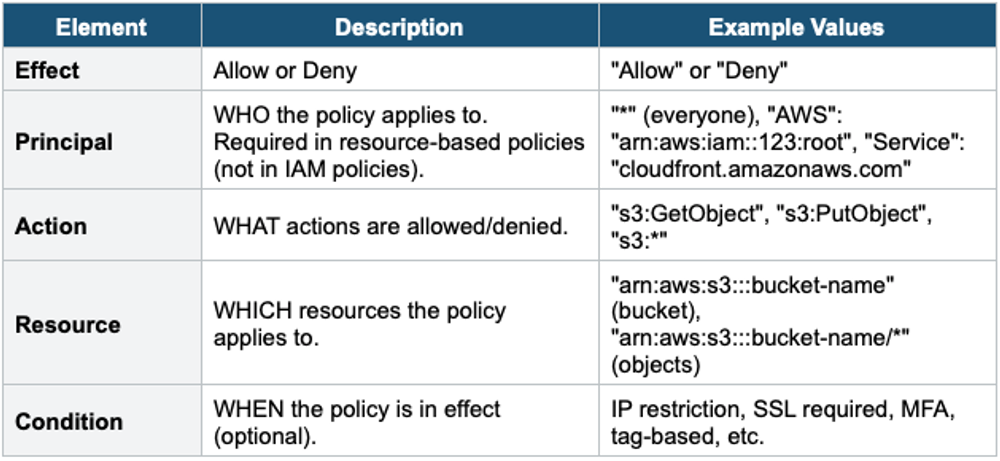
Policy Elements
Important Warning
Resource ARN matters: "arn:aws:s3:::my-bucket" targets the BUCKET itself (for actions like s3:ListBucket). "arn:aws:s3:::my-bucket/*" targets the OBJECTS inside the bucket (for actions like s3:GetObject, s3:PutObject). Mixing these up is a common exam trick and a real-world mistake.
3. Common Bucket Policy Examples
Example 1: Grant Public Read Access (Static Website)
{
  "Version": "2012-10-17",
  "Statement": [{
    "Sid": "PublicReadGetObject",
    "Effect": "Allow",
    "Principal": "*",
    "Action": "s3:GetObject",
    "Resource": "arn:aws:s3:::my-website-bucket/*"
  }]
}
Example 2: Enforce HTTPS Only (Deny HTTP)
{
  "Version": "2012-10-17",
  "Statement": [{
    "Sid": "DenyHTTP",
    "Effect": "Deny",
    "Principal": "*",
    "Action": "s3:*",
    "Resource": [
      "arn:aws:s3:::my-bucket",
      "arn:aws:s3:::my-bucket/*"
    ],
    "Condition": {
      "Bool": { "aws:SecureTransport": "false" }
    }
  }]
}
Example 3: Cross-Account Access
{
  "Version": "2012-10-17",
  "Statement": [{
    "Sid": "CrossAccountRead",
    "Effect": "Allow",
    "Principal": {
      "AWS": "arn:aws:iam::111122223333:root"
    },
    "Action": [
      "s3:GetObject",
      "s3:ListBucket"
    ],
    "Resource": [
      "arn:aws:s3:::shared-data-bucket",
      "arn:aws:s3:::shared-data-bucket/*"
    ]
  }]
}
Example 4: Restrict to Specific VPC Endpoint
{
  "Version": "2012-10-17",
  "Statement": [{
    "Sid": "RestrictToVPCE",
    "Effect": "Deny",
    "Principal": "*",
    "Action": "s3:*",
    "Resource": "arn:aws:s3:::private-bucket/*",
    "Condition": {
      "StringNotEquals": {
        "aws:sourceVpce": "vpce-1a2b3c4d"
      }
    }
  }]
}
Example 5: Force Encryption on Upload
{
  "Version": "2012-10-17",
  "Statement": [{
    "Sid": "DenyUnencryptedUploads",
    "Effect": "Deny",
    "Principal": "*",
    "Action": "s3:PutObject",
    "Resource": "arn:aws:s3:::secure-bucket/*",
    "Condition": {
      "StringNotEquals": {
        "s3:x-amz-server-side-encryption": "aws:kms"
      }
    }
  }]
}
4. S3 Block Public Access
Block Public Access is a safety mechanism that overrides bucket policies and ACLs to prevent accidental public exposure. It can be set at the account level or bucket level.
Four Settings
- BlockPublicAcls: Blocks new public ACLs from being applied. Existing public ACLs are not removed.
- IgnorePublicAcls: Ignores all existing public ACLs. Objects with public ACLs remain private.
- BlockPublicPolicy: Blocks new bucket policies that grant public access.
- RestrictPublicBuckets: Restricts access to buckets with public policies to only authorized AWS services and accounts.
Block Public Access Priority
Block Public Access settings OVERRIDE bucket policies and ACLs. Even if a bucket policy grants public access (Principal: "*"), Block Public Access will deny it. This is a safety net. AWS enables all four settings by default on new buckets. You must explicitly disable them if you need public access (e.g., static website hosting).
5. S3 ACLs (Access Control Lists)
ACLs are a legacy access control mechanism that predates bucket policies. AWS now recommends disabling ACLs and using bucket policies instead.
Key Facts
- Two levels: Bucket ACL and Object ACL
- Coarse-grained: can only grant READ, WRITE, READ_ACP, WRITE_ACP, FULL_CONTROL
- Cannot specify conditions (no IP restriction, no HTTPS enforcement)
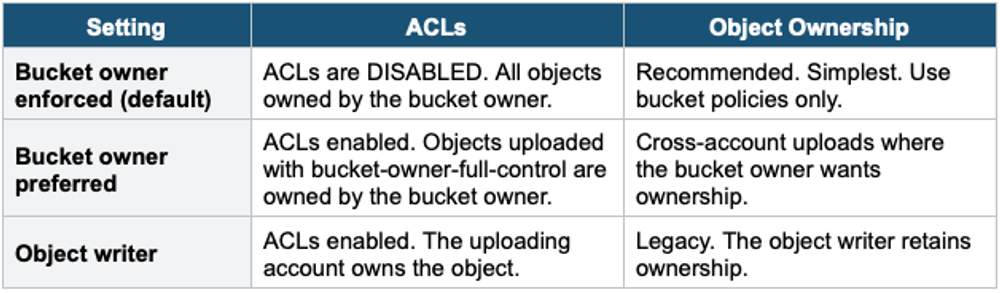
- New buckets default to "Bucket owner enforced" = ACLs disabled
- Only use case where ACLs are still needed: S3 server access logging (log delivery requires ACL)
Object Ownership Settings
6. S3 Access Points
S3 Access Points simplify managing access to shared datasets in S3. Each Access Point has its own DNS name, access policy, and network controls.
- Each Access Point has a unique hostname and its own access policy
- You can create hundreds of Access Points per bucket
- Each team/application gets its own Access Point with tailored permissions
- Access Points can be restricted to a specific VPC (VPC origin)
- The bucket policy must allow the Access Point to delegate access
Without Access Points:
  One complex bucket policy handling all teams/apps

With Access Points:
  AP: finance-ap  → policy: Finance team can read reports/
  AP: analytics-ap → policy: Analytics can read raw data/
  AP: marketing-ap → policy: Marketing can read/write campaigns/

Each AP has its own simple, focused policy.
S3 Object Lambda Access Points
- Transform objects on-the-fly as they are retrieved using a Lambda function
- Use cases: redact PII, convert formats, resize images, decompress on retrieval
- The original object in S3 is not modified
- Caller requests via the Object Lambda Access Point, Lambda processes, and returns transformed data
7. Pre-Signed URLs
Pre-signed URLs grant temporary access to a specific S3 object without requiring AWS credentials or changing bucket policies.
- Generated by an IAM user or role using the AWS CLI or SDK
- The URL inherits the permissions of the user/role that generated it
- Expiration: configurable (default 1 hour for Console, up to 168 hours / 7 days for CLI)
- Works for GET (download) and PUT (upload)
- Common use: share a private file temporarily, allow upload to a specific key without AWS credentials
# Generate a pre-signed URL (valid for 1 hour)
aws s3 presign s3://my-bucket/private-report.pdf \
  --expires-in 3600

# Output:
# https://my-bucket.s3.amazonaws.com/private-report.pdf
#   ?X-Amz-Algorithm=AWS4-HMAC-SHA256
#   &X-Amz-Credential=...
#   &X-Amz-Expires=3600
#   &X-Amz-Signature=...
8. S3 Access Logging
- Logs all requests made to a bucket (GET, PUT, DELETE, etc.)
- Logs are written to a separate S3 bucket (the target/logging bucket)
- Log format includes: requester, bucket name, request time, action, response status, error code
- Used for: security auditing, access analysis, compliance
Important Warning
NEVER set the logging bucket as the same bucket being logged. This creates an infinite logging loop: every log write generates a new log entry, which writes another log, endlessly. This will rapidly fill your bucket and generate massive costs. Always use a separate bucket for logs.
Exam Tip
S3 Security Lesson 1: Bucket policies are the primary access control (use JSON). Block Public Access overrides everything. ACLs are legacy — disable them (Bucket owner enforced). Resource ARN: bucket = arn:...:::bucket, objects = arn:...:::bucket/*. Pre-signed URLs = temporary access without changing policies. Access Points simplify multi-team access. "Enforce HTTPS" = Deny with aws:SecureTransport condition. "Transform data on retrieval" = S3 Object Lambda Access Point.